
iibpgpkhpfggipbacjfeijkloidhmiei
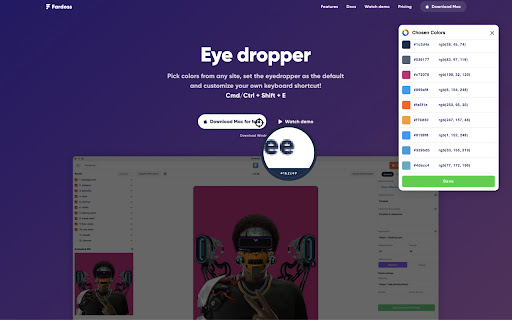


Pick colors from websites, save colors & gradients, get matching shades and tints and create beautiful gradients. ✅ Color pick and save multiple colors from any site (using zoom technology) ✅ Customize your color picker keyboard shortcut in options (default: Cmd/Ctrl + Shift + e) ✅ Add the color picker as the default in options ✅ Save your favorite colors and gradients, click any color and it's HEX is saved to your clipboard ✅ Find shades, tints, complementary and other color combinations for any color ✅ Create linear or radial gradients with unlimited stops ✅ Browse hundreds of beautiful gradients, edit, save and copy it's CSS whenever you need it ✅ Get color palettes from any gradient you create ✅ Site pallete fetches all the colors of any page ✅ Customize the color type when auto copying Have any new ideas to improve Color? Email us at support@fardoss.com and we will look into it. There are 5 different built in tools including a color picker to help you through your design journey. The first tool is the Color Picker. Our color picker uses zoom technology that will accurately get you the closest color to where you hover over. You can access the color picker by right clicking the page or Cmd/Ctrl + Shift + e. We made sure the experience of picking colors was smooth, quick and efficient. When you color pick on any website, we generate a picture from the site, and pinpoint the exact location of your cursor to find that color. Choose as many colors from any site, click Save & Exit and they are automatically added to your overall saves. Great color pickers are very hard to find which is why we added countless hours to make sure our color picker is the best. Our color picker is the most accurate, the fastest and we guarantee you will have the best experience with it. We created our color picker with the mind set of ease. Our color picker ensures that every color you pick is exactly that color or at least the closest color to it. With that in mind, our color picker is super quick and calculates that color hex wherever you hover over. The second tool is a Color Search. When developing this functionality, we took our personal experiences into consideration and found that finding colors that match each other was one of the hardest things. We would go to so many websites to find what we are looking for. We wasted so much time just to get the colors that worked together. If you are a designer or developer, you know what we are talking about. With Color by Fardos, it now takes seconds to get matching color combos like Shades, Tints, Complementary, Triadic, Analogous, Split Complementary and Tetradic colors. Within any color, there is an explosion of new similar colors that will work perfectly together all built into one extension. Within any color you choose, you can now save those colors so they stay with you wherever you go. We made sure this was a feature because everyone knows the pain of trying to find the color they used before. Accessing those colors on any Chrome browser is super easy. The third tool is a Color Chooser. We designed our color chooser with a black theme because we wanted to remove any distraction when trying to choose that perfect color. Whenever you change the color, it automatically changes the selected color within the entire extension. So, if you change from white to black and go to Color Search, that color is now black. This allows for a much more fluent experience within the entire extension. The fourth tool is Gradients. Gradients are incredibly painful to code. Finding the perfect blend of colors contributes largely to what works and what doesn't. We made sure that our gradient builder took that into consideration. With our gradient builder, every gradient is beautifully composed and generated. Add as many stops as you want, use your saved colors to make something beautiful, choose whether linear or radial and most importantly, save them so you can use them whenever you want. After you have created that gradient, all you have to do is click Copy CSS, and you are set. No more hassling if you missed a comma between your colors. Every gradient comes with a generated palette. Whether you are creating your own gradients, choose one of our gradients, color palettes help you find the perfect blend-able color. Copy the colors just by clicking and start using them in your designs. The fifth tool is Site Pallete. Site Pallete allows you to get all the colors of a page instantly. We quickly screenshot each section and allow you to add any of the colors you like, directly to your saved colors. Site Pallete is quick and easy and can be located in your toolbar next to the Eye Dropper / Color Picker. If you have any questions or issues about our Color Picker, Gradient, Color Search or other features, feel free to contact us at support@fardoss.com. Stay tuned for more life changing extensions like our Color Picker!

Image Downloader - Save pictures
Find, choose and download images you need from any web pages or select all to bulk image download at once. Image Downloader - Save pictures for Chrome is a tool that helps you find the images published on a web page. The images may be protected by copyright and you should always assume that they are. It's a free tool that works without registrations and sign ups. Just make a few clicks and here you go! Images will be saved to your PC in seconds. A powerful Extension that gives you fast and convenient access to all images on any web page. Just click and download image on popular web sites such us Instagram, Facebook, Pinterest and also on others sites, simple as that! Image Downloader easy to use with responsive and intuitive design, so you don't need a special skills to use it properly. Just a single click to download all the images and colors available of any webpage. You can now with this Image downloader click on a single image to download or click on the - Select All - button to select and download all images at once. Alternatively, you can select a single image to download. With a bulk image saver, it becomes possible to download all website images simultaneously with simple clicks. What do you get by installing this Chrome Extension: ✔️ Filter based on pixel width and height ✔️ Download location (create folder directly to your images) ✔️ Display images in two columns ✔️ Filter based on url ✔️ Bulk download all images in once ✔️ Select what images you want to download ✔️ Check the size of each image ✔️Copy the url of the original image ✔️ Supporting all principal websites Now you can download all the images you might ever need. Every image format can be downloaded by this Picture Downloader extension. Our new application doesn't weigh a lot but simply does the job. Don't wait and install brand new extension and you'll get something special. Simple bulk image download extension, filter by resolution and file type, download photos from multiple tabs in one click. After installing this powerful Photo Downloader extension you will see a great improvement. You won't find a better tool to simplify the process than application. Privacy Policy You can read our privacy policy here: https://imagenloader.com/privacy-policy.html Website For more information about the extension, visit: https://imagenloader.com Before reusing an image, make sure you check its license and the specific terms of reuse. Do not use any image, illustration or photograph without researching its copyright status first.

Color Picker
Build a personalized color palette, select colors from webpages with the eyedropper, create color scales, and blend colors Create your own personalized 4- color palette that you can use for your web pages, pick colors from a web page with the eyedropper, create color scales for chart, and map visualizations, experiment by blending colors. Color Picker: Use the color picker by clicking and dragging the markers around the palette. The color selections are shown together with their Hex code values in the boxes below the palette. The color picker will also display the colors to different formats (i.e., HEX, RGB, HSV, HSL, CMYK). Eyedropper: Use the Eyedropper by right-clicking on the page and selecting "Pick a color on the page". You can also use the Eyedropper button on the Eyedropper tab of the extension's popup. Note that colors are picked from a snapshot of the viewable area of the page. Make sure you scroll to the area of the page that you want to select colors from before starting the eyedropper. Also note that some pages (e.g., chrome://, file://, urls) have security that prevent eyedropper from working. The Color Picker tracks a history of the colors you've selected with the eyedropper. You can see the history on the Color Picker's Eyedropper tab. On hi-dpi (high resolution) screens the eyedropper snapshot may appear blurry. Color Scale: Use the color scale to create a set of visually pleasing colors that are evenly spaced. If you are creating any type of chart or map that relies on colors to visually distinguish elements (or data values) in your chart or map you'll find this very hard to do manually and the results will likely be not ideal - often leaving the viewer to guess the intent of the color. This tool will produce a pleasing color scale from the start and end colors you select. Select from different color modes to get your favorite colors. Color Blender: Use the color blender to blend two colors using RGB channel-wise blend functions. You can also type or paste a Hex code into the text fields to get a particular color. This tool is useful if you : - to create a four color personalized 4-color palette - find the color code of a color on a web page with the eyedropper - to create a color scale from 3 to 25 colors for use in bar charts, maps, etc. - blend two colors using different modes Features: - available as an icon on your Chrome toolbar - remembers the current state so when you reopen the color picker you can carry on where you left off. - convenient buttons to copy color codes to the clipboard and save codes to a text file - A dark-mode option allows you to view the color picker with a dark background and white text - provides links to other tools from LinangData from the More tools menu - It's free!

Color Picker for website - Monster pick
🎨 Color Picker Monster — powerful color picker & eyedropper tool for your browser Color Picker Monster is a fast, lightweight, and precise color picker extension built for designers, developers, and creative professionals. Whether you're building a brand, designing a website, or creating digital art — this HTML color tool helps you grab, organize, and use colors like a pro. 💡 With this color picker, identifying, copying, and editing colors from any web page becomes simple. Just point and click to instantly grab HEX, RGB, or HSV values from text, backgrounds, gradients, and images. It's your go-to eyedropper tool for everything design-related. 🚀 Main features of Color Picker Monster: • Instant color picker from any website element • Shows color values in HEX, RGB, and HSV formats • Built-in eyedropper tool for quick color detection • Automatically detects the most used color on a page • Color history panel with your recently picked colors • Create and edit custom color palettes with ease • Use the interactive RGB color wheel to fine-tune selections • Lightweight & privacy-friendly – no trackers, no data collection This is more than a simple color picker extension — it's a full-featured web design tool made for modern creative workflows. Perfectly suited for tasks like CSS color picking, website redesigns, branding projects, and theme adjustments. 🌐 Ideal for: • Web developers and frontend engineers • UI/UX designers and product teams • Digital artists and content creators • Anyone who wants to grab color from screen and build color schemes • Users looking for a trusted browser color extractor Whether you're grabbing HEX codes, fine-tuning RGB values, or exploring design ideas, Color Picker Monster helps you stay organized and creative. Use it as a fast CSS color picker, a design reference, or simply to explore how websites use color.

Color Picker Tool & Eye Dropper
Use the Eyedropper to pick colors from websites. Generate gradients, palettes, and instantly copy HEX or RGB values. Powerful color tool for developers, designers. Perfect for web projects using HTML, CSS, and JavaScript. Create, customize, and download your own color palettes. Easily discover the perfect colors for CSS gradients. Capture colors from any website with the Color Picker extension. Select any pixel in your browser to instantly get its color code. Copy and paste HEX, RGB, HSL, or HSV values with ease. Extension features: ▪️ Save favorite colors ▪️ Automatic color code copying ▪️ RGB, HEX, HSL, HSV, and Filter formats ▪️ Take all colors web page ▪️ Rearrange colors ▪️ Remove colors Quickly extract colors from any webpage using the built-in Eyedropper tool. Generate color palettes from the sites you love — an essential tool for web developers and designers. The Color Picker tool features a clean, intuitive interface that makes color selection simple and efficient. Extract colors from websites in seconds and work with four popular color formats: RGB, HEX, HSL, and HSV. Whether you're creating high-converting ads with our Eye dropper or simply want to bring more color into your daily browsing, Color Picker is the tool for you!
