
emajnoacacifjgmkkmheackniabamonm


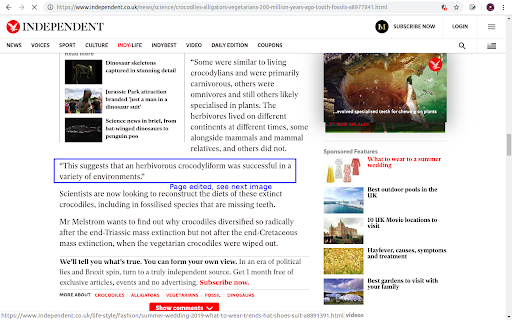
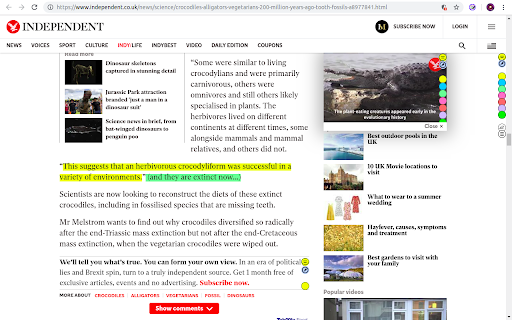
Use this extension to annotate (edit, highlight, popup/embedded notes & page notes) your web-pages. Use this extension to annotate: highlight, edit, add popup notes, and page notes on web pages as you browse. The extension saves your changes locally, and next time the same URL is visited, the web page is replaced by your annotated version. Click on the extension icon (page action button) next to the address bar to see different options. Restarting the browser is required/recommended after the initial installation. Please note that your feedback is very important to us. Thus, please let us know how you feel about it (good, bad, nothing... anything) by reviewing it. It will help us improve the extension and also motivate us to work on it. Privacy and legal document: https://neural2-0.github.io/Legal.html FAQs: https://neural2-0.github.io/FAQ.html Ver 1.8 - Bug fix with Chrome update Ver 1.7 - Manifest V3 and bug fix. Ver 1.6 - Changed search page for some monetization. Ver 1.4 - Features added - Page notes - Annotation indicator (via color of extension button) - UX enhanced. - Bug fixes. Ver 1.3 - Features added - Popup notes - View all highlights and notes for a page - Search annotated pages - Bug fixes. Limitations: - Changes at the source (actual pages) for annotated pages won’t be visible, as the page is replaced by the locally stored annotated version. - As annotated pages are saved locally, their lifespan depends on the extension remaining installed.

Highlighter
Make creating ,viewing and managing highlight easier HIGHLIGHTER I used to write a lot of essays, and reports when I was in university. I developed Highlighter in order to help me highlight interesting ideas that I came across on the internet. This tool can store those highlights on your local so that you can check them back later. ===================== INSTALLATION + After installing the extension from chrome web store, it is recommended to refresh all the tabs or reopen the browser. ===================== CURRENT FEATURES + Highlight selected text + Change highlight colour + Remove highlight + Bookmark highlighted sites + Bulk remove highlights from the popup + Enable/Disable highlight from the popup

Annotate PRO
Create, share, and USE reusable comments to edit and grade faster! Use with Canvas, Google Docs/Classroom, Microsoft Teams, Bb... AP is the platform for feedback excellence. Share comment banks, syllabus content, school policiies, and rubrics for use across the EDU platforms you know and love: Canvas, Google Docs, Microsoft Word, D2L, Moodle, and more. You can: - Create and manage content centrally, assuring every teacher has the right rubric, comment bank, policy info, syllabus snippet, or LibGuide URL. - Use dynamic rubrics and comment banks to handcraft feedback in less time. With AP you write it once, to perfection, then re-use to your heart's content! See https://www.11trees.com/solutions/annotate-pro/annotate-pro-works-with/ for a complete list of supported platforms. See https://www.11trees.com/solutions/annotate-pro/features/ for a complete list of features. For Individuals: Use the forever-free version of AP to create an unlimited number of comment banks for yourself, then use them with popular education platforms. Sign up and you'll get a 14-day trial of AP+ (no credit card required). AP+ adds Feedback Forms, Dynamic Rubrics, additional sidebar options, comment history, subgroups, analytics, and Google Translate integration. You can also license content libraries like our College Edition, Presentation Skills Edition, or Legal Writing Edition that provide 100s of stock comments that can be quickly personalized. For Institutions: License AP to easily share content libraries across 5, 50, or 500+ faculty. Schools use AP to scale writing across the curriculum initiatives, writing center operations, tutoring, foreign language instruction, project-based learning, presentation skills coaching, science labs grading, and even to centralize and share school resources and policy info through AP's Knowledge Base mode. AP analytics help measure the impact of feedback and help schools document regular and substantive interaction with students. With AP+ or Institutional Licenses you can: - Create and share (institutions only) large or small content libraries to serve as comment banks, rubric sets, or knowledge bases. Quickly add pre-written feedback to documents, respond to discussion posts, create emails, or answer chats. - Turbocharge specific, personalized feedback with AP Feedback Forms including nested checkboxes. - Create simple or complex rubrics that escape the traditional grid to create rich, narrative responses for students. - Search across multiple content libraries, and hundreds of Comments, with full-text search or right-click menu to find just the right comment. - Leverage Google Translate to flip comments into another language or even provide dual language responses. - Write free form comments to effortlessly store them in your AP library for reuse. - Turn on the History feature to store ALL the comments you create in Google Docs or Canvas SpeedGrader so you can easily build out your content libraries and engage students with previous feedback. - License our College Edition, Presentation Skills Edition, or other content libraries to access hundreds of expertly written comments that you can extend and personalized. - Review usage data, see where you have invested your engagement energy by comment group, sub-group and individual comment. Release Notes: 7.21.4 | April 20, 2026 * Minor update - bugz and tweaks. 7.21.3 | March 10, 2026 * Minor update - bugz and tweaks. 7.21.2 | January 3, 2026 * Happy New Year! * Word Count on Feedback Forms and Dynamic Rubrics to help modulate feedback volume. * Feedback Forms and Dynamic Rubrics stay open by default. * Bugz!. 7.21.1 | December 3, 2025 * Persist preferred word for "Grade" in rubrics. * Disable form check if a checkbox preceeds a text entry form. * Pin text formatting toolbar when editing. * Improved rubric printing. * Improved Startup Guide (AP menu > Gear > Startup Guide). * Bugz!. 7.21.0 | October 23, 2025 * RUBRICS! * Improved Feedback Forms: nested checkboxes and bulleted lists. * Improved support for Canvas SpeedGrader. * Bugz / improvements. 7.20.3 | September 13, 2025 * Improvements to support Canvas SpeedGrader changes * Improvements to Google Docs/Classroom experience * Support longer Feedback Form editing from the AP Chrome Extension * Minor tweaks, bug fixes, and improvements 7.20.2 | July 17, 2025 * Fixes duplicate comment insert when using the green Library dropdown option in the AP toolbar. * Canvas learnings. * Improved Edit and Knowledge Base behavior. 7.20 | June 30, 2025 * Right-click a AP content to edit it - from the Extension * Introducing Feedback Forms and Knowledge Base mode * Improved Canvas Gradebook support (sidebar, student history) * Numerous improvements to support D2L's Brightspace, Schoology, Google Classroom * Bugz and performance improvements 7.16 | March 31, 2025 * Improved Forms and Checklist behavior (keep a checklist open and use across multiple windows) * Improved support for Feedback Fruits * Polish & BUGZ! 7.15 | January 31, 2025 * New toolbar options (show all comments, sort by groups). AP+ feature. * Support for GoReact (video commenting) and Perusall (social learning) * Improved support for Moodle and BrightSpace * Polish & BUGZ! For previous release notes please visit https://www.11trees.com/support/release-notes-annotate-pro-for-google-chrome/.

Diigo Web Collector - Capture and Annotate
Diigo is the #1 extension for annotating, archiving and bookmarking webpages. With this easy-to-use tool, you can 1. Bookmark links to archive webpages or to read later 2. Attach highlights & stickies to a webpage as a reminder 3. Share pages with annotation via Twitter, Facebook, Google Buzz 4. Access anywhere, via iPhone, iPad (http://bit.ly/e2ujpL), Android (http://goo.gl/tvbuq). 5. Create groups to pool findings, share resources or curate content 6. Automatically cross-post to social bookmarking site Delicious (optional) 【For Those with Privacy Concern 】 Chrome will alert you that the extension may access all your data. Here is the whole story: This extension has bookmark, highlight and add sticky note features. These features need the privilege to access your pages. However, we never collect any of your data unless you select some content and choose to send it to diigo. Don't worry. We are also internet users and don't want to be evil. Recent updates * More robust twitter OAuth * [new] Search your Diigo library simultaneously while searching google * [new option] Load bookmarking info automatically. When enabled, the browser action icon will indicate whether current page is bookmarked. * [new] Upload cache page. Save a copy of the web page to My Library. * Diigo+Google search in context menu: Select some text, right click and search your library! (can be disabled in options) * New option: "Show highlights automatically". When enabled, annotations on a page will be displayed automatically 【Bug Report and Suggestions】 We appreciate and receive many user suggestions and requests for improvements. If you have features you would like to see added, or experience a bug for reporting, please send us e-mail at 【developer@diigo.com】. Doing so will allow us to consider any improvements and correct any bugs as soon as possible. Thank you! 【More Great Chrome Apps/Extensions by Diigo】 Check them out: http://bit.ly/hDJ5se You won't be disappointed! Changelog: http://appchangelog.com/extension/2/Diigo-Web-Collector-Capture-and-Annotate

TabMate
TabMate helps you manage the tab clutter. Easily switch between tabs, save & restore set of tabs or windows, and more. TabMate helps you manage tab clutter and be more productive. Stash a set of tab/windows that you want to save for later and easily restore them when needed. Use quick switcher to search among open tabs and stashes and switch to them. Drag and drop the tabs to rearrange them with in windows or stashes. Name stashes so you can easily remember the purpose for each set of tabs. Easily send tabs to named stashes through right click context menu. Common usages: - Quickly search and switch between all the open tabs and stashes - Save the pages you've visited during your research session and restore all of them later. - Logically group all the pages you visit often and load each group when needed. - Easily manage existing open tabs by saving unnecessary tabs as a session.
