
dinoehnfgoidbfpggkdkofpijennefgf

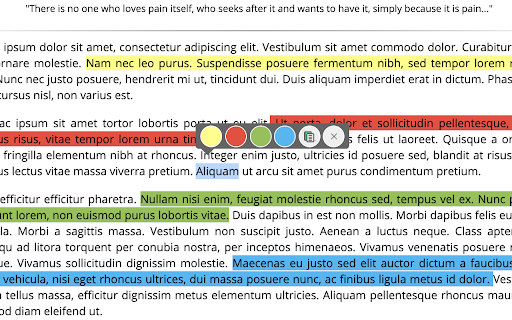

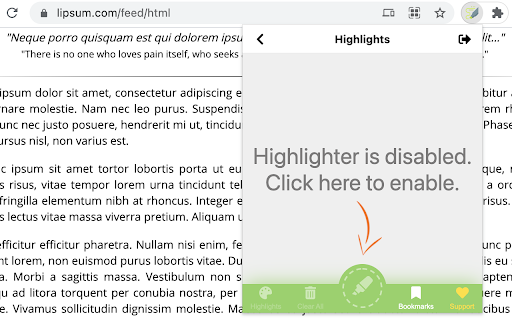
Make creating ,viewing and managing highlight easier HIGHLIGHTER I used to write a lot of essays, and reports when I was in university. I developed Highlighter in order to help me highlight interesting ideas that I came across on the internet. This tool can store those highlights on your local so that you can check them back later. ===================== INSTALLATION + After installing the extension from chrome web store, it is recommended to refresh all the tabs or reopen the browser. ===================== CURRENT FEATURES + Highlight selected text + Change highlight colour + Remove highlight + Bookmark highlighted sites + Bulk remove highlights from the popup + Enable/Disable highlight from the popup

Annotate web pages/CONTEXT
Use this extension to annotate (edit, highlight, popup/embedded notes & page notes) your web-pages. Use this extension to annotate: highlight, edit, add popup notes, and page notes on web pages as you browse. The extension saves your changes locally, and next time the same URL is visited, the web page is replaced by your annotated version. Click on the extension icon (page action button) next to the address bar to see different options. Restarting the browser is required/recommended after the initial installation. Please note that your feedback is very important to us. Thus, please let us know how you feel about it (good, bad, nothing... anything) by reviewing it. It will help us improve the extension and also motivate us to work on it. Privacy and legal document: https://neural2-0.github.io/Legal.html FAQs: https://neural2-0.github.io/FAQ.html Ver 1.8 - Bug fix with Chrome update Ver 1.7 - Manifest V3 and bug fix. Ver 1.6 - Changed search page for some monetization. Ver 1.4 - Features added - Page notes - Annotation indicator (via color of extension button) - UX enhanced. - Bug fixes. Ver 1.3 - Features added - Popup notes - View all highlights and notes for a page - Search annotated pages - Bug fixes. Limitations: - Changes at the source (actual pages) for annotated pages won’t be visible, as the page is replaced by the locally stored annotated version. - As annotated pages are saved locally, their lifespan depends on the extension remaining installed.

Super Highlighter
Highlight text on web page with a simple right-click and keyboard shortcut. Custom highlight color. Saves highlights on your device. Highlight text on websites with a simple right-click or keyboard shortcut. Saves highlights on your device. Easiest way to highlight text on any webpage! Simply select text, then right click it to select the "Highlight" option. Alternatively, use the default keyboard shortcut 'Alt+H'. You can customize the colors of the highlighter, and you can switch these colors through shortcut keys. You can customize shortcut keys and use all functions without mouse. All highlighted texts are saved so that your highlights are not lost when exiting a page! Simply re-opening that page will bring back all the highlights.

Roam Highlighter
Web highlighter for Roam Research 📢 Update: I'm working on a new and improved version of this web highlighter called Markway. To learn more and get notified about the release, go to https://markway.io 🙂 DESCRIPTION: This extension offers an easy way to highlight text on a web page and import it to note-taking apps like Roam Research, Obsidian, Logseq or Notion in the format that best suits your workflow. This is especially helpful of you are doing research, want to build your own knowledge-base or just want to save your favorite blog articles. FEATURES: Easily highlight any text on a web page → Add tags to bring your highlights into context → Customise the format of your copied highlights with placeholders → Jump to the next open Roam Research tab, to quickly insert your highlight HOW TO GET THE MOST OUT THE EXTENSION? The quickest way to launch the extension is with a hotkey (e.g CMD + SHIFT + R). You can set a hotkey in the Chrome Settings for Extensions. Next you can create your own format for the highlights, by going into the widget settings. Play around with the placeholders and use spaces to indent content. QUESTIONS / FEEDBACK: Do you have questions or feedback? The best approach is to write me directly on x.com/wirtzdan PERMISSIONS: Roam Highlighter needs to modify the websites you visit to display the widget. That's why it needs the requested permissions to function properly. However, the exact phrase ("Read and change all your data on the website you visit") make it sound more invasive than it actually is. Currently, the extension runs completely on your local machine and the only thing that is saved, are the settings you make.

Snippet Highlighter - Web & PDF
Highlighter tool to annotate websites and PDF, import Kindle highlights and more. Get all your highlights in one place, instantly searchable, available wherever you go. All your highlights are synchronized and backed up in the cloud. The extension requires a FREE account you can create immediately after the installation. Some functionality requires upgrade to a Snippet PRO account. HOW DOES HIGHLIGHTING WORK? ✓ Simply use your mouse to select and highlight text snippets on any website or PDF ✓ Click the "Add" button on any image to highlight and save charts, graphs or other images from all around the web. You can disable the "Add" button from the extension Options page. You can still highlight images by right-clicking on the image and choose "Add to Snippet". ✓ Highlight screen regions by capturing screenshots directly from the extension ORGANIZE, SEARCH AND REVIEW HIGHLIGHTS ✓ browse highlights by books and authors ✓ organize highlights with folders and subfolders ✓ tag highlights and assign colors ✓ bookmark and return to source articles with a click ✓ add personal notes ✓ powerful text search EXPORT AND SHARE YOUR HIGHLIGHTS ✓ Download highlights and notes as PDF or editable text files. ✓ Download highlights as Word or Excel files (coming soon) ✓ Use various citation systems for all your highlights ✓ Share individual highlights and collections of highlights via email or social media (Twitter, Facebook) ✓ Export collections of highlights as slideshows ✓ Connect your highlights to apps like Evernote, OneNote and more (coming soon) ENHANCE YOUR KINDLE READING EXPERIENCE ✓ Make use of all those important highlights and notes you took on your Kindle ✓ Works with highlights made on any Kindle device ✓ Review and edit all the highlights and notes that you have made on your Kindle ✓ Export Kindle highlights and notes as PDF, Word, Excel or text files SNIPPET PRO Get the most out of Snippet with features like unlimited number of folders, export options, PDF upload and more. *** Limited time offer — Get 2 Months FREE with the yearly plan! *** TRUSTED BY THOUSAND OF USERS Snippet is trusted by passionate readers, writers, students, business professionals, researchers, quotes collectors, bloggers, and many people who want to enhance their learning and reading experience. GIVE US A REVIEW ★★★★★ Do you like Snippet? Support us by giving a review! By installing the extension, you agree to Snippet’s Terms and Conditions (www.gosnippet.com/terms) and Privacy Policy (www.gosnippet.com/privacy).
