
fkaokedhimpifhfadmgjpfjimkogdlcm
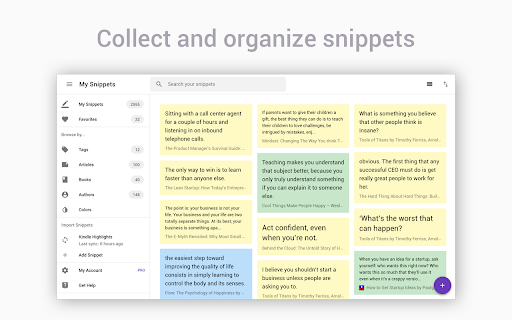


Highlighter tool to annotate websites and PDF, import Kindle highlights and more. Get all your highlights in one place, instantly searchable, available wherever you go. All your highlights are synchronized and backed up in the cloud. The extension requires a FREE account you can create immediately after the installation. Some functionality requires upgrade to a Snippet PRO account. HOW DOES HIGHLIGHTING WORK? ✓ Simply use your mouse to select and highlight text snippets on any website or PDF ✓ Click the "Add" button on any image to highlight and save charts, graphs or other images from all around the web. You can disable the "Add" button from the extension Options page. You can still highlight images by right-clicking on the image and choose "Add to Snippet". ✓ Highlight screen regions by capturing screenshots directly from the extension ORGANIZE, SEARCH AND REVIEW HIGHLIGHTS ✓ browse highlights by books and authors ✓ organize highlights with folders and subfolders ✓ tag highlights and assign colors ✓ bookmark and return to source articles with a click ✓ add personal notes ✓ powerful text search EXPORT AND SHARE YOUR HIGHLIGHTS ✓ Download highlights and notes as PDF or editable text files. ✓ Download highlights as Word or Excel files (coming soon) ✓ Use various citation systems for all your highlights ✓ Share individual highlights and collections of highlights via email or social media (Twitter, Facebook) ✓ Export collections of highlights as slideshows ✓ Connect your highlights to apps like Evernote, OneNote and more (coming soon) ENHANCE YOUR KINDLE READING EXPERIENCE ✓ Make use of all those important highlights and notes you took on your Kindle ✓ Works with highlights made on any Kindle device ✓ Review and edit all the highlights and notes that you have made on your Kindle ✓ Export Kindle highlights and notes as PDF, Word, Excel or text files SNIPPET PRO Get the most out of Snippet with features like unlimited number of folders, export options, PDF upload and more. *** Limited time offer — Get 2 Months FREE with the yearly plan! *** TRUSTED BY THOUSAND OF USERS Snippet is trusted by passionate readers, writers, students, business professionals, researchers, quotes collectors, bloggers, and many people who want to enhance their learning and reading experience. GIVE US A REVIEW ★★★★★ Do you like Snippet? Support us by giving a review! By installing the extension, you agree to Snippet’s Terms and Conditions (www.gosnippet.com/terms) and Privacy Policy (www.gosnippet.com/privacy).

Research Notes
Bookmark, tag or add notes to pages, highlight and save quotes or images, save selected Google searches, filter out search results. KEEP NOTES AND ORGANIZE PAGES Bookmark, tag or add notes to pages. SAVE & HIGHLIGHT QUOTES Save quotes or other text snippets from pages (or PDFs), highlight quotes on the page. SAVE IMAGES Save images with pages - either pictures directly from the page or copy-pasted screenshots via a tool like Snipping Tool or Paint. TAGS WITH VALUE Advanced tagging: you can add values to the tags. For example, to record a page’s author, add a tag like “Author: ”. Or, when searching for products and comparing good websites with alternative offerings, add tags to pages such as “Product: ” or “Price: ”. You can group and sort by tags and values separately on the all notes -page. RESEARCH UNDER SEPARATE TOPICS All your pages and searches will be saved under topics that you define. This helps keep your different research topics - be it work, school or hobbies - separated from each other. SAVE YOUR GOOGLE OR GOOGLE SCHOLAR SEARCHES When studying a topic in-depth, save searches to remember what search terms you’ve used, which ones got great results and how far into the results you have looked. By default, search saving is turned off, it can be activated for each Google search tab separately. HELPFUL SEARCHING OPTIONS Cross out and hide search results that are not useful. Instantly add notes and tags to results straight in your Google search. OVERVIEW OF SAVED RESEARCH A special all notes -page gives a comprehensive overview of your topics, pages and searches. See your researched pages either in list or table format. Filter pages by text, tags, notes or bookmarks. PRIVATE The information that you create while working with the extension - addresses, searches, notes, tags, etc - is stored exclusively in your own browser and is not shared with anyone. We only collect anonymous analytics information about this products usage to get an overview of what features are used. DO YOU HAVE QUESTIONS OR RECOMMENDATIONS? We are open to feedback about this product, about existing features or new ideas - just send as an e-mail (feedback@onlineresearchnotes.com) or drop by in our Discord server (https://discord.gg/pE9BMg2m). And please do inform us also about any possible bugs that may be lurking. FREE This extension is free to use.

Annotate web pages/CONTEXT
Use this extension to annotate (edit, highlight, popup/embedded notes & page notes) your web-pages. Use this extension to annotate: highlight, edit, add popup notes, and page notes on web pages as you browse. The extension saves your changes locally, and next time the same URL is visited, the web page is replaced by your annotated version. Click on the extension icon (page action button) next to the address bar to see different options. Restarting the browser is required/recommended after the initial installation. Please note that your feedback is very important to us. Thus, please let us know how you feel about it (good, bad, nothing... anything) by reviewing it. It will help us improve the extension and also motivate us to work on it. Privacy and legal document: https://neural2-0.github.io/Legal.html FAQs: https://neural2-0.github.io/FAQ.html Ver 1.8 - Bug fix with Chrome update Ver 1.7 - Manifest V3 and bug fix. Ver 1.6 - Changed search page for some monetization. Ver 1.4 - Features added - Page notes - Annotation indicator (via color of extension button) - UX enhanced. - Bug fixes. Ver 1.3 - Features added - Popup notes - View all highlights and notes for a page - Search annotated pages - Bug fixes. Limitations: - Changes at the source (actual pages) for annotated pages won’t be visible, as the page is replaced by the locally stored annotated version. - As annotated pages are saved locally, their lifespan depends on the extension remaining installed.

Auto Highlight
*Auto Highlight* automatically highlights the important content on article pages. This extension automatically highlights the important content on article pages. To use, click the highlighter icon in the location bar. Clicking multiple times changes the highlighting coverage. As the page receives more highlighting from clicking the icon, the icon will show less available ink in the highlighter. Please let me know if you find particular pages where the extension does not work well. *Auto Highlight* currently uses an algorithm for picking important sentences based on term frequencies in the entire article. With examples of problematic pages, I can possibly improve the technology. I would also like to incorporate more advanced techniques from extraction-based article summarization research. The source code is available on GitHub: https://github.com/dstein64/highlight Privacy Policy: This extension does not collect user data nor transmit user data remotely. Options for the extension are saved locally.

ZetaMarker - PDF & Web Highlighter
The privacy-friendly tool for highlighting web pages and PDF files. ZetaMarker PC is a browser extension for higlighting, annotating, and organizing online pages and PDF files on your PC. It is compatible with Chromium-based browsers including Chrome, Edge, Brave, and Opera. 🔒 Privacy-Focused: Privacy is paramount with ZetaMarker, as our extension operates on a permission-free principle, ensuring that your sensitive data remains secure. ZetaMarker prioritizes your privacy, providing a seamless and secure highlighting and annotation experience without compromising your personal information. 🖍️ Easy Highlighting and Commenting: Easily capture Your Focus with our intuitive highlighting and annotation features, allowing you to mark important sections of PDFs or web pages for easy reference. Revisit annotated pages to access key insights and stay focused on essential information whenever you need it. 🔄 Cross-Device Sync: Stay in sync across all your devices with our annotation synchronization feature. Whether you're working on a desktop, laptop, or mobile device, your annotations are always up-to-date, ensuring you never lose your notes again. Your annotations are consistently accessible whenever and wherever you need them. 🔍 Powerful Search Tool: Quickly locate the information you need with our robust search tool, designed to search through all your annotations and labels in seconds. Whether you're searching for specific notes or insights, our powerful search functionality ensures you can quickly pinpoint relevant information, saving you valuable time and enhancing your productivity. 📤 Export Your Notes: Export your highlights and comments to PDF, HTML, Markdown or TXT formats, enabling sharing, collaboration, and knowledge dissemination. Whether you're compiling reports, integrating annotations into websites, or simply keeping a backup in plain text, our export options ensure flexibility and convenience for all your needs. 📱 Anywhere, Anytime Access: Experience access anywhere, anytime with our web app. Your notes are conveniently available at your fingertips, ensuring uninterrupted productivity and effortless organization. 🚀 Always Evolving: Stay ahead with our platform's continuous evolution, as we're constantly introducing exciting new features. Install now and reap the benefits of automatic updates, ensuring you always have access to the latest enhancements and functionalities, keeping your experience fresh and innovative. 📁 File Access: To highlight local PDFs, grant access to file URLs. 1️⃣ Open your browser's Extensions page. 2️⃣ Find ZetaMarker and click 'Details.' 3️⃣ Toggle on 'Allow access to file URLs.' More info: https://zetamarker.com/documentation 🔐 Your Data, Your Control: Your highlights and comments are yours. We don't sell or misuse your data. Learn more: https://zetamarker.com/legal/privacy. 📜 Terms of Service: Installing the extension or signing up means you agree to ZetaMarker's Terms: https://zetamarker.com/legal/terms.
