
pnhplgjpclknigjpccbcnmicgcieojbh
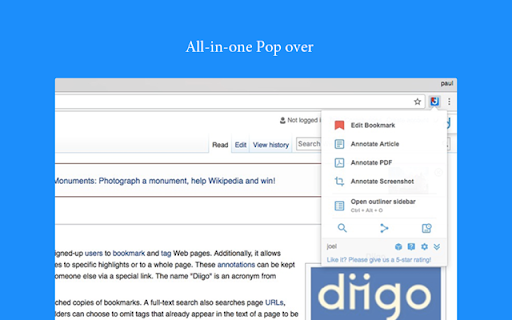


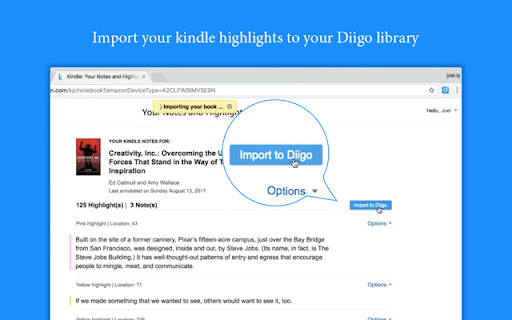
Diigo is the #1 extension for annotating, archiving and bookmarking webpages. With this easy-to-use tool, you can 1. Bookmark links to archive webpages or to read later 2. Attach highlights & stickies to a webpage as a reminder 3. Share pages with annotation via Twitter, Facebook, Google Buzz 4. Access anywhere, via iPhone, iPad (http://bit.ly/e2ujpL), Android (http://goo.gl/tvbuq). 5. Create groups to pool findings, share resources or curate content 6. Automatically cross-post to social bookmarking site Delicious (optional) 【For Those with Privacy Concern 】 Chrome will alert you that the extension may access all your data. Here is the whole story: This extension has bookmark, highlight and add sticky note features. These features need the privilege to access your pages. However, we never collect any of your data unless you select some content and choose to send it to diigo. Don't worry. We are also internet users and don't want to be evil. Recent updates * More robust twitter OAuth * [new] Search your Diigo library simultaneously while searching google * [new option] Load bookmarking info automatically. When enabled, the browser action icon will indicate whether current page is bookmarked. * [new] Upload cache page. Save a copy of the web page to My Library. * Diigo+Google search in context menu: Select some text, right click and search your library! (can be disabled in options) * New option: "Show highlights automatically". When enabled, annotations on a page will be displayed automatically 【Bug Report and Suggestions】 We appreciate and receive many user suggestions and requests for improvements. If you have features you would like to see added, or experience a bug for reporting, please send us e-mail at 【developer@diigo.com】. Doing so will allow us to consider any improvements and correct any bugs as soon as possible. Thank you! 【More Great Chrome Apps/Extensions by Diigo】 Check them out: http://bit.ly/hDJ5se You won't be disappointed! Changelog: http://appchangelog.com/extension/2/Diigo-Web-Collector-Capture-and-Annotate

Cubox
Highlighter, Clipper, AI Reader. Read, annotate and take notes with AI assistant. One-click Saving, Clipping, Highlighting and Taking Notes. Cubox is an AI reader built for learning. With the Cubox browser extension, you will unleash the full potential of highlights and notes. • You can quickly select multiple sections of text, images, or links on a webpage with just one shortcut, and easily highlight or clip them. • In capture mode, you can multi-select, or click and drag to batch select adjacent content. • Select contents on webpage with mouse dragging, then highlight them with just one click. • It supports adding notes, changing colors, allowing you to fully experience all the highlighting features right on the webpage. • Get a quick understanding of the article’s summary through summarization. Use key questions to understand the main points of the article and their answers. • Automatically highlight with Ghost Highlight and mark your favorite sections with annotations. • Save the web page you are browsing with one shortcut. • Save web snippets by dragging, Capture, dropping, and right-clicking. • Suggest tags, website title, description, and cover image. • Update information for already saved content. • Automatically detect same saves. More features on https://cubox.cc/ Please visit the Cubox web app or download Cubox apps. Your collections will automatically sync across all your devices.

Smart TOC
Displays a table of contents for any website, making it easier to read and navigate long articles, documentations, and online books. - Auto detects article and headings, with our smart algorithm - Highlights current heading - Click to jump to heading - Expand/fold headings, or to specified level - Floating panel, drag, resize, or dock to side - Mouse hover while holding Alt/Option key to glance - Copy to clipboard - Clean user interface - Only runs when you use it The Pro version offers extra features: - Dark mode, automatically - Up to 6 heading levels (free version capped to 3) - Quickly go to headings, with full-keyboard support Click the browser button to toggle table of contents for the current site Any website that conforms to the HTML standard and uses HTML heading tags properly (e.g. Wikipedia.com). You can also enable Smart TOC for local html in the extension settings.

Yawas
Highlight Web pages; stored in your browser bookmarks, searchable, and recreated automatically when you revisit a page Yawas lets you highlight and comment web pages in multiple colors. Your highlights are stored in the built-in Chrome Bookmarks API (you need to check Sync if you want them to be synchronized across all your devices). Yawas automatically recreates the highlights when you reopen web pages. All functions are available from the context-menu (Ctrl-Shift-Y for Yellow) To highlight, simply select some text and choose the color from the context menu. To add a note or comment, mouse over an existing highlight and pick "Add Note" (or the keyboard shortcut -N). To recolor or delete a highlight, select some of its text and choose another color or "Delete" from the context-menu. You can also quickly search all your bookmarks with "Yawas - Search" or edit the current page's highlights using "Yawas - Edit".

YiNote
Description: YiNote can help you easily save your ideas with online videos, and provide smooth note taking experience! In-page notes taking and reviewing for videos - Save time-stamped notes while watching online video - Quick access to interested video time by clicking note - Notes are always stay with video in page for easy review Manage all video notes in one place - Bookmark your noted videos - Search notes and videos by keywords - Always keep new note on top of list
