
ehndikigeekodlnbohjndjjiikphickb

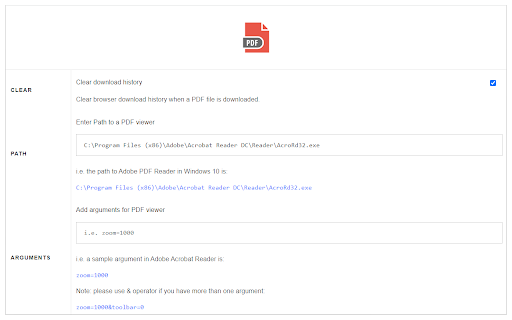
Open in PDF Viewer is a simple and lite addon that allows you to easily open desired PDF links in a chosen PDF viewer. Note 1: after installing the addon, you need to connect it with native applications (i.e. adobe acrobat reader) on your machine. To make this connection, a separate patch is provided in GitHub. Please download and install this patch from: https://github.com/alexmarcoo/open-in-native-client/releases Follow the instructions in the above GitHub page to download and install the related patch to your system. After installing, the "Open in PDF Viewer" addon in your browser can communicate with PDF viewer on your machine (Window, Linux, or Mac). The default option for the PDF viewer is adobe acrobat reader. In windows 10, the default location for Adobe Acrobat is "C:\Program Files (x86)\Adobe\Acrobat Reader DC\Reader\AcroRd32.exe". If you have a different OS, or if you installed Adobe Acrobat in a different folder, please adjust the field accordingly. You can change this from the options page. There is also an input field in which you can add arguments for the viewer. For example, to open PDF as full-screen or without toolbar. Please note that, if you change the PDF viewer make sure to change the input arguments as well. Each PDF viewer has its arguments to operate. If you keep Adobe as the default PDF viewer, please visit this page (http://www.adobe.com/content/dam/Adobe/en/devnet/acrobat/pdfs/pdf_open_parameters.pdf) to get more info about input arguments. To operate with this addon, please right-click on any link (a link to a PDF document) and then click on - Open and Download with PDF Viewer - item from the context menu. The PDF file will first be "downloaded" and then "opened" in a default PDF viewer (the one which is set on the options page). Please note that the PDF file will be downloaded in the "default" download folder on your machine. Note 2: before using the addon, please open the option's page and make sure the path to the PDF viewer is correct based on your Operating System. To report any bug, please fill the bug report form on the addon's homepage (https://mybrowseraddon.com/open-in-pdf.html).

Docs Online Viewer
Open and view any online file in your browser. Supports almost all major file and document formats. Fast, easy to use and free. Docs Online Viewer introduces a convenient way to view documents on the web. It uses third party online services like Google docs API (or other services when available) to open links with extension PDF, DOC, DOCX, XLS, PPT, RTF, ODT, ODS, ODP, CSV and many more file formats online in the browser itself without need for any third party software installed on your computer. This extension reduces the need for additional software required to open documents such as Acrobat reader plugin, Microsoft Office and so on. This is less resource intensive compared to using external software/plugins which are a bloat on your system and may cause browser / system crashes. It also reduces the risk of downloading malicious documents. Docs Online Viewer is lightweight and tightly packed so that it does not slow down your browser. If there are any bugs or if there are any missing features, please report in the "SUPPORT" section. I will try fixing them. For more information, visit: http://dov.parishod.com/ Privacy Policy: https://dov.parishod.com/privacy/

Open in Foxit™ Reader
Send PDF (Portable Document Format) links to the Foxit™ Reader from right-click context menu or browser's action button This extension simplifies the use of Foxit Reader to open PDF links. How to Use: 1. Use the right-click context menu item to direct PDF links to Foxit PDF Reader. 2. Click the action button on PDF pages to transfer the PDF file to Foxit PDF Reader. 3. On the options page, customize the extension settings to open PDF links with Foxit Reader. Notes: 1. Because Foxit Reader cannot directly open remote PDF links, this extension initially downloads the PDF file to your browser's default download directory and then activates the external PDF reader. 2. To establish communication with Foxit Reader, install a small native client specific to this extension. This client is compatible with Windows, Linux, and Mac operating systems. ChromeOS is not supported. 3. Ensure you have Foxit PDF Reader installed on your device. This extension only simplifies Foxit Reader integration with your browser and does not perform the installation. --- Legal Foxit Reader is a registered trademark of Foxit Software Incorporated, registered in the U.S. and other countries. This extension is an independent project and is not affiliated with Foxit Software. It serves as a tool designed to enhance the PDF reading experience.

PDF Mage
Click to save page as PDF PDF Mage lets you save the page you are currently viewing as a high quality PDF file. Features: - Saves a page with a single click of a button - Works with any page you are currently viewing, even if it requires a login - No watermarks applied - Automatically downloads the saved PDF file - Capable of saving parts of a web page as PDF Note: this extension requires an Internet connection to operate. It uses an external API to convert a web page into a PDF file and lets you download the file once the conversion is completed.

Soda PDF Viewer: Edit, Convert, Compress PDF files
Edit and read any PDF files in Chrome. Soda PDF is the ultimate online PDF editor and viewer for any device! Get the most out of your PDFs with the Soda PDF Chrome extension. This powerful PDF viewer and editor integrates smoothly into your browser, offering a complete solution for all your PDF needs. With Soda PDF, viewing, reading, and editing PDFs is a breeze. You can add text, edit text, edit images, rearrange pages, and even create forms. Plus, you can easily upload files from the extension to our online tool, giving you access to a wide range of powerful features. Enjoy seamless performance and productivity, no matter where you are. Key Features: Online PDF Viewer & Reader: Quickly open and read PDF files with our user-friendly PDF reader. Online PDF Editor: Modify your documents with ease. Add text, edit text, and include images directly in the PDF. Rearranging Pages: Organize your documents by rearranging pages with just a few clicks. Create Forms: Design and create forms within the app for easy data collection.
