
gmpljdlgcdkljlppaekciacdmdlhfeon

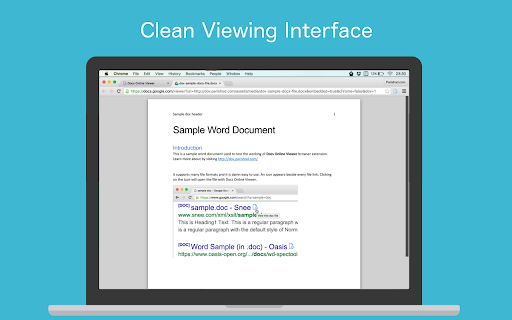

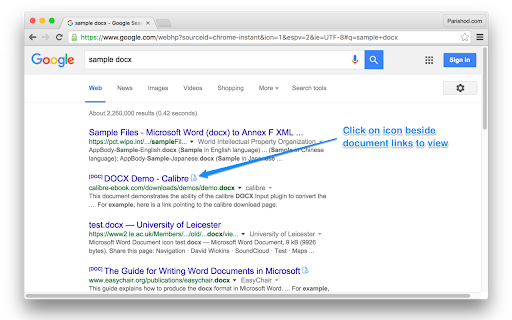
Open and view any online file in your browser. Supports almost all major file and document formats. Fast, easy to use and free. Docs Online Viewer introduces a convenient way to view documents on the web. It uses third party online services like Google docs API (or other services when available) to open links with extension PDF, DOC, DOCX, XLS, PPT, RTF, ODT, ODS, ODP, CSV and many more file formats online in the browser itself without need for any third party software installed on your computer. This extension reduces the need for additional software required to open documents such as Acrobat reader plugin, Microsoft Office and so on. This is less resource intensive compared to using external software/plugins which are a bloat on your system and may cause browser / system crashes. It also reduces the risk of downloading malicious documents. Docs Online Viewer is lightweight and tightly packed so that it does not slow down your browser. If there are any bugs or if there are any missing features, please report in the "SUPPORT" section. I will try fixing them. For more information, visit: http://dov.parishod.com/ Privacy Policy: https://dov.parishod.com/privacy/

Undisposition [Racle fork]
Removes Content-Disposition: attachment HTTP header to allow view files instead of downloading them. Extension icon acts as toggle. Removes Content-Disposition: attachment HTTP header to allow view files instead of downloading them. Sometimes you want to see files in Chrome inline, but Chrome started to download it. This is quite irritating. This extension relaxes this behavior. Extension icon acts as quick toggle on/off. Original extension: Undisposition: https://chrome.google.com/webstore/detail/undisposition/hjfncfijclafkkfifjelofbeclipplfi Original code: https://github.com/cielavenir/ctouch/tree/master/undisposition Issue this fork is based on: https://github.com/cielavenir/ctouch/issues/1 (Thanks to GianPaolo70!) Remove Content-Disposition: attachment HTTP header. Sometimes you want to see files in Chrome inline, but Chrome started to download it. This is quite irritating. This extension relaxes this behavior. - Added advanced settings for file type handling — define custom rules by file extension or URL pattern with automatic type detection (#8) - Built-in file type rules trimmed to images only; other types (PDF, JSON, YAML, etc.) available as user-configurable rules - GitLab artifact viewing works out of the box with default URL pattern rule New permission required: The "tabs" permission is used to access tab URLs in order to display per-tab badge indicators showing whether the extension is active or disabled on the current domain. - Added allowlist mode as alternative to blocklist - Added per-tab badge indicator: blue (active), gray (skipped), pink (disabled) - Smart Content-Disposition handling: preserves header for binary types like zip, rar, exe - Added modern image format support: webp, avif, apng, svg - Rewrite text/csv Content-Type to text/plain for inline display - Default blacklist seeded with googleusercontent.com on first install - Modernized settings page with card layout, segmented control, and save toast - Improved URL parsing for file extension detection - Ported all improvements to Chrome MV3 branch from Firefox extension branch with declarativeNetRequest URL-based Content-Type rewriting

Peek: Preview PDFs, Office files, and more
Preview documents, videos, music, and more with a mouse hover. Peek is a browser extension that shows previews for links to files and supported services in web pages. Just hover your mouse over a link, and Peek will display a small popup with an interactive preview of the link's content. Peek can show previews for PDFs, Microsoft Office documents, YouTube video links, audio files, Google Docs, and much more. It uses the browser's built-in rendering features, in combination with the Google Docs Viewer, Microsoft Office Web Viewer, and other third-party embedded viewers to display rich previews. Peek is open source under the GPL license. The code is available on GitHub: https://github.com/corbindavenport/peek

LibreOffice Editor
Create and edit documents with LibreOffice Online. LibreOffice Editor is a Chrome extension that allows to create, edit and view any Microsoft Word document, Excel spreadsheet and Powerpoint slide. It is an integration with LibreOffice Online and a file manager in order to handle all your documents when online. It is a document, spreadsheet and presentation editor integrated with our file manager to manage only "Office" file types with this online app. 1) It provides direct access to create a doc, xls or ppt document from scratch with this LibreOffice Editor. 2) It detects when you access to an "Office" document, and it opens it directly using this LibreOffice Editor. A) LibreOffice Editor Online, which contains the following features: - Create, edit and view XLS spreadsheets written using OpenOffice Calc, LibreOffice Calc or Microsoft Excel. - Create, edit and view DOC documents written using OpenOffice Doc, LibreOffice Doc or Microsoft Word. - Create, edit and view PPT slides written using OpenOffice Impress, LibreOffice Impress or Microsoft Powerpoint. - Styles management. - Font sizes. - Font colours. - Background colours. - Search for texts. - Insert columns / rows / tables / images.. - Delete rows / columns. - Advanced find & replace / regular expressions / special characters. - Spreadsheet functions. - Slides preview. - Export to PDF. - Auto save files. - Open source code. B) LibreOffice Desktop API, which supports the formats detailed here https://wiki.openoffice.org/wiki/Documentation/OOo3_User_Guides/Getting_Started/File_formats. 3) File manager module, which includes the following functionality over the files used by this extension: - Personal files and directories in the Cloud. - Operations with files and folders: copy, move, upload, create folder/file, etc - Search for files This LibreOffice Editor extension use the platform http://www.offidocs.com. It is available for free online users but it also allows the integration with premium users and on-premises OffiDocs deployments where the OffiDocs LibreOffice online global bundle is installed. IMPORTANT: This extension scans the URLs browsed in order to detect DOC, XLS, PPT files. The DOC, XLS, PPT files detected appear in a list located in the extension popup that are retrieved from our servers. The scanning is performed from our servers so your URL are reported to our system. No personal data is collected. This scan can be disabled with a checkbox that appears in the extension popup. If you disable this scanning, this functionality is not available so then the extension functionality is very limited.

Awesome PDF Viewer, Reader
PDF Viewer, Reader is a free tool that allows you to view/edit PDF files directly in your web browser. This PDF Viewer is a free tool that allows you to view/edit PDF files directly in your Chrome. This extension adds a button menu to Chrome's built-in PDF viewer. This button will allow you to view or edit a PDF file directly. The tool allows you to import a PDF and image through the web page context menu (right-click menu) on links/images, and provides support for PDF viewing, editing, and creation. This PDF Viewer reads files without uploading the file to any servers. It only works locally without going through the server. This PDF viewer/editor supports local & web PDF files. Based on HTML5/js/wasm PDF library. *Other Features Convert a PDF to HTML to edit, Extract texts from a PDF, PDF Compress, XFA PDF Viewer PDF pages to Image, Extract images from a PDF, Extract attachments from a PDF, Merge a PDF with another PDF Extract single pages from a PDF, Page delete/move in a PDF, Optimize images, Remove text/Images in a PDF OCR Text Recognition, Text to Speech, Encrypt/Decrypt PDF, Convert to Postscript/HEIC/TIFF/SVG, and more. Support Chrome 109 and later versions.
