
bfpogemllmpcpclnadighnpeeaegigjk


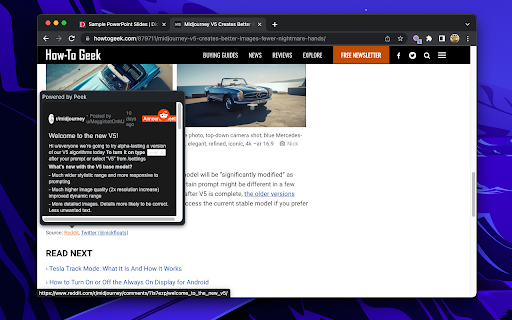
Preview documents, videos, music, and more with a mouse hover. Peek is a browser extension that shows previews for links to files and supported services in web pages. Just hover your mouse over a link, and Peek will display a small popup with an interactive preview of the link's content. Peek can show previews for PDFs, Microsoft Office documents, YouTube video links, audio files, Google Docs, and much more. It uses the browser's built-in rendering features, in combination with the Google Docs Viewer, Microsoft Office Web Viewer, and other third-party embedded viewers to display rich previews. Peek is open source under the GPL license. The code is available on GitHub: https://github.com/corbindavenport/peek

YouTube™ on Hover Preview
Watch YouTube videos instantly by hovering your mouse over any YouTube link on a webpage. "YouTube™ on Hover" extension displays a floating panel player once your mouse is over a YouTube link. This is useful to preview YouTube links without the need to open them in separate tabs. To hide the floating player, just click somewhere inside the page. For your convenience there are some options: 1. You can either place the player at the center of the screen or just beneath the YouTube link with custom offset. 2. For the player to appear, keep hover over a link for 1 second. This option is useful to bypass YouTube links that are accidentally been hovered 3. Once a link is previewed, it will be stroked-through to be distinguished from other YouTube links that are still not visited. Note that the strike-though is not permanent. Reloading the page will remove all the decorations. 4. As of version 0.1.4, you can watch previews in "Turn of the Light" mode. Open options page to change this setting. For FAQs please visit: http://add0n.com/youtube-hover.html For reporting bugs please use: https://github.com/schomery/youtube-hover/issues Permissions: Storage: to store internal preferences. This permission allow the extension to have access to chrome.storage API which is used for saving user preferences. History: This one is used to mark previewed links as visited. This is useful to prevent multiple preview of a single link Tabs: to open FAQs page Change Logs: 0.1.8 1. It is now possible to close the preview with ESC key 2. Clicking outside player is now blocked (to prevent accidental link redirect) 0.1.9 1. Supports start time 2. Fixes the youtube player is not accepting fullscreen attribute 3. Preview panel can now be activated on youtube.com as well (disabled by default)

Search & Link Preview
See previews of links and instantly performs searches on the same page using this previewer instead of opening new tabs This extension enables you to browse faster online in two ways: preview search results on same page and secondly preview any link from the search result page. How it works: * To perform a search in preview mode, simply select the text and the click on the "search" tooltip button that appears. * To preview a URL, hover over the URL and click on the "preview" tooltip that appears. Features: * !NEW! Automatic hover to preview any URL; choose the hover delay. * !NEW! Works on links that usually break previews including stackoverflow.com * It supports multiple search engines including Google, Bing, Yahoo, Yandex and Baidu * The preview window is resizable and the default size (width and height) of the preview window can be set in the settings pages. * Easily go from preview mode to a new tab page by clicking on the "Open in New Tab" control icon. * Ability to minimize the window or drag it to ensure it does not block important content. * Disable it for specific sites by right-clicking on the browser icon and selecting the "Disable" option while that page is active. The preview may not work on certain pages like Chrome Webstore pages, browser pages (e.g. New Tab), and certain websites managed by enterprise-policy. Report any issues or feature requests at the support hub here - https://chromewebstore.google.com/detail/mmmfofondapflhgbdidadejnechhjocm/support

Super Focus Tabs
Quickly find out tab/page. Reduce much more time while working with multiple tabs/pages. + Quickly find out tabs. + Quickly closing current tab by pressing double esc + Quickly find the page in your bookmark/history. + Quickly save the page by using shortcut key. + Quickly go back to previous active tabs by shortcut key. + Quickly go to latest created tab. + Support auto close unused tabs. + Support real time update. + Support page screenshots. + Support list view, thumbnail view and tree view, preview. + Support tabs, bookmarks, history, saved pages. + Support sorting, filtering, grouping, etc. + Support many functions such as saving and closing all tabs, merging windows, closing the duplicated pages, etc. + Many options for you to customize. Reduce much more time while working with chrome. Let try and experience.

Trufflepiggy - Context Search
The context search for all of us: quick, easy & fully customizable. Perfect for translations, price comparisons, image searches,… Trufflepiggy - Context Search is the swiss army knife addon for your context menu. It unites many context menu extensions like Wikipedia Search, Google Translation, Reverse Image Search, Amazon Shopping, Price comparisons... into one powerful WebExtension. Also features group searches to find on multiple websites at once. 🔨 Further improvements to our MV3 migration regarding omnibox search and Web Search wake up. 🌟 Select any text and right click to quickly search it on your favourite websites. A huge timesaver. 📚 Multi search: easily create groups with multiple websites and search on all at once. 📑 Tons of options how to open your new searches in current or new tab, background tab, (private) window or background window,... 🖼 Search images on TinEye, Yandex, Baidu, Bing or Google. (Reverse Image Search) ✅ Supports Chrome Sync. 💯 Super easy setup: choose from 100s of user generated searches or add your own. Just drag & drop your items, reorder or delete. It's super convenient. 📕 Full PDF Support. 🏠 If you don't select any text you can use Context Search to instantly go to the startpage of your chosen searches 🌎 The only addon that allows you to sync your setup across browsers(Firefox, Chrome and Opera) (Requires optional and free Trufflepiggy account) 🐽 Perfectly integrates with Trufflepiggy - Web Search: if you want to the edit the selected text or need a site that's not been added to your context menu just open and edit the text in Web Search, where you can access all our searches via !SITENAME. 🦊 + 🎭 Also available for Firefox and Opera. 🛠 Last but not least this extension is under active development so if you have ideas, need a feature let us know. --------------------------------------------------------------- Right-click on any selected text, words or images and do a search on your favourite search engines and websites right from your context menu . If you don't select any text you can quickly open the startpage of the site or use the current pageUrl for searches to quickly check Whois entries, Google Pagespeed any much more. Just check it out. Easily personalize your menu with 100s of user generated searches or add your own in a few seconds. If you need help or have ideas just contact me. I speak english and german. This extension is under active development and many great improvements are on its way. Last but not least this extension has been developed with privacy in mind. Try it out and search safe. Q: Can I add my own sites/searches? A: Yes of course. On the edit screen go to "Available Searches" klick on the input field and search for the sites you want to add. If it isn't already available a form where you can create new searches will appear. For a step by step introduction watch our editor screencast: https://www.youtube.com/watch?v=OYZ_qnivQvg --------------------------------------------------------------- 👓 We respect your privacy - by default our extension only needs the most basic permissions and access to our website for editing and syncing. Enjoy Trufflepiggy - Context Search and leave a review when you like it. Thanks and quick and easy searching, 🎬 Context Search v0.9.5+ update video: https://www.youtube.com/watch?v=denM2MLQGbY 🌟 You can now delay the opening of search tabs for multiline and group-searches. ✅ New option to activate the first or last loaded item of a group search. 🖼️ Favicons for search-groups (Web Search). 🔘 You can now temporarily unselect single search-items of a group search (Web Search). 🐞 Fixed Google Reverse Image URL. 🔥 Based on your feedback we have made the extras section to search on the current active domain and subdomain optional. 🌋 𝗛𝗢𝗧 & 𝗡𝗘𝗪 release 0.9.*: 🌟 Update to webExtension MV3, which makes this addon future proof for 2024 and beyond. 🔨 Hot fix for v0.9.8. Service worker should now always awake properly and permission requests should only occur once per browser if at all. Sorry for the inconvenience. 🌋 𝗛𝗢𝗧 & 𝗡𝗘𝗪 release 0.8.*: 🔥 Search all reverse-image search-items at once from your context menu. 🌋 𝗛𝗢𝗧 & 𝗡𝗘𝗪 release 0.7.*: 🛠 Quick fix for Chromium related PDF bug. 🔥 0.7.1. adds two new search-rules to replace spaces with + and _. 🔥 0.7.2 adds more new search-rules: URLs without protocol encoded/unencoded when search term is empty, use - instead of space 🔥 0.7.4 adds encoded plus4space search rule 🌋 𝗛𝗢𝗧 & 𝗡𝗘𝗪 release 0.6.*: 🔥 v0.6.5 fixes an option page bug and also adds direct links to edit your search-items. 🔥 v0.6.4 improves syncing between devices. 🔥 v0.6.3 adds support for multiple occurences of the same search-term. 🔥 Improved sync across all your devices and browsers. Your setup and search-items now sync whenever you start your browser or switch your account. 🔥 Added manual sync from your context menu. 🔥 Works with our anonymous profiles and even if you don't use native Chrome sync. 🌋 𝗛𝗢𝗧 & 𝗡𝗘𝗪 release 0.5.*: 🔥 0.5.3 fixes a bug saving addon informations in native storage 🔥 0.5.2 adds fix when selecting non-breaking spaces 🔥 You can now close tabs on search. 🔥 Search on the current sub-domain only. 🔥 Minor bugfixes. 🔥 More details at https://trufflepiggy.com/contextsearch/updatenews?version=0.5.0 🌋 𝗛𝗢𝗧 & 𝗡𝗘𝗪 release 0.4.*: 🔥 You can now use your search-truffles directly from the omnibox (a.k.a address bar or omnibar). E.g.: "t az ps4" searches for Playstation 4 on Amazon. Watch the omnibox feature introduction video at https://www.youtube.com/watch?v=LeFd2NNRzyE 🔥 Open multiple search-truffles or search-groups from the omnibox. 🔥 Use any abbreviation you like instead of the full name in the omnibox. 🌋 𝗛𝗢𝗧 & 𝗡𝗘𝗪 release 0.3.*: 🔥 Web Search now also supports opening group searches via the extension. 🔥 Plenty of new editor features: test searches before adding them, quickly filter your items, tags to easily identify which of your searches are public, pending approval, or are private, group editing with instant update of your setup. 🔥 Any Trufflepiggy editor now updates both extensions: Quick Search and Context Search. 🔥 v0.3.2 fixes a bug where search items got duplicated after updating the extension until you restarted the browser or opened the editor. 🌋 𝗛𝗢𝗧 & 𝗡𝗘𝗪 release 0.2: 🔥 Improved keyboard support. Type > to directly access Context Search when context menu is open. 🔥 New browser-action option: set where to open a blank Web Search when clicking on the Context Search extension icon. 🔥 Users without account should see much less account option dialogues. 🌋 𝗛𝗢𝗧 & 𝗡𝗘𝗪 release 0.1.2 + 0.1.0: 🔥 Revamped internal option menu: directly access settings and change searches. 🔥 Open new searches now also in background tab, or (private) windows. 🔥 Search images on TinEye, Yandex, Baidu, Bing or Google. ---------------------------------------------------------------
