
achogidmbhmofkmpgamphmlebdhgkdhc


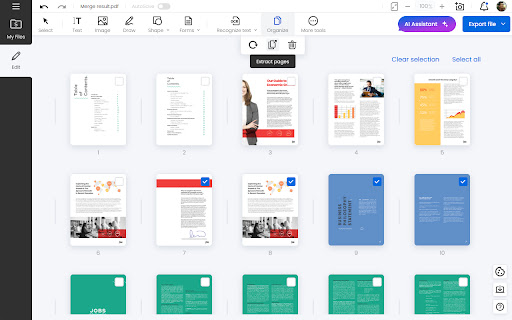


Edit and read any PDF files in Chrome. Soda PDF is the ultimate online PDF editor and viewer for any device! Get the most out of your PDFs with the Soda PDF Chrome extension. This powerful PDF viewer and editor integrates smoothly into your browser, offering a complete solution for all your PDF needs. With Soda PDF, viewing, reading, and editing PDFs is a breeze. You can add text, edit text, edit images, rearrange pages, and even create forms. Plus, you can easily upload files from the extension to our online tool, giving you access to a wide range of powerful features. Enjoy seamless performance and productivity, no matter where you are. Key Features: Online PDF Viewer & Reader: Quickly open and read PDF files with our user-friendly PDF reader. Online PDF Editor: Modify your documents with ease. Add text, edit text, and include images directly in the PDF. Rearranging Pages: Organize your documents by rearranging pages with just a few clicks. Create Forms: Design and create forms within the app for easy data collection.

Open in Foxit™ Reader
Send PDF (Portable Document Format) links to the Foxit™ Reader from right-click context menu or browser's action button This extension simplifies the use of Foxit Reader to open PDF links. How to Use: 1. Use the right-click context menu item to direct PDF links to Foxit PDF Reader. 2. Click the action button on PDF pages to transfer the PDF file to Foxit PDF Reader. 3. On the options page, customize the extension settings to open PDF links with Foxit Reader. Notes: 1. Because Foxit Reader cannot directly open remote PDF links, this extension initially downloads the PDF file to your browser's default download directory and then activates the external PDF reader. 2. To establish communication with Foxit Reader, install a small native client specific to this extension. This client is compatible with Windows, Linux, and Mac operating systems. ChromeOS is not supported. 3. Ensure you have Foxit PDF Reader installed on your device. This extension only simplifies Foxit Reader integration with your browser and does not perform the installation. --- Legal Foxit Reader is a registered trademark of Foxit Software Incorporated, registered in the U.S. and other countries. This extension is an independent project and is not affiliated with Foxit Software. It serves as a tool designed to enhance the PDF reading experience.

Open in PDF Viewer
Open in PDF Viewer is a simple and lite addon that allows you to easily open desired PDF links in a chosen PDF viewer. Note 1: after installing the addon, you need to connect it with native applications (i.e. adobe acrobat reader) on your machine. To make this connection, a separate patch is provided in GitHub. Please download and install this patch from: https://github.com/alexmarcoo/open-in-native-client/releases Follow the instructions in the above GitHub page to download and install the related patch to your system. After installing, the "Open in PDF Viewer" addon in your browser can communicate with PDF viewer on your machine (Window, Linux, or Mac). The default option for the PDF viewer is adobe acrobat reader. In windows 10, the default location for Adobe Acrobat is "C:\Program Files (x86)\Adobe\Acrobat Reader DC\Reader\AcroRd32.exe". If you have a different OS, or if you installed Adobe Acrobat in a different folder, please adjust the field accordingly. You can change this from the options page. There is also an input field in which you can add arguments for the viewer. For example, to open PDF as full-screen or without toolbar. Please note that, if you change the PDF viewer make sure to change the input arguments as well. Each PDF viewer has its arguments to operate. If you keep Adobe as the default PDF viewer, please visit this page (http://www.adobe.com/content/dam/Adobe/en/devnet/acrobat/pdfs/pdf_open_parameters.pdf) to get more info about input arguments. To operate with this addon, please right-click on any link (a link to a PDF document) and then click on - Open and Download with PDF Viewer - item from the context menu. The PDF file will first be "downloaded" and then "opened" in a default PDF viewer (the one which is set on the options page). Please note that the PDF file will be downloaded in the "default" download folder on your machine. Note 2: before using the addon, please open the option's page and make sure the path to the PDF viewer is correct based on your Operating System. To report any bug, please fill the bug report form on the addon's homepage (https://mybrowseraddon.com/open-in-pdf.html).

Open in PDF Reader
Send PDF links directly to your favorite PDF viewer like Adobe Acrobat Reader The "Open in PDF viewer" extension opens PDF files directly in your favorite external PDF viewer application. To use the extension, right-click on a PDF link and select the "Open in PDF viewer" item. The extension downloads the PDF file in your default downloads directory and then executes the external command to open the downloaded file with the default PDF viewer (e.g. Adobe Acrobat Reader or FoxIt PDF reader). Note that to execute an OS-level command, you need to install a native client. Native client installation guide appears on the first usage. Features: 1. Open PDF files from right-click context menu 2. Transfer already opened PDF files to the external PDF viewer by pressing the browser's action button 3. Detect PDF links and open them with left-click 4. Open the external PDF viewer with a user-defined delay 5. Supports most common PDF viewers Change Logs: 0.1.1: It is now possible to define left-click open in default PDF reader from the options page. If this mode is enabled, the extension blocks the default action when a link with the PDF mime type is the target. 0.1.2: It is possible to ask the extension to send the PDF URL to the external executable. Make sure your PDF Reader can open remote URLs before enabling this option 0.1.9: You can now run the external executable with a delay. This helps your antivirus application to validate the PDF file before this extension opens it with the external PDF viewer.

Easy PDF Viewer
Efficiently View and Interact with PDFs: Easy Navigation, Zooming, and Annotations! Experience the Comfort of PDF Browsing with Easy PDF Viewer! The art of reading and interacting with PDFs has never been more efficient, thanks to our Easy PDF Viewer browser extension! Perfect for professionals, students, and tech-enthusiasts—our extension focuses on delivering a smooth, user-friendly PDF navigation experience straight from your browser. - Multi-purpose PDF Viewer: Effortlessly open, view, and interact with PDFs. Whether they already live in your tabs or are stored locally, our extension has got you covered! - High-Customizability: Set your preferred viewing defaults or adjust the settings for each PDF—you decide! - Dark Mode: Flip to dark mode for a pleasant, eye-friendly browsing experience during the night or in low-light conditions. - Zoom & Auto-Rotate: Choose your comfort. Zoom in or out, rotate your viewing angle, and adapt your reading to your needs. - Contains Various Settings: From controlling the view, zoom level, to your preferred mode—it’s all a click away! - Local PDF File Openings: Not only does it handle online PDFs, but our extension also supports local files for your offline needs. - Annotations: Add notes, highlight text, or draw—make your PDFs interactive
