
kppkpfjckhillkjfhpekeoeobieedbpd
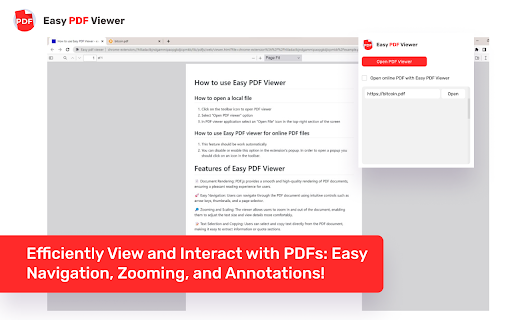
Efficiently View and Interact with PDFs: Easy Navigation, Zooming, and Annotations! Experience the Comfort of PDF Browsing with Easy PDF Viewer! The art of reading and interacting with PDFs has never been more efficient, thanks to our Easy PDF Viewer browser extension! Perfect for professionals, students, and tech-enthusiasts—our extension focuses on delivering a smooth, user-friendly PDF navigation experience straight from your browser. - Multi-purpose PDF Viewer: Effortlessly open, view, and interact with PDFs. Whether they already live in your tabs or are stored locally, our extension has got you covered! - High-Customizability: Set your preferred viewing defaults or adjust the settings for each PDF—you decide! - Dark Mode: Flip to dark mode for a pleasant, eye-friendly browsing experience during the night or in low-light conditions. - Zoom & Auto-Rotate: Choose your comfort. Zoom in or out, rotate your viewing angle, and adapt your reading to your needs. - Contains Various Settings: From controlling the view, zoom level, to your preferred mode—it’s all a click away! - Local PDF File Openings: Not only does it handle online PDFs, but our extension also supports local files for your offline needs. - Annotations: Add notes, highlight text, or draw—make your PDFs interactive

WPS PDF - Read, Edit, Fill, Convert, and AI Chat PDF with Ease
Easy-to-use PDF tools to view, edit, convert, fill, e-sign PDF files, and more in your browser. WPS PDF, part of the WPS Office suite with over 600 million monthly active users worldwide, offers an efficient approach to managing PDFs. Now integrated into Google Chrome, it enables effortless handling of PDF files across both desktop and web platforms, ensuring a consistent and powerful user experience. By adding the extension in Chrome, you can gain instant access to a wide range of tools, including various editing tools, parallel translate, fill & sign, chat PDF, drawing highlights, adding comments, making notes, and more. More features are waiting for your exploration here. How to Use the WPS PDF Chrome Extension: • Install and pin WPS PDF Chrome Extension • Open your PDFs in browser • Browse and process your PDFs View, Download, Print, and Store PDFs • Get the best PDF viewing experience online with WPS PDF extension. • Download or print your PDFs with a quick click. • Sign in to store your PDF files for fast access to them from anywhere. • Find your PDFs instantly. Edit PDFs • Add notes, text comments, and highlights to improve your work efficiency. • Use drawing tools to freely mark your ideas on your PDFs. • Unlock full PDF edit tools in WPS Office desktop, such as managing pages, extracting PDFs, protecting PDFs, combining PDF files, compressing PDFs, and more. Fill and Sign PDFs • Open a PDF file in WPS PDF extension and then fill or sign it in your WPS Office desktop. • Easily complete a form within WPS Office Fill & Sign feature. • E-sign your documents with your signatures or initials. Explore More Popular Premium Tools to Elevate Your Performance in Chrome PDF Parallel Translate • Supported by reliable LLMs with various languages. • Provide precise and layout-preserved translation. • Side-by-side comparison for intuitive reading and checking. Chat PDF • Extract essential information and provide concise summaries through insight. • Gain deeper insights and suggestions by asking the intelligent AI. • Provides credible and accurate AI responses backed by supporting citations. PDF Converter Offers over a dozen PDF solutions on the WPS online platform. Enjoy quick and high-quality PDF conversions to streamline your workflow. • Convert PDF to Word • Convert PDF to Excel • Convert PDF to PPT • Convert Word to PDF • Convert Excel to PDF • Convert PPT to PDF • Convert JPG to PDF Besides the PDF converter here, you can also find PDF tools such as compressor, splitter, merger, and more.

dark.pdf
Simple Dark Mode PDF Extension, User can toggle between dark and normal mode using this extension in chrome. Simple Dark Mode PDF Extension, User can toggle between dark and normal mode using this extension in chrome.

PDF Viewer
Display any PDF files in the Chrome browser with HTML5. Online editor, viewer and PDF converter tool. PDF Viewer for Chrome is a free and very useful tool that allows you to view and edit files directly in your browser. To see the file with this Reader simply hit the icon installed in the browser's toolbar or just click the Chrome's context menu and select "Open with PDF Viewer". Reader is the industry-leading solution. Use this tools right in Google Chrome to get the best viewing experience and get more done while browsing. You can add comments to file, including sticky notes, text, and highlights—all for free. What’s NEW: • Dark and light mode. • Read your document aloud • View file offline Other functions: • Displays both signed and unsigned PDF signatures. • Opens PDF files through drag-and-drop functionality. • Allows insertion of text and images into the document. • Includes drawing tools, making it possible to sign PDFs with a pen or mouse. To operate with this extension, please right-click on any link and then click on - Open and Download with Viewer - item from the context menu. The files will first be "downloaded" and then "opened" in a default viewer (the one which is set on the options page). Please note that the file will be downloaded in the "default" download folder on your machine. Leave feedback and ask questions about our product Viewer! We are developing new features and always listen to feedback.

PDF Viewer Pro - View, Edit, Fill, Convert, Sign, and More
PDF Viewer Pro: Your all-in-one PDF solution. View, edit, fill, comment, and sign PDFs seamlessly in your browser. PDF Viewer Pro is an advanced and user-friendly browser extension that allows you to view and edit PDF files directly within your browser, all for free. As a leading solution in PDF reading, PDF Viewer Pro integrates seamlessly with Google Chrome, offering an exceptional PDF viewing experience and enhanced productivity. - **Comprehensive PDF Application:** PDF Viewer Pro is a fully functional PDF web application designed for your busy lifestyle. It provides a complete suite of tools accessible from any device, making it ideal for on-the-go use. - **Conversion Capabilities:** - Convert PDFs to and from Word, Excel, PowerPoint, JPG, JPEG, PNG, and HTML. - Convert images (JPG, JPEG, PNG) to PDF and vice versa. - **PDF Management:** - Merge, Split, and Extract PDF Pages - Edit, Rotate, and Delete PDF Pages - Compress PDF Files - Sign and Send PDFs for Signature - Protect and Unlock PDF Documents 1. Install the PDF Acrobat extension for Chrome. 2. Pin the extension for easy access. 3. Open any PDF file directly in your browser. 4. Choose from the available PDF Acrobat tools to edit or convert your PDF. - **Productivity Boost:** Enhance your workflow with features such as PDF compression, merging, splitting, and more. - Supports Microsoft Office formats including Word, Excel, and PowerPoint. - Provides integration with Adobe Acrobat for additional PDF editing and conversion tools. Experience a better PDF interaction by adding PDF Viewer Pro to your Chrome browser. Enjoy tools for editing, converting, compressing, merging, and managing PDFs all from one place. We hope PDF Viewer Pro enhances your PDF handling experience. We welcome your feedback and suggestions for further improvements.
