
ehjnomdbkamcdhadcaghaflklcfhgonl
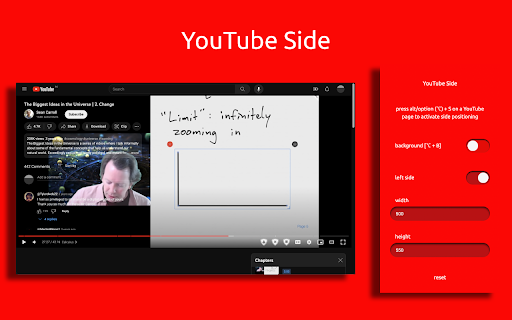
show YouTube video description and comments on the side of the video 'YouTube Side' displaces the video description and comments on the side of the YouTube video for a better experience. Features: + toggle with shortcut [alt/option + S] + change background (themed/transparent) [alt/option + B] + resize

Control Panel for YouTube
Gives you more control over YouTube by adding missing options and UI improvements • Disable new progress bar and controls (desktop version) - Note: this will stop working when YouTube removes the old player UI • Hide new full screen controls • Hide "More videos" in full screen • Always use compact Play button (desktop version) • Remove background from controls (desktop version) • Restore Miniplayer button (desktop version) • Restore corner click to toggle full screen (desktop version) • Hide full screen title (desktop version) • Hide full screen like/dislike buttons (desktop version) • Hide suggested sections • Hide Live videos • Hide Streamed videos • Hide Mixes • Hide Playlists • Hide Movies and TV • Hide Upcoming videos • Hide Members only videos • Hide Auto-dubbed videos in Related • Hide watched videos • Hide hidden videos - Hides the "Undo" button after 5 seconds • Hide channels - Adds "Hide channel" to video menus • Disable Home feed • Search thumbnail size (desktop version) • Minimum grid items per row (desktop version) • Hide Collaborations in Subscriptions (desktop version) • Hide Posts in Home (mobile version) • Disable Autoplay • Disable Ambient mode • Hide Related videos • Hide the Next button • Hide channel watermark • Hide Share/Thanks/Clip etc. • Hide video metadata • Hide Comments • Always use theater mode (desktop version) • Full size theater mode (desktop version) • Disable enlarged UI in theater mode (desktop version) • Always use original audio (desktop version) • Hide video end cards (desktop version) • Hide video endscreen content (desktop version) • Hide Chat (desktop version) • Add Take snapshot to video menu (JPEG / PNG) (desktop version) • Make Transcript downloadable (desktop version) • Hide Posts in Home (mobile version) • Hide Shorts • Redirect Shorts to the normal player • Hide suggested actions • Hide link to related Short by the same channel • Always show progress bar • Stop Shorts looping • Hide Remix button (desktop version) • Hide Shorts metadata until hover (desktop version) • Minimum Shorts per row (desktop version) • Show full video titles • Use square corners for thumbnails and videos • Hide categories in Home • Hide channel banner images • Hide Search with your voice • Link YouTube logo to Subscriptions (desktop version) • Tidy Guide sidebar (desktop version) • Hide "Latest" bar in Subscriptions (desktop version) • Use grid view for Subscriptions & Search (portrait only) (mobile version) • Hide Explore button in Home (mobile version) • Hide channel list in Subscriptions (mobile version)

YouTube Video Focuser
Removes the comments and recommendation sections from YouTube videos. Nowadays YouTube became one of the biggest information source on the internet but at the same time one of the biggest distraction source. This extension allow you to just focus video content and ban the comments and recommendation sections. By this way, you directly get what you want from the YouTube instead of dealing with distracting comments and click-bait recommendations.

Show YouTube comments while watching
Show YouTube comments on the right of the video. Read comments while you watch! ---------- Want to read comments while you watch a YouTube video? Tired of scrolling or pausing just to read comments? We got you. Comments now appear to the right of the video player, and suggested videos are moved underneath the video player. Thank you so much for your comments! I do read all of them and appreciate your feedback. 1.0.5 - 2026-05-13 * Fixed the extension breaking due to YouTube layout changes. Thank you all for your quick bug reports. 1.0.4 * Fixed the extension breaking due to YouTube layout changes. Thank you all for your quick bug reports. 1.0.3 * Fixed a bug where comments would only swap after refreshing the page. * Migrated to Manifest V3 (new thingies from Google) before it becomes mandatory. Will be monitoring closely for bugs.

Sidesy: Your Comments Sidebar For YouTube
Bring YouTube comments to the side. Dive into the comments without scrolling past the video. Features - 1. Easy toggle via keyboard shortcut or the button integrated right into the comments section to easily switch between default and sidebar views. 2. Built for convenience with an eye for aesthetics. Unlike other similar options in the market, the sidebar comments don't feel out of place. They look nice and work well. 3. Dark & light modes depending on your YouTube settings. If you enjoyed using Sidesy, please consider leaving a review - it really helps a lot! And if you’re feeling extra generous, you can buy me a coffee here: https://buymeacoffee.com/abin.john
