
gonknbphdaoahjnamfjpaincammofgae
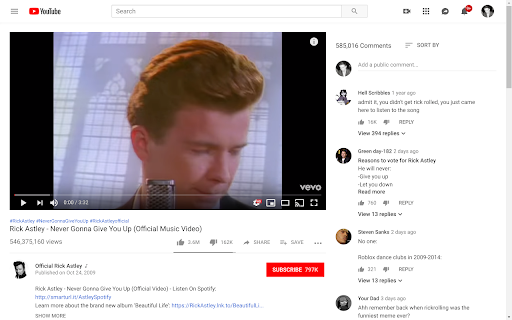
Show YouTube comments on the right of the video. Read comments while you watch! ---------- Want to read comments while you watch a YouTube video? Tired of scrolling or pausing just to read comments? We got you. Comments now appear to the right of the video player, and suggested videos are moved underneath the video player. Thank you so much for your comments! I do read all of them and appreciate your feedback. 1.0.5 - 2026-05-13 * Fixed the extension breaking due to YouTube layout changes. Thank you all for your quick bug reports. 1.0.4 * Fixed the extension breaking due to YouTube layout changes. Thank you all for your quick bug reports. 1.0.3 * Fixed a bug where comments would only swap after refreshing the page. * Migrated to Manifest V3 (new thingies from Google) before it becomes mandatory. Will be monitoring closely for bugs.

YouTube Timestamps
The extension shows timestamps that YouTube users leave in comments. It shows timestamps from the top 100 comments. If YouTube video doesn't have comments with timestamps or the timestamps are not in the top 100 comments the extension doesn't show anything. Timestamps are placed right on YouTube's video timeline. Hover a timestamp on the timeline to preview the corresponding comment. Key features: - Shows timestamps from YouTube comments on timeline. - Works in Fullscreen and Theater modes. - Works for embedded videos. - Dark theme support. - Open Source https://github.com/ris58h/youtube-timestamps NOTE: To scroll a long comment preview scroll on the timestamp you are hovering over. LIMITATIONS: Only timestamps from the first 100 comments are shown.

YouTube Timestamp Comments
An extension that lists timestamp comments on YouTube. This is a Google Chrome extension that displays timestamp comments on YouTube. The main features are:

YCS - YouTube Comment Search
Search comments, replies, chat replay, video transcript for the current video on YouTube by contents, authors, time. The YCS (YouTube Comment Search) is a chrome extension. Search comments, replies, chat replay, video transcript for the current video on YouTube by contents, authors, time. Features: ✅ Quick search by timestamp, author, content ✅ Export comments, replies, chat replay, video transcript ✅ Flexible (fuzzy) search ✅ Multilingual search ✅ Search by Emoji ✅ Works in incognito mode ✅ Unlimited load comments ✅ Time stamps - show comments, replies with time stamps ✅ Author - show comments, replies and chat comments from the author ✅ Likes - show comments, replies by number of likes (sort largest to smallest) ✅ Replied - show comments by number of replies (sort largest to smallest) ✅ Members - show comments, replies and chat comments from channel members ✅ Donated - show chat comments from users who have donated ✅ Show random comment ✅ Small size, low use CPU and memory Instructions: 1. Open video on YouTube 2. Find the YCS extension under the current video and click the button "Load all" or choose to load the categories 3. Write the search query, press Enter or click the button Search 1) How to like, reply to a comment? In the search results, click on the date (like, "2 months ago") of the comment, reply and will open a new window with an active comment or reply under the video, where you can do any action. 2) How do I find all timestamped comments and replies on a video? Click on the "Time stamps" button under the search bar. 3) How can I find addressed to user's comments, replies? Write " @ " in the input field. 4) How can I view the contents of the video transcript at a specific minute? You can write a search query for Trp. Video, in the " mm:ss " format. For example: " : " - all the text of the video transcript. " 15: " - all the text in the 15th minute. And etc. 5) How can I view the comment for a found reply? Click on the " ▼ " button. 6) How can I see the all replies to the found comment? In the header of the found comment, you can find the reply icon and the count, to see the replies click on the " + " button. 7) How to use search in YouTube shorts? Open a YouTube video short. Click badge YCS (right of the address bar) and click on the button Open YT short. You can use the search engine (YCS), while loading comments, chat, transcript video.

FloatFrame
YouTubeの動画を固定するやつ ◆どんな機能? YouTubeの動画を見ながらコメント欄を読むことができます。 動画を上の方に固定して浮かせ、スクロールしても動かなくなります。 ◆使い方 サイト左上のボタンをクリックするとオン/オフの切り替えが可能です。 ◆注意点 起動中はシアターモード、ミニプレイヤー、フルスクリーンにできません。 ◆他の機能 YouTube用の自作拡張まとめ https://null.style/app ◆不具合を見つけたら 作者Twitter(@nulltypo)までご連絡お願いします。レビューには回答できません。 ◆免責事項 このChrome拡張によりいかなる損失や損害などが発生しても責任を負いかねます。ご了承ください。
