
egninknfgneooknnhpcenmpojmdmlhho
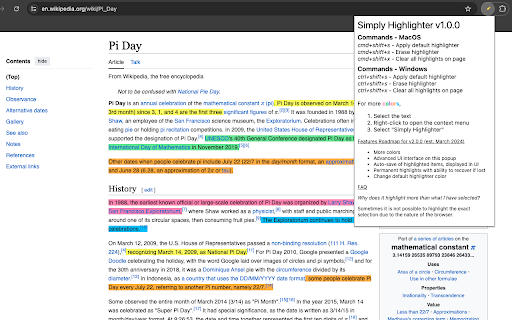

A Chrome extension to highlight any text via a click or a keyboard shortcut Highlight any text on the page with a click or a keyboard shortcut!

Link Grabber
An easy to use extractor or grabber for hyperlinks on an HTML page Extract links from an HTML page and display them in another tab. Permissions Required: Link Grabber requires permission to copy links to the clipboard. No other special permissions are required. Features: * No usage information / analytics are collected from you * Use either browser action button or context menu item to activate * Configurable list of blocked domains * Filter links by substring match * Copy links to clipboard * Show/hide links that appear more than once on the page * Show/hide links to the same origin as the source page * Group links by domain

Read Aloud
Use Read Aloud Chrome Extension for fast text to speech as your screen narrator and voice reader on any webpage 🗣️ Read Aloud Chrome Extension is a powerful text-to-speech tool designed to transform any webpage into clear, natural audio. With this chrome extension read aloud solution, users can enjoy articles, documents, or long pages while multitasking or resting their eyes. This read aloud extension chrome helps improve accessibility and reading comfort for millions of users worldwide. 💡 The read aloud extension for chrome is easy to use and turns any paragraph into spoken content instantly. Whether you need a chrome read aloud extension for studying, working, or entertainment, the tool adapts to your needs. Many people choose the free read aloud chrome extension because it works quickly, smoothly, and without limitations. 📍 chrome extensions read aloud tools are becoming essential for productivity. This google chrome read aloud extension stands out due to its clean interface, stable operation, and compatibility with many websites. It also supports naturalreader text to speech and voice reader modes for enhanced clarity. read aloud a text to speech voice reader chrome extension gives you the flexibility to listen to articles at your own pace. Use this read aloud text to speech chrome extension to turn blogs, research, PDFs, and even emails into audio you can follow effortlessly. 📲 Key benefits of using this chrome extension that will read aloud any webpage text: ➤ smooth text-to-speech generation ➤ clear voice aloud reader mode ➤ support for multiple speeds and voices ➤ ability to read my text from various content sources ➤ compatibility with pdf voice reader features 🌟 Why users choose this read aloud chrome extension Simple interface Natural and stable text-to-speech Support for long reading sessions Works with articles, blogs, PDFs Helps boost productivity 🎧 Extra features included in this read aloud extension for chrome • integration with natural reader text to speech engines • speech to text free tools for added flexibility • support for google speech to text and speech speech to text workflows • automatic detection of text reader content • useful for pdf document reader voice tasks 📘 Many users call it the best read aloud extension for chrome because it merges accessibility and convenience. Others appreciate that it’s also a best free read aloud chrome extension alternative, helping convert text into audio with minimal effort. With this chrome extension read aloud setup, your online reading becomes easier and more enjoyable. 📌 Use cases for the read aloud text to speech chrome extension 1️⃣ studying and note-taking 2️⃣ reading digital books 3️⃣ multitasking while listening 4️⃣ improving focus 5️⃣ learning languages with natural voices ▸ It works great as a voice reader for long documents ▸ Helps transform articles into free text to speech ai audio ▸ Acts as a speech to text app companion for people who switch between reading and dictation 📄 Many users also rely on the google chrome read aloud extension for accessibility needs, especially when dealing with long research documents. Combined with voice aloud reader features, this chrome extension that will read aloud any text becomes an essential tool. 🧩 The read aloud a text to speech voice reader chrome extension integrates seamlessly into your workflow. Whether you use naturalreader text to speech daily or just need a quick text reader for a PDF, this tool handles it with ease. enhances productivity for students and professionals 🧠 This chrome read aloud extension is built for anyone who wants to make digital reading more comfortable. By using chrome extensions read aloud features, your browser becomes a complete audio reading assistant. 📌 What can the read aloud chrome extension do? ➤ It converts any webpage into spoken audio using advanced text-to-speech technology. 📌 Can it read PDFs? ➤ Yes, it works as a pdf voice reader and pdf document reader voice tool. 📌 Does it support natural voices? ➤ Yes, it integrates with natural reader text to speech and naturalreader text to speech engines. 📌 Can it help with eye strain? ➤ Absolutely, the read aloud extension chrome lets you listen instead of reading. 📌 Is it free? ➤ Yes, it works as a free read aloud chrome extension with no hidden fees.

Page Plain Text
Chrome extension that shows page plain text and allows you to edit or download the text [Features] - Shows page plain text (keyboard shortcut: Ctrl + Shift + 1) - Extracts text from the selection on the page - Text editing - Download page plain text (keyboard shortcut: Ctrl + Shift + 2) - Removes all formatting from text - Removes all advertising to focus only on the content of the text - Copy text to use it in other documents (keyboard shortcut: Ctrl + Shift + 3) - Zoom In and Zoom Out text to improve legibility (keyboard shortcut: Ctrl + ➕ / Ctrl + ➖) - Contextual menu to quickly copy or download the plain text of the current page - Dark Mode color scheme [Keyboard Shortcuts] To change the keyboard shortcuts of the extensions you can go here: chrome://extensions/shortcuts [Links] - My Home page: https://www.vincenzodevivo.com/ - My GitHub: https://github.com/deltavi ... or you can buy my books on Amazon 📚 www.amazon.it/Vincenzo-De-Vivo/e/B09MPTBBFY

Zoom for Google Chrome
Zoom in or out on web content using the zoom button and mouse scroll wheel for more comfortable reading. That to each percent value. Are you tired of struggling to zoom in and out of web pages? Look no further! The Zoom browser extension is the ultimate solution, featuring an intuitive slider and zoom buttons for effortless navigation. Ranked as the number one and best magnifying browser extension, it allows you to customize the zoom value of any webpage, enhancing readability and comfort. Zoom is a lightweight and useful add-in designed to get a perfect zoom experience. Whether you are dealing with bad vision issues, myopia, lazy eye, or amblyopia, this extension can enhance your vision on any website. Simply increase the zoom slider to select your preferred scale. Additionally, you have the option to switch between the zoom engine, allowing you to zoom the entire page or only text zoom. Browser extension features: ◆ Slider Zoom: The slider offers a perfect zoom experience, allowing you to adjust the zoom factor from 1 up to 400. ◆ Scroll and Zoom: Click the Z button and scroll up or down with your mouse to witness live changes in the webpage's zoom. ◆ Zoom All Together In/Out: Enable this option to simultaneously zoom in/out on all open web pages. ◆ Save Website Zoom Value: Automatically save the current zoom value of a website, ensuring it is restored when you return. Easily reset to default zoom with the "Reset" button. ◆ Zoom Engine Options: Choose between the default browser zoom engine, the CSS website style zoom, or the font-size engine for text adjustment. The font-size engine will specifically increase or decrease the text on that website while preserving the page's layout and formatting. ◆ Manage Zoom for Each Website: Edit or remove zoom values for specific websites in the options page. That according to the domain or web page level. By utilizing the web page level and the built-in zoom engine, it enables the browser's built-in zoom per tab. ◆ Display Options: - Show Zoom value percent number in the Z button as a badge. - Display right-click context menu with necessary zoom percentages. - Display right-click context menu with your chosen zoom percentages. - Hold mouse click and scroll to zoom in or out. - Include visual cues, such as a circle or square magnifying glass around the cursor. Specify the magnifier glass size, and zoom scale to determine the degree of magnification. ◆ Set Default Zoom: Choose default zoom ratio and zoom step for a personalized experience. ◆ Video and Web Enhancement: Improve your video entertainment by enlarging web pages and increasing video player sizes on platforms like YouTube™ and HTML5 video. You can achieve this with the widely-used Turn Off the Lights browser extension, which dims the surrounding area around the video player, providing a more immersive viewing environment. ◆ Custom Zoom Keyboard Combinations: - Shortcut to display the magnifying glass. - Shortcut to zoom in. - Shortcut to zoom out. - Shortcut to reset zoom value. ◆ Zoom Popup Design Options: - Choose between a minimalist popup design. - Opt for a larger popup window for enhanced accessibility. - Explore the new default modern panel with direct control of your magnifying glass. ◆ Support for Dark Mode Project Information: https://www.stefanvd.net/project/zoom/browser-extension/ Required Permissions: ◆ "contextMenus": Add Zoom percentage levels to the web browser context menu. ◆ "tabs": Manage zoom on open tabs, show welcome/guide page, and access Options page. ◆ "storage": Save settings locally and sync with your web browser account. ◆ "": Control the button on all websites, including http, https, ftp, and file. Note: Windows: CTRL and + or CTRL and - Linux: CTRL and + or CTRL and - Mac: ⌘ and + or CTRL and - Performing the same action is possible with this browser extension. However, this extension enhances user experience by enabling you to adjust the zoom to a custom percentage with greater ease. >> Unlock an option feature to protect your eyes at night and focus on the video player, such as YouTube™, by installing Turn Off the Lights browser extension for YouTube and Beyond. https://chromewebstore.google.com/detail/turn-off-the-lights/bfbmjmiodbnnpllbbbfblcplfjjepjdn
