
ecbgnkobdpgmofceoljghglggimcckab
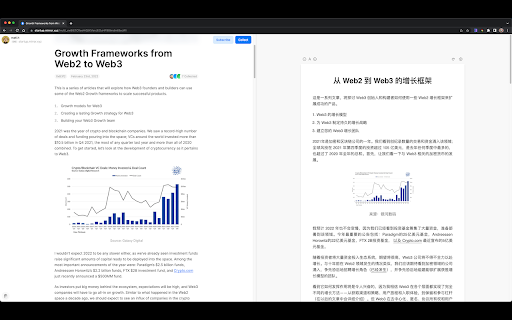


Split screen and read translated content side by side version 1.1.1: bugfix for translate API error; --- Bilingual Reader is a browser extension designed to enhance your reading experience by providing side-by-side translations of web articles. It helps users easily read and compare original text with translated content. * One-Click Split-Screen Translation: Translate web articles with a single click, displaying the original and translated content side by side for easy comparison. * Focused Translation: The extension only translates the main content of a web page, providing a more focused and enjoyable reading experience. * Synchronized Scrolling and Text Highlighting: As you scroll through the original text, the translated content scrolls automatically. Selecting a paragraph in the original text highlights the corresponding translated paragraph. * Adjustable Font Size: Easily modify the font size in the reader to suit your reading preferences. * Customizable Settings: Set your default font and target language for translations, streamlining your user experience. 1. Visit the Chrome Web Store or the browser's extension store and search for "Bilingual Reader". 2. Click the "Add to Chrome" button (or the equivalent for your browser) to install the extension. 1. Navigate to the web article you want to translate. 2. (Optional) Pin the Bilingual Reader icon to your toolbar to make your experience more great! 3. Click the Bilingual Reader icon in your browser toolbar to activate the split-screen translation. 4. (Optional) Adjust the font size, default font, and target language in the extension settings, if desired. 5. Enjoy an enhanced reading experience with side-by-side translations! If you find any websites having layout/ui/translation issues when using Bilingual Reader, please [create an issue](https://github.com/zamia/bilingual-reader/issues) in our GitHub repository.

side-by-side translation
This extension creates an additional window for translation. Check source text and translated page side by side. This extension creates an additional window for translator. Check source and translated page side by side. This feature helps you with translation. Usage - Navigate to the web article you want to translate. - (Optional) Pin the this extention icon to your toolbar to make your experience more great! - Click the extension icon in your browser toolbar to activate the split pane for translation. - Alternatively, right-click on your page and click on the icon in the context menu. - Translate whole web page with Google Translator or DeepL ,etc. - Enjoy an enhanced reading experience with side by side translation! v0.0.10-12 Fix minor bugs v0.0.9 Add aligning src/dst height feature as possible & support button v0.0.8 minor env update v0.0.7 Support local files (Allow access to file URLs in the extension details)

Tab Translate
Easily translate selected text from one language to another and improve your language skills. This extension brings together best practices for using language translators in both business and educational contexts. The translator tools provided by the extension help users overcome language barriers and communicate more effectively across different languages. Modes: • Pop-up translation: Opens a pop-up window with the translated text. • Split screen: Splits the screen between the browser and the language translator. • One tab: Uses a single tab for translations. Use the Text-to-Speech (TTS) feature to learn correct pronunciation. You can also translate web pages into your preferred language with just one click. The Tab Translate extension is powered by the Google Translate API and provides unique features and benefits beyond standard translators. Benefits: ✓ Fast and responsive: Experience quick response times and smooth operation. ✓ Versatile modes: Access multiple modes to accommodate different translation needs. ✓ Compatibility with various content types: Easily work with web content, local documents, PDF files, and common tabs. ✓ Ideal for study: Perfect for students who need to translate documents or study materials, making language learning more accessible and efficient. ✓ User-friendly: Designed with a clear and intuitive interface. This extension automatically detects your primary language and is ready to use immediately after installation. Technical support: Please report any bugs or submit feature suggestions here: https://tabtranslate.com/feedback.html Localization of the user interface will be introduced gradually. Note: All copyrights belong to their respective owners. This extension is not owned, licensed, or sponsored by Google Inc., and Google does not provide support for it.

Efficiency Split Screen
Split screen to improve search efficiency. Click search link in one window and open it in another. Features: 1. Split screen, display multiple windows on the screen at the same time. 2. Click a link in one window, the link will open in another window. Advantage: 1. You don't have to leave the search page and wait for a new page to load. 2. You don‘t have to switch tabs or click the go back button. 3. You will not forget the original search purpose in the maze of links. Operation: Ctrl+Mouse Click --> Open link in next window [new tab] Shift+Mouse Click--> Open link in next window current tab Click the action icon to enable or disable functions of the extension. --- This addons doesn't collect any user data. --- Change list: 2.0.10 Add: Ctrl+Mouse Click --> Open link in next window [new tab] Shift+Mouse Click--> Open link in next window current tab 1.1.9 fix: This extension may have been corrupted. 1.1.4 Add: "Open link in next window current tab" in right-click menu. Fix: There are no events, When a website uses history.pushState to change address. 1.0.3 Improve user experience Fix: 'show all windows' leads to too many pop-up windows. 1.0.2 Features: 1. Add collect all tabs in context menu. 2. Add save all windows layout (You can specify the layout of windows yourself) Fix: 1. Some of Amazon sites don't split screen automatically.

Graphic Novel Screen Translator
An easy to use extension for translating any text on the webpage to English Description: Graphic Novel Screen Translator is a powerful Chrome extension that brings the convenience of on-the-fly language translation to your web browsing experience. With Graphic Novel Screen Translator, you can effortlessly draw an area containing text from any webpage and translate in the same location using just your mouse. Key Features: 1. Mouse-Driven Translation: Simply highlight any text on a webpage using your mouse, and Graphic Novel Screen Translator will instantly capture it for translation. 2. Multiple Languages Supported: Graphic Novel Screen Translator supports a wide range of languages, allowing you to translate text from various sources into English for easy understanding. 3. Seamless Integration: Our extension seamlessly integrates into your Chrome browser, providing an intuitive and hassle-free translation experience. 4. Capture and Display: Graphic Novel Screen Translator not only translates text but also captures a screenshot of the selected area on the webpage. The translated text is then superimposed onto the captured image, making it easy to comprehend in context. 5. Customization Options: Tailor Graphic Novel Screen Translator to your preferences with customizable settings for translation services, appearance, and more. How to Use: 1. Install Graphic Novel Screen Translator from the Chrome Web Store. 2. Click on the extension icon in your browser to activate it. 3. Draw a box containing the text you want to translate using your mouse. 4. The translated text will appear superimposed on the captured image, providing context and clarity. Graphic Novel Screen Translator is your go-to tool for breaking down language barriers while surfing the web. Whether you're reading articles, browsing foreign websites, or communicating with global audiences, this extension empowers you to access information in your preferred language. Say goodbye to language obstacles and make the most out of your web exploration with Graphic Novel Screen Translator. Try it today and experience a more connected and informative online world.
