
ffickclfdcokegoihgmdlhcpfpeiklfa
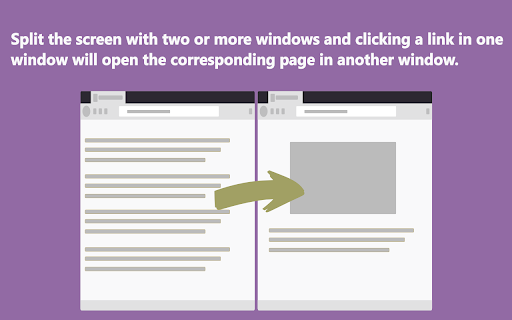
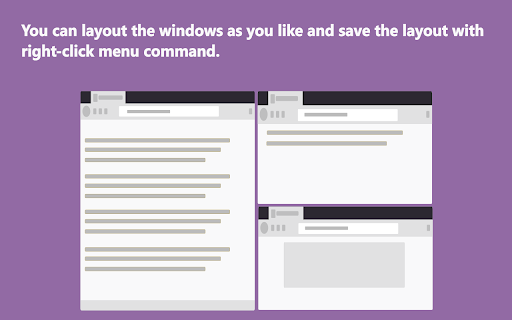

Split screen to improve search efficiency. Click search link in one window and open it in another. Features: 1. Split screen, display multiple windows on the screen at the same time. 2. Click a link in one window, the link will open in another window. Advantage: 1. You don't have to leave the search page and wait for a new page to load. 2. You don‘t have to switch tabs or click the go back button. 3. You will not forget the original search purpose in the maze of links. Operation: Ctrl+Mouse Click --> Open link in next window [new tab] Shift+Mouse Click--> Open link in next window current tab Click the action icon to enable or disable functions of the extension. --- This addons doesn't collect any user data. --- Change list: 2.0.10 Add: Ctrl+Mouse Click --> Open link in next window [new tab] Shift+Mouse Click--> Open link in next window current tab 1.1.9 fix: This extension may have been corrupted. 1.1.4 Add: "Open link in next window current tab" in right-click menu. Fix: There are no events, When a website uses history.pushState to change address. 1.0.3 Improve user experience Fix: 'show all windows' leads to too many pop-up windows. 1.0.2 Features: 1. Add collect all tabs in context menu. 2. Add save all windows layout (You can specify the layout of windows yourself) Fix: 1. Some of Amazon sites don't split screen automatically.

Dual Windows (Updated)
1. Install and pin 📌 the extension to Chrome. 2. Click on the extension, and choose the format you want the tabs to show. 3. Customize the dual window format using horizontal/vertical options. 1. Split, resize, and/or merge the browser windows. 2. Pressing the middle key on the split window button will duplicate the current page on another window. 3. Bookmark 🔖 management. Relaunch your favorite site in a new tab 🗂 and windows will get split in the recorded ratio. Use this extension to simulate a dual monitor for your machine. 💻

TabSplit
You can split the current tab into two vertical or horizontal windows.

Stimulating Split Screen
Watch satisfying videos next to anything you want! Do you like to watch Subway Surfers gameplay and Family Guy at the same time on TikTok? Now you can watch relaxing videos next to anything you do in Chrome with just one click! If you are stuck in a boring online lecture, working, or just needing something to look at in the background to focus, then you this is the extension for you. Your screen will automatically be split in two, so half of your screen can be used for visual pleasure at the same time as you do your work. This extension already has playlists of many different types of satisfying videos, everything from Minecraft parkour, deep cleaning, slime and cooking to name a few of the categories.

Asider
Arrange browser windows up to your saved user-defined grid layouts in one-click, and with multi-monitor support!
