
npnmdlaheifodkaaopfimkkdmkdhlhhg

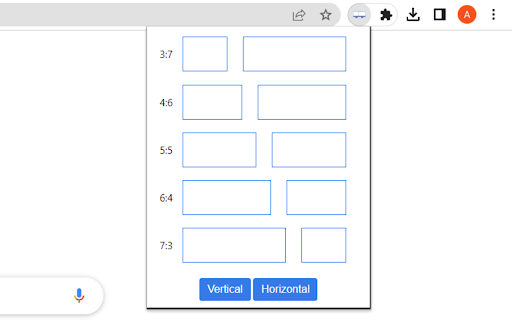

1. Install and pin 📌 the extension to Chrome. 2. Click on the extension, and choose the format you want the tabs to show. 3. Customize the dual window format using horizontal/vertical options. 1. Split, resize, and/or merge the browser windows. 2. Pressing the middle key on the split window button will duplicate the current page on another window. 3. Bookmark 🔖 management. Relaunch your favorite site in a new tab 🗂 and windows will get split in the recorded ratio. Use this extension to simulate a dual monitor for your machine. 💻

TabSplit
You can split the current tab into two vertical or horizontal windows.

New Window Setup
Do you use multiple monitors? This extension will force new windows into one of them. New Window Setup extension allows you to setup how the new windows are created - on which monitor and with what size. Why? 1) Chrome creates new window on the same monitor where the last focused window is. If you use multiple monitors and you have Chrome windows opened on each one, new window can be created on any of them. Using this extension you can force it to your main monitor. 2) Chrome creates new windows with the same dimension as last focused window. If your last focused window is snapped on a side, your new window will have this crazy dimension. Using this extension your new windows will be always on the correct monitor with the correct size! I'm extension developer since 2016. My goal is to build powerful extensions for your web-browser to make you more productive. If you think I'm doing a good job, please donate :) - Ko-Fi.com: https://ko-fi.com/fastaddons - PayPal.Me: https://paypal.me/fastaddons - Patreon.com: https://www.patreon.com/fastaddons Thank you! :) Your donation will help me keep this extension working in future versions of Chrome! Privacy and permissions: - this extension doesn't have any permissions

Split Screen on Mac
Use Split Screen on Mac: seamlessly resize tab. Have a split screen on a macbook to get boosted productivity! 🚀 Elevate Your Productivity with on Split Screen on Mac! Tired of juggling multiple tabs and windows? Our Split Screen on Mac Chrome Extension streamlines your workflow, allowing you to multitask efficiently. It's perfect for both professional and personal use. Split your display easily and handle various tasks at once. Installation and Ease of Use ➤ Quick Installation Download Split Screen on Mac from the Chrome Web Store. Follow the easy setup instructions on-screenshots. Use immediately after installation—no restart required. ➤ Keyboard Shortcuts ⌨️ Assign custom shortcuts for quick operations. ⌨️ Default shortcuts help new users get started. ⌨️ Detailed guide in the extension help section. Customization and Flexibility ➤ Two-Click Browser Tab Resize Click the Split Screen on Mac icon to enter resizing chrome window. Choose your preferred mac split screen setup from a popup. Instantly resize tab to the chosen layout. ➤ Multiple Standard Sizes Options include vertical, horizontal, and quadrant splits. Pre-set ratios like 50/50, 70/30, or customize as needed. Easily switch between sizes for different tasks. ➤ Customizable Chrome Split Screen on Mac Layouts Save custom Layouts with a single click. Manage and edit screen via the extension interface. Share and import layouts to enhance team productivity. ➤ Dynamic Window Pairing Choose from predefined or custom window ratios. Switch easily between single and dual scree. Visual guides aid in changing tab resize and aligning. Performance and Compatibility ➤ Cross-Platform Compatibility 📍 Split screen on Mac works on both iOS and Windows. 📍 Integrates with native window management settings. 📍 Consistent performance across various hardware. ➤ Compatibility with All Major Browsers for Mac 🔥 Compatible with Chrome, Firefox, and more. 🔥 Smooth functionality maintained with browser updates. ➤ To boost productivity, streamline your workflow by minimizing time spent switching between tabs and windows, organizing your workspace for efficient multitasking, and using tools that reduce distractions. ➤ For multi-monitor setups, adjust windows effectively, using features like screen duplicating and extending, and manage layouts either independently or synchronized across monitors for optimal display configuration. Advanced Features ➤ Automatic Adjustment Auto-detects content to suggest split ratio. Adjusts to optimal layout when opening new content. Remembers last configurations for quick reuse. ➤ Screen Edge Snapping Windows snap smoothly to each other and screen edges. Customize snapping sensitivity in the settings. Additional Utilities 🔥 Merge and Maximize: Merge all split screens into one with a single click, maximize any window to full screen from split mode, and easily revert to the original layout. 🔥Mac Window Management: Mimics Mac's focused window behavior, with customizable settings for minimizing other windows when one is focused. 🔥Duplicate with a Click: Clone the current tab to a new split. ❓Frequently Asked Questions about Split Screen on Mac: 📌 How to split screen on Windows? 💡 Click the extension icon in your browser, pick a layout from the pop-up menu, and watch your screen split instantly to enhance your multitasking capabilities. 📌 How to split the screen on Mac? 💡 Simply click the extension icon in your browser toolbar, select a suitable layout, and effortlessly divide your Mac Book screen for improved productivity. 📌 How to split screen on dell? 💡 Just as well as for Mac and Windows 📌 What is the tab resize feature? 💡 Adjust browser tab sizes within the split screen on Mac layout for effective multitasking and content comparison. 📌 Split screen how to use shortcut? 💡 Press the full screen shortcut windows, then activate our extension to select your split display setup, ensuring smooth transitions. 📌 How to change browser window size in two clicks? 💡 Open the Split on Mac option in the menu, choose a predefined size, and adapt your workspace instantly. 📌 Does this resolution scale work only on MacBook? 💡 No, it's designed for both Mac and Windows, enhancing multitasking and usability across platforms. 📌 Does the Dualles feature with tab resize and smart mode work on Mac? 💡 Yes, the Split screen on Mac supports tab resize, enhancing productivity and multitasking with its smart mode.

1TabScape: Split tabs into 1 tab, merging all websites.
A smart tab merging tool that helps you browse multiple websites in the same tab. A smart tab merging tool that helps you browse multiple websites in the same tab.
