
efcakoakpkmgedabopglbgpdepfkkhib
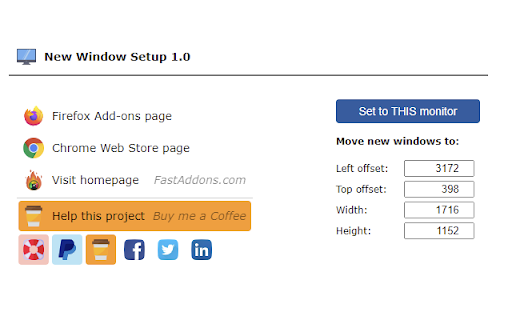
Do you use multiple monitors? This extension will force new windows into one of them. New Window Setup extension allows you to setup how the new windows are created - on which monitor and with what size. Why? 1) Chrome creates new window on the same monitor where the last focused window is. If you use multiple monitors and you have Chrome windows opened on each one, new window can be created on any of them. Using this extension you can force it to your main monitor. 2) Chrome creates new windows with the same dimension as last focused window. If your last focused window is snapped on a side, your new window will have this crazy dimension. Using this extension your new windows will be always on the correct monitor with the correct size! I'm extension developer since 2016. My goal is to build powerful extensions for your web-browser to make you more productive. If you think I'm doing a good job, please donate :) - Ko-Fi.com: https://ko-fi.com/fastaddons - PayPal.Me: https://paypal.me/fastaddons - Patreon.com: https://www.patreon.com/fastaddons Thank you! :) Your donation will help me keep this extension working in future versions of Chrome! Privacy and permissions: - this extension doesn't have any permissions

New Window to the Right
Opens a new window directly to the right of the current window and wraps when the window reaches the edge of the monitor. # New Window to the Right A Chrome extension to avoid having new window open off screen or partially off screen. This Chrome extension opens new windows directly to the right of the current window (instead of Chrome's default cascading behavior). Like many people, my Chrome window is always set to take the maximum vertical space on my monitor (but not the maximum horizontal space). Unfortunately, whenever you open a new Chrome window, Chrome cascades new windows down and to the right by default. This means that every new window starts off with part of its window off screen. 1. **Disables cascading:** Opens new windows directly to the right of the current window. 2. **Right edge protection:** Protects against opening a new window having any part of its window off screen to the right. If a new window has any portion of its window off screen, the new window will open on the left side of the screen, instead. 3. **Multi-monitor support:** New windows always fully appear on the same monitor from the window they were spawned from. (Note: The source monitor is determined by the location of the top left corner of the last focused window.) This keeps windows from opening with their window split across multiple monitors or having a window appear on a different monitor than the one you were originally working on (less mental context switching). * Note: The source monitor is determined by the location of the top left corner of the last focused window. I hope you find this as useful as I have!

Open Link on Second Monitor
Adds a context menu item to open a link in a new window on the second monitor.

Tiling Window Manager
Automatically tile your browser windows to maximise your screen space. "Tiling Window Manager" is a helpful little tool that automatically organizes your browser windows into a neat, tiled layout. Enable "Tile Windows Automatically" in the extension popup and your windows will be arranged according to your preferred layout—opt for a focused "master window" layout with one larger window or evenly distributed "even tiles". Any new windows you create will be added to your tiled arrangement. Requires a one-time payment. Key Features: - Automatic Tiling: As you open new browser windows, they will be tiled according to your layout preferences, maximizing your screen space without manual adjustment. - Choose a Layout: Choose between "master window" or "even tiles" to fit your working style. The layout adapts to your screen size and orientation. - Window Spacing: Toggle spaces between windows with the "Window Spacing" option. - Multi-Monitor Support: Each display is treated independently.

Movie Meter
Movie Meter will show you rating and popularity of a movie (or TV series) on many movie related pages! Doesn't work on your favorite movie page? Contact me and I will add it - if possible (page must contain movie name in English or IMDb link). Features: - movie rating and popularity from IMDb - next / previous episode date from TV Maze - additional movie / TV series information - notification about new episode - mark TV series as favorite and you will get notification when new episode is available - auto-hide when video playback detected I'm addon developer since 2016. My goal is to build powerful extensions for your web-browser to make you more productive. If you think I'm doing a good job, please donate :) - Ko-Fi.com: https://ko-fi.com/fastaddons - PayPal.Me: https://paypal.me/fastaddons/ - Liberapay: https://liberapay.com/juraj.masiar/ - Patreon.com: https://www.patreon.com/fastaddons - BuyMeACoffee.com: https://www.buymeacoffee.com/fastaddons - Bank transfer using IBAN:: SK6283300000002701131205, BIC/SWIFT: FIOZSKBAXXX Your donation is my only income! Thank you for supporting my work! Known issues: - movie not found / wrong movie found - since there is no "official" integration with target pages, I cannot guarantee 100% correct results (but in majority of cases it works perfectly) Credits: - TV shows info is provided by TVmaze.com page - movie info is provided by IMDb.com page This addon is not endorsed by or affiliated with IMDb.com nor TVmaze.com.
