
khepfpojckhooicloeheemlhcljpjcjg
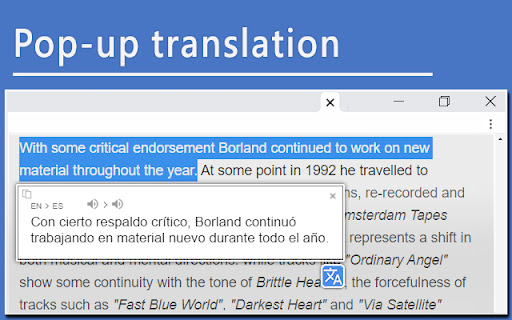
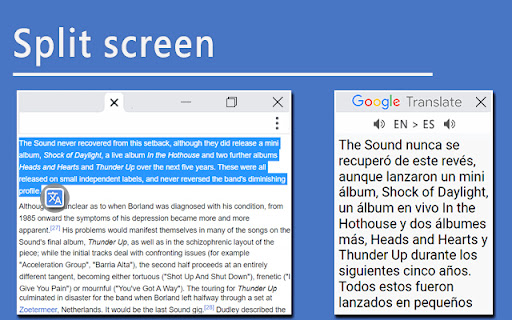
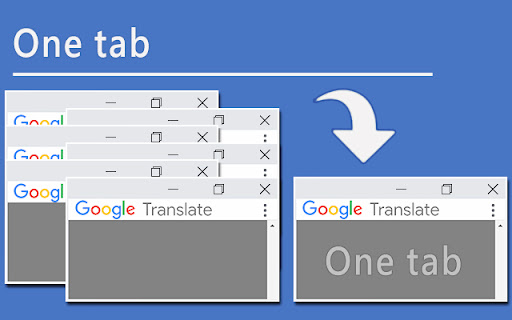
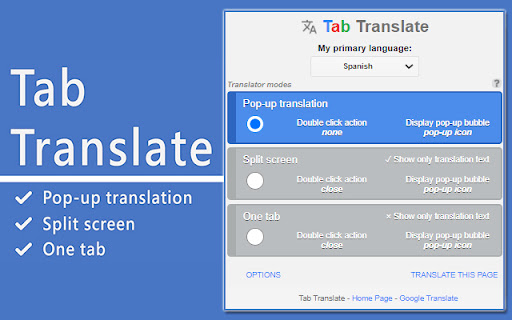
Easily translate selected text from one language to another and improve your language skills. This extension brings together best practices for using language translators in both business and educational contexts. The translator tools provided by the extension help users overcome language barriers and communicate more effectively across different languages. Modes: • Pop-up translation: Opens a pop-up window with the translated text. • Split screen: Splits the screen between the browser and the language translator. • One tab: Uses a single tab for translations. Use the Text-to-Speech (TTS) feature to learn correct pronunciation. You can also translate web pages into your preferred language with just one click. The Tab Translate extension is powered by the Google Translate API and provides unique features and benefits beyond standard translators. Benefits: ✓ Fast and responsive: Experience quick response times and smooth operation. ✓ Versatile modes: Access multiple modes to accommodate different translation needs. ✓ Compatibility with various content types: Easily work with web content, local documents, PDF files, and common tabs. ✓ Ideal for study: Perfect for students who need to translate documents or study materials, making language learning more accessible and efficient. ✓ User-friendly: Designed with a clear and intuitive interface. This extension automatically detects your primary language and is ready to use immediately after installation. Technical support: Please report any bugs or submit feature suggestions here: https://tabtranslate.com/feedback.html Localization of the user interface will be introduced gradually. Note: All copyrights belong to their respective owners. This extension is not owned, licensed, or sponsored by Google Inc., and Google does not provide support for it.

Linguist - web page translator
Web page translation, text translation, dictionary, history, custom translators, all you need to break language barriers Translate web pages, highlighted text, Netflix subtitles, private messages, speak the text, and save important translations to your personal dictionary to learn words in over 130 languages. Encountering unfamiliar words while reading an online article? Just select text on the page and click the button to translate it. You can speak the translated and original text, and save the translation to your dictionary. If you need to input text and translate it, you can just click the Linguist button to open the pop-up window. Full-page translation With Linguist, you can conveniently translate entire web pages with just one click. All you need to do is select "Translate page" from the context menu on any webpage, and it will be instantly translated into your preferred language. Make your own personal knowledge base with Linguist! Any translated text is saved in the history, and you can add your favorite translations to your dictionary. You can search for translations in both your dictionary and history, and even filter your translations by language. The dictionary feature is available even when you are offline, making it an ideal tool for language learners or travelers who require constant access to their word lists. Offline translation and privacy Linguist can translate texts even without the internet - a feature that no other extension has. The offline translator allows you to translate texts on your device without sending any private messages over the internet, ensuring your privacy. Simply enable the feature on the options page to maintain your privacy while translating work emails and personal messages. Customize Linguist as you wish Unlike other browser extensions, Linguist is not just a wrapper over the Google Translator Widget; it's a complete and independent translation system. This is why Linguist is not limited in what features may be implemented. Linguist is the leading extension for translating pages. Join Linguist and start using the most advanced features now and always stay at the forefront of technological progress in the future. You have complete control over your data and how Linguist works for you: - Control web pages auto-translation by language and domain name - Choose a service that will translate your texts - You may use popular services like Google, Yandex, Bing, DeepL, Reverso - You may use an offline translator that will translate texts on your device (not sent to the internet at all) - You may use custom translator modules to use your own translation service. Read more: https://github.com/translate-tools/linguist/blob/master/docs/CustomTranslator.md - Choose a service to speak texts - Customize the user interface and available features Privacy Linguist is free, open-source, and never collects your personal data. If you want to report a bug, suggest a feature, or donate, visit GitHub: https://github.com/translate-tools/linguist

Translator - Select to Translate
Translate words and phrases while browsing the web using the Google Translator. Full page translator. This extension offers a range of features to help you navigate different languages online. It allows you to effortlessly translate web pages, highlighted text, Netflix subtitles, and private messages. You can also have the text read aloud and save important translations to your personal dictionary for learning. Encountering unfamiliar words while reading an online article? No problem! Simply select the text you want to translate, and with a click of a button, you'll get the translation. You can also speak the translated text and save it directly to your dictionary. For text input and translation, just click the extension button to open a pop-up window. The extension's beautiful design makes it easy to use, allowing you to explore its functionality and choose your preferred color theme. When reading foreign articles, you can quickly understand every word with the full-page translation feature. With a simple click on the extension's button in the context menu or the pop-up, the entire page will be translated into your chosen language. With "Translator: Select to Translate," you can easily translate complete web pages with a single click. Just select "Translate page" from the context menu on any webpage, and it will be instantly translated into your preferred language. Extension relies on Google Translator to quickly translate individual words on the web page you are currently viewing.

Web Translate - Online translator
Right-click to translate words or phrases with Google Translate: accurate translations, page translator 🖱️ Simply click on any word or phrase to access Google Translate for instant online translation of words, phrases, or entire pages. 🔗 Extension Features: Effortlessly translate words and phrases on the current web page with a single click. Use this powerful online translator for quick and accurate results. ⚙️ Easy Configuration: Customize your preferred language in the extension settings with automatic language detection based on your location. 🌐 Multilingual Capabilities: Translate seamlessly between a wide array of languages, making it perfect for translating text, websites, or full pages. 🔒 Privacy Policy: Use the "Web Translator" extension at your own discretion; no warranty is provided. The author bears no responsibility for any data loss or damage resulting from its use. By utilizing "Web Translator," you agree to these terms. 🔄 Two Convenient Translation Options: Translate words and phrases by clicking on them or copy and paste larger texts into the extension’s popup for precise translations. Ideal for those who need a full text translation capabilities. 🎨 Beautiful Design: Navigate effortlessly through the extension’s features with its visually appealing design. Choose the color theme that best suits your preferences for efficient use of this translator tool. 📖 Efficient Reading: Quickly read foreign text and understand every word by translating the entire page or selected text at once. Use the translation button in the context menu or the extension’s popup. 🕰️ History and Favorites: "Click to Translate" remembers your language preferences and history, saving you time. Add frequently used languages or phrases to your favorites for quick access. 🚫 Disclaimer: The "Web Translator" Chrome extension is independent of the popular site https://translate.google.com. All copyrights belong to their respective owners. This extension is not supported, sponsored, or owned by Google Inc. 📚 Copyright Acknowledgment: All copyrights are duly acknowledged and belong to their respective owners. Google does not endorse or sponsor this Chrome extension

Image Drops: Downloader & Viewer for web images
Displays image details, applies filters and saves selected images as a ZIP archive or views them in an image viewer. Image Drops is a powerful tool that makes it easy to find, view and download all images from any web page. This extension provides detailed information about each found image, including size in pixels, weight in bytes, MIME type and source URL. It also simplifies the process of saving images to your computer, either individually or as a ZIP archive of selected images. Works with all types of images. It's free, easy to use and doesn't require registration. Just a few clicks and all images will be under your control. Key Features and Benefits: ✓ Image Download Tool: Select and download all images at once as a ZIP archive or individually. ✓ Flexible Settings: Customize parameters including image display, search modes, additional processing and more. ✓ Image Viewer Client: A rich tool for convenient image viewing that allows you to zoom, rotate, scroll and download selected images. ✓ Image Filter: You can filter images by size, weight, type and source URL. ✓ Base64 Encoding Converter: Select and convert any image in base64 encoding string (right-click the "Open in New Tab" button ⇨ to toggle the opening mode). ✓ Keyboard Control: Can be controlled using the keyboard (as well as the mouse). ✓ Fast and Responsive: You can expect fast response time and smooth operation. ✓ Easy to Use: Simple and intuitive interface. Install the Image Drops extension and start viewing and downloading images immediately.
