
dmfledeppinlciakcinbegohoadmbigm

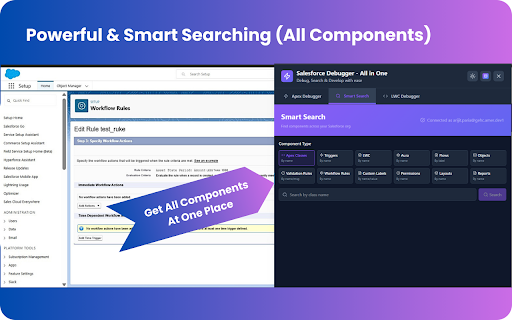


Advanced Salesforce debugging tools for developers. Transform Your Salesforce Development Workflow The ultimate debugging and productivity extension for Salesforce professionals. Debug Apex code, execute unlimited SOQL queries, inspect Lightning Web Components, search metadata across your org — and now, explore objects visually, manage fields intuitively, export picklists effortlessly, filter debug logs in real time, search code across multiple files, and access everything from a single command palette. All from one powerful interface. Apex Debugger & Debug Logs - Real-time debug logging for any user with custom trace levels and durations - Smart log retrieval and full-text search inside log contents - NEW: Debug Log Filters — filter logs by debug only, SOQL queries, errors, exceptions, and more - Multi-user debugging with user-specific isolation - Automatic cleanup of trace flags and debug levels to avoid clutter - Cross-tab sync for consistent debugging state Smart Metadata & Code Search - Search across 12+ metadata types: Apex Classes, Triggers, LWCs, Aura Components, Flows, Custom Objects, Validation Rules, Workflows, Custom Labels, Permission Sets, Page Layouts, Reports - Find by component name, API name or source-code content - NEW: Code Search Across Files – search inside Apex classes, triggers or components to locate methods, logic or keywords - Direct navigation to Salesforce Setup pages from results - View metadata insights: creation date, last-modified info, status Picklist Exporter - Export picklist values from any object to CSV or JSON - See controlling-field relationships for dependent picklists - View active/inactive values and default selections instantly - One-click export with full object and field metadata - JSON export mode with nested structure retaining dependency relationships Object Inspector - Visual metadata dashboard: pie-charts for field type distribution, bar-charts for field stats (custom, standard, required, lookup, formula) - Tabs: Overview, Fields (searchable with badge indicators), Relationships (parent and child viewers) - Export full object metadata to CSV/JSON - Context-menu integration: right-click on Object Manager to open Object Inspector - Dark/light theme support; color-coded field types Org Dashboard - Comprehensive visual analytics dashboard for Salesforce org monitoring - Real-time org limits with circular progress charts and color-coded indicators - Monitor API usage, storage limits, and automation thresholds - Collapsible sections for organized limit categories - One-click refresh for current metrics Session Information - View complete session details including user info, org details, and session ID - One-click copy functionality for all session values - Connection status monitoring API Name Revealer - Hover over any field to see its API name in a tooltip - Click any field to copy API name to clipboard - Works with both Lightning Experience and Classic Salesforce - Toggle with Ctrl+Shift+A keyboard shortcut Advanced SOQL Studio - 50-line query editor with syntax highlighting and auto-completion - Cursor-based pagination for unlimited record retrieval (bypasses 50k row limits) - Save, manage and reuse frequently used SOQL queries - SObject explorer with relationship field traversal and smart suggestions - Query history with execution time, record count and performance metrics - NEW: Query Formatter – one-click beautify for better readability - NEW: Query Snippets – pre-built templates for common use cases Context Menu Integration - Right-click on Object Manager pages to launch Picklist Exporter or Object Inspector - Quick copy options: Record ID, Page URL, User ID, Org ID - Automatically identifies and pre-loads objects from current context - Right-click "Show all data" on record pages for instant field access Command Palette - Press Ctrl+K to open the Salesforce Debugger Command Palette - Instant access to SOQL Studio, Apex Debugger, Smart Search, Picklist Exporter, Object Inspector, Org Dashboard, API Name Revealer, and more - Keyboard-driven workflow for maximum productivity Lightning Web Component (LWC) Debugger - Dedicated DevTools panel for LWC inspection and debugging - Real-time Apex call tracking from Lightning components - Inspect component properties, state, and DOM structure - Performance monitoring for component lifecycle - 90%+ faster component discovery — find metadata or code in seconds - Unlimited data access — run high-volume SOQL queries beyond standard limits - Safe multi-user debugging without affecting other users - Real-time log filtering for faster troubleshooting - One-click picklist export (CSV or JSON) - Instant field API name discovery - Visual object insights via Object Dashboard - Comprehensive org monitoring with limit tracking PERFECT FOR Salesforce Developers - Debug production issues safely with user-specific isolation - Analyze and optimize SOQL queries with performance metrics - Search code across multiple files to locate specific logic - Inspect LWC components and monitor Apex calls - Quick access to all tools via Command Palette (Ctrl+K) System Administrators - Troubleshoot user-specific issues in production environments - Export picklist values and object metadata - Monitor org limits and usage metrics - Explore field relationships and dependencies - Quick copy functionality for IDs and URLs Technical Architects - Deep org analysis with comprehensive metadata search - Performance optimization through query analysis - Visual field type distribution and relationship mapping - Monitor API usage and storage limits - Export complete object schemas Development Teams - Collaborate with shared query templates - Consistent debugging workflows across team members - Share metadata insights and component discoveries - Streamlined development process with integrated tools - Works within existing Salesforce security model - Read-only access to metadata and logs - Secure API communication via active session - Local preference storage only - No external data transmission - Respects object-level and field-level security - All activities visible in Salesforce audit logs Production Debugging - Filter debug logs by type, errors, or SOQL queries - Isolate and fix user-specific issues safely - Search through log contents for error patterns - Enable debugging without affecting other users Data Analysis & Reporting - Execute complex SOQL queries without row limits - Export query results to CSV or JSON - Build relationship queries with intelligent auto-completion - Track query performance and optimize slow queries Code Discovery & Navigation - Locate Apex classes, triggers, or LWC components instantly - Search inside code files for specific methods or logic - Find validation rules by error message content - Navigate directly to Setup pages for editing Metadata Management - Export complete object metadata schemas - Visualize field type distributions - Map parent and child relationships - Export picklist values with dependencies Quick Navigation & Workflow - Command Palette (Ctrl+K) for instant tool switching - Keyboard shortcuts for common operations - Context menus for quick actions - Cross-tab synchronization 1. Install from Chrome Web Store 2. Pin extension to browser toolbar 3. Navigate to any Salesforce org (Production, Sandbox, or Developer Edition) 4. Click extension icon to launch the interface 5. Use Alt+S for quick SOQL Studio access 6. Use Ctrl+K to open Command Palette 7. Right-click on Salesforce pages for context menu options WHY CHOOSE THIS EXTENSION? Unlike standard Salesforce tools, this extension consolidates debugging, SOQL execution, metadata search, code search, log filtering, picklist/object exporting, org monitoring, and command-based navigation into one unified interface. Save hours daily with powerful workflows designed for individual developers and enterprise teams. Whether you're debugging production issues, analyzing data, searching code, or managing metadata, every tool you need is one click away. Compatible with Lightning Experience, Classic Salesforce, and Developer Edition orgs. - Built with React 19, TypeScript, and modern web standards - Manifest V3 extension architecture - Works with Chrome and Chromium-based browsers - Real-time synchronization across browser tabs - Dark and light theme support - Responsive design for all screen sizes - No backend servers - 100% local processing - No data collection or transmission - Open source code available on GitHub - Minimal permissions (only what's required) - Only communicates with YOUR Salesforce instance - No third-party integrations or external calls - All data processing happens locally in your browser - GitHub Repository: https://github.com/arijitparia2002/salesfoeceDebugger - Documentation and guides available - Active maintenance and regular updates - Community support via GitHub Issues New in this release: - Org Dashboard with visual limit tracking - Session Information tab - API Name Revealer (hover and click to copy) - Enhanced context menu with quick copy options - Debug log filters for targeted troubleshooting - Improved performance and reliability Get started today and transform your Salesforce development workflow.

Salesforce Inspector Reloaded
Productivity tools for Salesforce administrators and developers to inspect data and metadata directly from the Salesforce UI. This extension is based on the original Salesforce inspector extension made by Søren Krabbe. IMPORTANT: If you have any question or facing bugs, please use the GitHub repository : https://github.com/tprouvot/Salesforce-Inspector-reloaded/issues - Analyze Field Usage in Show All Data - Multi Query tabs in Data Export - Download & Deploy Metadata - Security improvements - Field Creator page to bulk create fields from the extension - Event Monitor page to subscribe to Platform Events from the browser - Import / Export configuration from Option page - Customise extension shortcuts - Support SOSL and GraphQL languages - REST Explore page to run any API from the extension without external tool - Load recent records from popup - Customize extension favicon and Sandbox banner - Check QueryPlan on data export - Enable Logs from User tab - Customize settings in Option page - New Org tab - Search for a particular flow, profile or permission set from Shortcut tab - Restrict Salesforce Inspector usage with a default connected app - New "Shortcut" tab to quickly access setup menu - Link to permission sets assignment from User tab And many more !

Maven Tools for Salesforce
Uniquely architectured for Salesforce technical consultants, Maven Tools transforms how Salesforce implementations are being delivered. It offers features like an intelligent query editor, REST console, event hub and many more, giving you the power to deliver changes more quickly and effectively. 📨 Support ▸ Go to our service desk to get technical support, or to report bugs and suggest improvements : https://mavenmule.atlassian.net/servicedesk/customer/portal/6

Salesforce DevTools
Salesforce DevTools is a powerful Salesforce developer chrome extension for doing the below things : ・Quickly generate Apex code / SOQL, exporting query results to Excel file. ・Quickly access to new record page, list page and object setting page of any object. ・Quickly search object fields and check its usage. ・Display fields API name on Salesforce object detail page. ・Exporting Objects Definition to Excel file. ・Exporting Objects Fields Definition to Excel file. ・Exporting Objects Page Layout Definition to Excel file. ・Exporting Objects List View Definition to Excel file. ・Exporting Flow Definition to Excel file. ・Salesforce data modal (ERDs) generator. ・All Check / Select on profile edit page and field permissions edit page. ・Mass edit, mass delete, mass clone custom fields (Only Classic). ++++++++++++++++++++++++++++ Release notes ++++++++++++++++++++++++++++ 2026/01/1 ・Added features of "Export Flow Definition". -------------------------------------- 2023/04/10 ・Added features of mass edit, mass delete, mass clone custom fields on Lightning. -------------------------------------- 2022/01/30 ・Added feature of searching object fields and show its usage. -------------------------------------- 2021/04/05 ・Added feature of exporting Object definition (FULL) and fixed bugs. -------------------------------------- 2020/09/07 ・Added feature of exporting List View definition and fixed bugs. -------------------------------------- 2020/06/07 ・Fixed Lighting active bug and Japanese language document exporting bug. -------------------------------------- 2020/04/12 ・Improved feature of Query Editor. -------------------------------------- 2020/01/06 ・Added feature of exporting object page layout. -------------------------------------- 2019/08/18 ・Added feature of Multi Check on field permission edit page. -------------------------------------- 2019/05/13 ・Added features of mass edit, mass delete, mass clone custom fields -------------------------------------- 2019/03/24 ・Fixed issues. -------------------------------------- 2018/12/17 ・Reactivated feature of Debug Log Viewer. ・Added feature of searching Debug Log. ・Fixed issues. -------------------------------------- 2018/11/12 ・Improved UX of feature exporting object API reference to Excel file. ・Added Query Editor feature to all Objects. ・Added feature of exporting query result to Excel file -------------------------------------- 2018/09/25 ・Added support for cloudforce orgs. -------------------------------------- 2018/09/03 Major Release ・ Added support for Lightning! ・ Improved UX of feature Object Reference Doc generating. ・ Improved UX of feature All Check. -------------------------------------- 2018/04/17 ・Improved ERDs UX, fixed bugs. -------------------------------------- 2017/10/11 ・Improved Debug Log Viewer UX. -------------------------------------- 2017/05/29 ・Added feature of query editor and csv data exporting. -------------------------------------- 2017/04/23 ・Added feature of ERDs generator. -------------------------------------- 2017/02/06 ・Fix bugs. -------------------------------------- 2017/01/30 ・Added features of SOQL generator and Apex debug log viewer. -------------------------------------- 2016/12/20 ・Fixed export excel bugs. -------------------------------------- 2016/12/06 ・Improved UI, fixed bugs. -------------------------------------- 2016/11/25 ・Added features that allows you to enable it on custom domain. -------------------------------------- 2016/08/21 Major Release ・Added features of exporting objects definition to excel file. -------------------------------------- 2016/05/18 ・ Added support for Visualforce Page. -------------------------------------- 2016/04/04 ・ Added the features of object searching and object quick access. -------------------------------------- 2016/03/31 ・ Added support for generating Apex Code include blank fields -------------------------------------- 2016/03/28 ・ Added support for RecordType ・ Added hint for Quick Access Menu Turned Off

Salesforce Inspector Advanced
Productivity tools for Salesforce administrators and developers to inspect data and metadata directly from the Salesforce UI. Salesforce Inspector Advanced - The Ultimate Developer Toolkit for Salesforce Transform your Salesforce development workflow with this comprehensive browser extension designed for developers, admins, and architects. Salesforce Inspector Advanced provides powerful tools to inspect, analyze, and optimize your Salesforce org. 🔍 INSPECT & ANALYZE • Object & Field Inspector: Deep dive into object metadata, field usage analysis, and relationship mapping • Flow Analyzer: Comprehensive flow analysis detecting performance issues, security vulnerabilities, and best practice violations with actionable recommendations • Org Analyzer: Identify unused resources, code quality issues, security vulnerabilities, and migration opportunities across your entire org 💾 DATA MANAGEMENT • Advanced SOQL/SOSL Editor: Intelligent code editor with autocomplete, syntax highlighting, and inline suggestions for fields, objects, and relationships • Data Export: Query and export data with advanced filtering, sorting, column management, and support for GraphQL • Data Import: Bulk import with Bulk API support, hard delete capabilities, and smart field mapping • Inline Editing: Edit records directly in the data export view with bulk update capabilities ⚡ APEX DEVELOPMENT • Apex Runner: Execute anonymous Apex, batch jobs, and queueable classes with real-time log monitoring • Log Viewer: Advanced log analysis with flame charts, profiler, resource tracking (SOQL, DML, callouts), and unit test execution with code coverage • Code Editor: Full-featured editor with syntax highlighting, auto-indentation, and intelligent suggestions for Apex classes and methods 🔧 METADATA & DEPLOYMENT • Metadata Browser: Explore and download metadata with automatic package.xml generation • Metadata Import: Streamlined metadata deployment with relationship handling 🌐 API & INTEGRATION • API Explorer: Test Salesforce APIs with templates, history, and response formatting for REST, Bulk API, Chatter, Reports, and more • Platform Event Manager: Subscribe, monitor, and publish platform events, push topics, and change data capture events 🤖 AI-POWERED FEATURES • AI Flow Analysis: Leverage ChatGPT, Claude, Mistral, or Agentforce to analyze flows and generate SOQL queries • Intelligent Suggestions: Context-aware autocomplete for fields, picklist values, and relationships 🎨 USER EXPERIENCE • Customizable Interface: Custom favicon colors, editable shortcuts, and personalized settings • Quick Access Popup: Fast access to common tasks, user management, and org navigation • Modern UI: Clean, responsive interface with keyboard shortcuts and intuitive navigation 🔒 SECURITY • OAuth 2.0 with PKCE: Secure authentication with support for external connected apps • Security Analysis: Detect SOQL injection vulnerabilities, XSS risks, and access management issues Perfect for developers who need to: • Analyze and optimize Salesforce Flows • Query and manipulate data efficiently • Debug Apex code with advanced log analysis • Manage metadata and deployments • Test APIs and integrations • Identify org health issues and optimization opportunities Whether you're building new features, debugging issues, or maintaining your org, Salesforce Inspector Advanced provides the tools you need to work faster and smarter. https://github.com/dufoli/Salesforce-Inspector-Advanced This extension is based on the original Salesforce inspector extension made by Søren Krabbe and Salesforce inspector reloaded by Thomas Prouvot.
