
dlfapgifkfkaennninpefffjcokklnlg
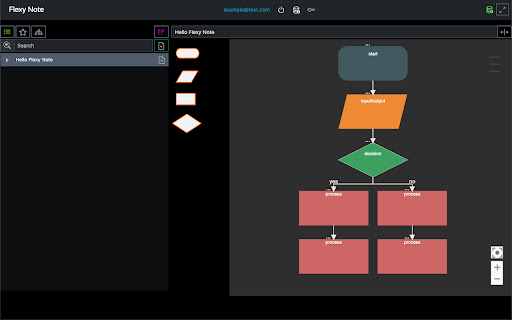
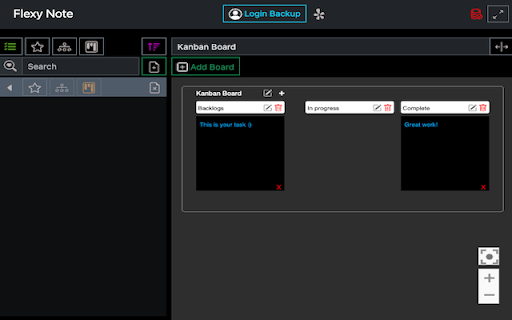
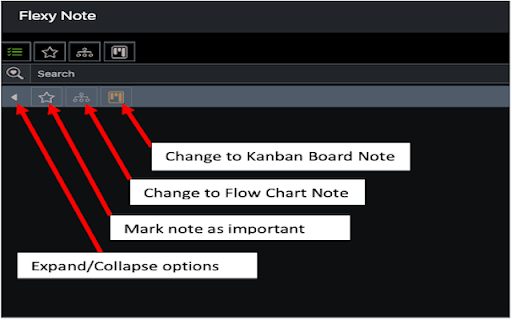
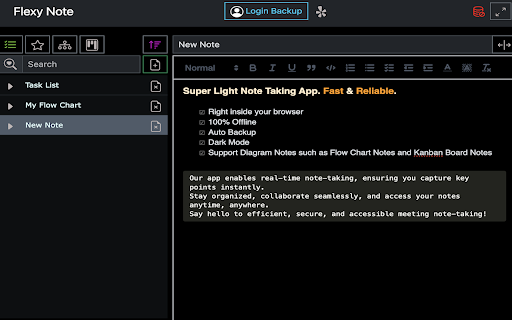

Super Light Note Taking App. Fast & Reliable. -Right inside your browser -100% Offline -Auto Backup -Dark Mode -Support Diagram… Super Light Note Taking App. Fast & Reliable. -Right inside your browser -100% Offline -Auto Backup -Dark Mode -Support Diagram Notes such as Flow Chart Notes and Kanban Board Notes Our app enables real-time note-taking, ensuring you capture key points instantly. Stay organized, collaborate seamlessly, and access your notes anytime, anywhere. Say hello to efficient, secure, and accessible meeting note-taking! Update: June 17th 2024 New Locking Feature with PIN Code to Protect Your Notes Steps: 1. Set up a PIN code by clicking on the lock icon on top. 2. For existing notes, click the caret icon and then the lock icon. 3. To open a locked note, enter the PIN.

Membr: Effortless & Secure Note-taking
Stay organized and productive with Membr's rich note-taking editor, AI powered summaries and secure storage. Stay In Flow, Be More Productive =============================== A huge portion of work already happens in the browser. And if you’re like us, you also take draft notes when studying, researching or ideating. You can do this through note-taking apps like Notion, Evernote, Google Docs and many more. However, most of these note-taking apps interrupt *flow* by forcing you to context switch, either by opening a new browser tab or app window. With Membr for Chrome, your notes sit alongside the source content. Why Membr Notes? =================== - Rich editor experience with all the essentials and more. The editor offers rich formatting, task lists, drag and drop images etc. with regular updates expanding this feature set. - Encrypted notes. We take the security of your information seriously and that’s why all your notes in Membr are stored and retrieved while encrypted. - It's fast. Membr runs on all browser tabs and offers single-click access to your most recent notes. - It works well with other apps. You can export to PDF with *Google Docs and Notion export coming soon. FAQs ======= 1. Membr doesn't start after install? If you are unable to start the extension immediately after install, try refreshing the browser tab(s) that you'd like to use Membr on. 2. Do my notes sync across devices? Yes, your notes will sync across all signed in Chrome browsers that have the extension installed. 3. Is there a mobile app? The mobile app will launch later in 2022. August 2024 Updates: ============= * ⚡️Improved login experience. * ❤️🩹 Minor bug fixes and improvements.

CopyMore
Copy multiple items at once: Save time and increase productivity with CopyMore. CopyMore is the ultimate multi-copy solution for your Chrome browser. Say goodbye to manual copying and hello to a more efficient workflow. With CopyMore, you can copy multiple items at once and store them in CopyMore clipboard across all your devices for easy access whenever you need them. Whether you're working on a project, drafting an email, or just need to quickly copy and paste information, CopyMore has got you covered. With a simple and intuitive interface, CopyMore makes it easy to copy and store multiple items. Simply select and copy the items you want, and CopyMore will save them in the clipboard for easy access. Whether you're working on multiple projects at once or just need to copy and paste information quickly, CopyMore makes multitasking a breeze. User Safety: - At CopyMore, we are committed to protecting your privacy and ensuring the security of your data. We do not store, share, or access your data with any third-party entities. All information that you store in our clipboard extension is kept confidential and secure within your device. Limitations: - Compatibility Issues: The extension may not be compatible with all websites and may have issues with copying data from certain types of websites or web applications. - Scope: The extension is designed to work within the Chrome browser window. Copying data from outside the Chrome window or links, such as from desktop applications or other browsers, is outside the scope of our extension and may not be supported.

QuickPad: fast Markdown notepad
An in-browser Markdown notepad. Optimize for writing experience. Free, plus your data doesn't leave you computer ≡ Why do I build this extension 🤔 When reading cool stuffs on the net, I often want to take some notes, but opening my noting applications such as Notion/Obsidian takes much time. So I built this extension to quickly jot down my idea, then later copy to whatever noting systems. ≡ What it does really well 💪 - Fast & Clean - Markdown support - Writing should feel pleasant (sth like Notion editor) - Your data stays in your computer ≡ What it *will* do well in the future ⚙️ - Pasting image into the editor - Searching - Exporting notes - Data backup ≡ Feedbacks 💙 If you have any feedbacks or suggestions, I'm really happy to hear that, feel free to leave me a review

QuickAccess Sidebar
Customizable sidebar to open Gmail, ChatGPT, WhatsApp and any custom URL. Add icons, set shortcuts, and stay focused. New Features: 🌙 Dark Mode: Toggle between light and dark themes 📍 Position Control: Move sidebar to left or right side ⏰ Auto-Hide Toggle: Keep sidebar always visible or auto-hide ⚙️ Settings Panel: Easy access to all customization options *Please restart the browser once so the sidebar loads on all tabs* *You will see the sidebar only when you take the cursor to the left edge of the screen or if you use any shortcut* *To edit shortcuts, go to chrome://extensions/shortcuts* QuickAccess Sidebar is a lightweight, customizable sidebar for quick access to your most-used web tools. Features: - Up to 10 configurable shortcuts - Custom icons - Keyboard shortcut support - Persistent across sessions - Auto-collapses after opening - designed to stay out of your way 📌 Notes: - All shortcuts are opened as pinned tabs within the browser. There is no option within chrome for opened tabs to not show up as a tab - To edit shortcuts, go to: `chrome://extensions/shortcuts` - The sidebar collapses automatically after use. This is intentional - loading websites inside the extension frame causes compatibility issues. We’ve optimized for a smooth, unobtrusive experience.
