
hmpekcomffccbkcfmflnbifbndekfnam
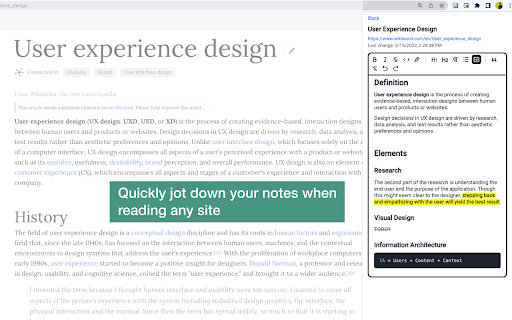
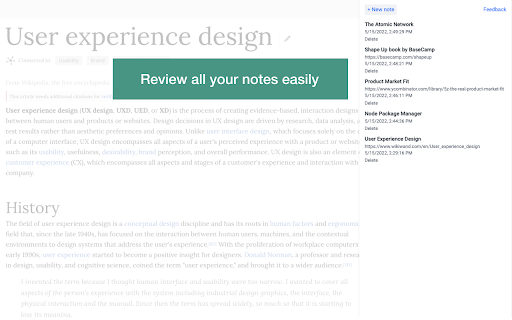
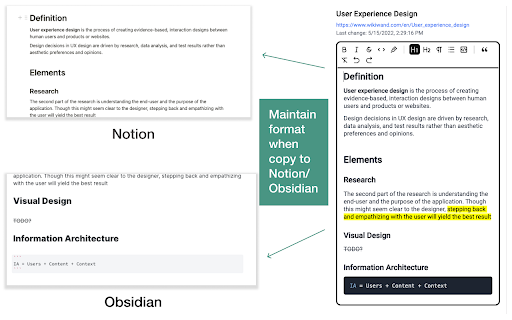
An in-browser Markdown notepad. Optimize for writing experience. Free, plus your data doesn't leave you computer ≡ Why do I build this extension 🤔 When reading cool stuffs on the net, I often want to take some notes, but opening my noting applications such as Notion/Obsidian takes much time. So I built this extension to quickly jot down my idea, then later copy to whatever noting systems. ≡ What it does really well 💪 - Fast & Clean - Markdown support - Writing should feel pleasant (sth like Notion editor) - Your data stays in your computer ≡ What it *will* do well in the future ⚙️ - Pasting image into the editor - Searching - Exporting notes - Data backup ≡ Feedbacks 💙 If you have any feedbacks or suggestions, I'm really happy to hear that, feel free to leave me a review

SimpleNote
The simplest note extension Tools/Modes included (you can activate and desactivate them at anytime): 🔍 Increase font size 🌙 Night/Light mode 👨💻 Code mode 🛡️ Spell-Check mode ➕ Extend window size 📩 Import and export your notes ♾️ 100 pages We don't collect your data, your notes are stored LOCALLY in your browser ✅ CHANGELOG 06-2024 : Add notes import and export, you now have 100 pages. 🔥 IF YOU NEED A CUSTOM EXTENSION, I CAN CREATE ONE FOR YOU : ibuildyourextension.com

Side Note
Side Note is a lightweight and intuitive Chrome extension designed to enhance your note-taking experience. With Side Note, you can easily capture and organize your thoughts, ideas, reminders, and important information right from your browser.

NEW TAB NOTE
This extension allows you to use your new tab as a notepad! 📚 Features ・Use a new tab as your notebook ・Supports Markdown syntax ・Notes are saved automatically, even after reloading ・Filter mode blurs your notes to prevent peeking ・Create and switch between multiple notes ・Customize with different color themes ・Notes with sync enabled are shared across devices signed in with the same Chrome account ⚠️ Notes ・The sync storage capacity is limited to roughly 100 KB in total by chrome.storage.sync. If you exceed the quota, syncing stops until you clean up notes. ・The administrator (developer) does not store or manage your memo data. In case data is lost due to browser behavior, sync limitations, or other environmental factors, recovery is not possible. Please make sure to back up important information yourself. For feedback or bug reports, please visit https://github.com/deren2525/new-tab-note/issues/new/choose

Notes Dashboard
Notepad and to-do lists saved to your browser Open a new tab to write down your thoughts and keep track of your agendas! Replace a new tab page with a markdown text editor and an organised task manager. Your data is saved to your browser storage and will be synced across different tabs. (Clearing your browser cache will also clear your data.) This extension works offline though some styles may be affected. Features: ** To-do lists ** ➝ Add, delete & update tasks ➝ Categorise your to-do lists into stay organised ➝ Colour-code your lists ➝ Set different priority levels for each task ➝ Clear completed tasks to keep your list clean ➝ Toggle to hide/show the task panel ** Text editor ** ➝ Choose to hide/show your toolbar to keep the interface clean ➝ Notes are immediately saved to your local storage ➝ Supports markdown editing - if you're unfamiliar with markdown, you can click on the extension icon to view a cheatsheet :)
