
cfkmfhonabmdcgamkfijfncoipiooipm
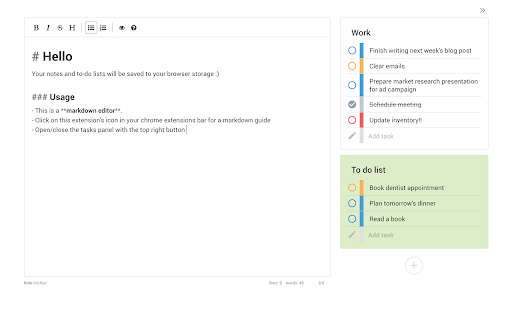

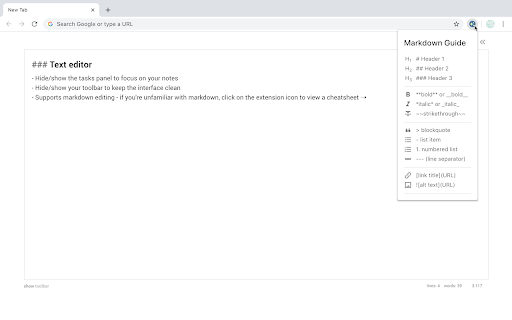
Notepad and to-do lists saved to your browser Open a new tab to write down your thoughts and keep track of your agendas! Replace a new tab page with a markdown text editor and an organised task manager. Your data is saved to your browser storage and will be synced across different tabs. (Clearing your browser cache will also clear your data.) This extension works offline though some styles may be affected. Features: ** To-do lists ** ➝ Add, delete & update tasks ➝ Categorise your to-do lists into stay organised ➝ Colour-code your lists ➝ Set different priority levels for each task ➝ Clear completed tasks to keep your list clean ➝ Toggle to hide/show the task panel ** Text editor ** ➝ Choose to hide/show your toolbar to keep the interface clean ➝ Notes are immediately saved to your local storage ➝ Supports markdown editing - if you're unfamiliar with markdown, you can click on the extension icon to view a cheatsheet :)

Memento
A simple but smart notepad; A place to go to get out your thoughts quickly and save them for later. Memento is a very simple and elegant, yet smart offline notepad with rich text-editing capabilities. It allows you to take as many notes as you would like. Not only that, but you can also access your notes quickly and simply. Features 🌿 Elegant, Beautiful, and customizable UI 🌿 Opens on each tab 🌿 Rich text-editing 🌿 Dark Mode 🌿 Emoji Picker 🌿 As many notes as you want 🌿 Note Search 🌿 Privacy Mode for presentations 🌿 Pin notes to the top for better visibility 🌿 Powerful Shortcut system 🌿 Command Palette for accessing common options. 🌿 Use the notepad in Latin. 🌿 Create and Restore Backups 🌿 Export and Import Markdown 🌿 Note Archive and recovery system 🌿 Cleanup Utilities: Duplicate note elimination 🌿 Multiple Language Support (currently EN, DE, HR, ES, HI, FR, LA, PT, ZH, EL, SK) 🌿 Data Privacy and anonymity.

Page Notes Sidebar
Add notes to web pages and access them from the sidebar when you revisit. This extension helps you add notes to a webpage. You can click on the extension icon and open sidebar. In the sidebar you will see sections for Page, Site and All. You can add notes for page in Page section. Add notes to be visible throughout the site in Site section. And if you want to keep notes that are shown on all the pages, add them to All section. * Add notes for a web page, for entire website or to see it on all the pages * Notes are shown in chrome sidebar * Badge is shown to highlight if there is a note present for the page you are visiting. To make sure you see a badge, please pin the extension * Now supports dark mode

Outline: quick notes
An extension that let you save you quick notes while browsing Outline help you to save quick notes while browsing on the internet. The process for taking notes with outline is simple. You simply need to install the extension. And start adding whatever you like on the internet. This project I created for my personal use but later I realise it can be used by anyone. So here it is available for everyone. Why Outline? 1. Privacy focused. The data can only read by you only. Its between you and your browser. Code is open sourced. So you can always look whats going. No one can recover your info. If it's gone, it's gone 2. Rich text formatting allowed. You can highlight according to your convenience. 3. Less clutter info: Not everything you read should be in your notes. Sometimes you just need some pointer which you can review later. You can think outline as quick draft which you can save all your info anywhere you want 4. Easy to find whatever you type Note: This extension rely chrome storage api. So it has its own limitation. If you do not need any specific notes, delete it. So that it does not give your storage warning. More you can read here: https://developer.chrome.com/docs/extensions/reference/storage/#property-local And much more feature will come soon... If you want new feature request or found any bug. Feel free to open ticket here: https://github.com/shubhamV123/outline

Side Note
Side Note is a lightweight and intuitive Chrome extension designed to enhance your note-taking experience. With Side Note, you can easily capture and organize your thoughts, ideas, reminders, and important information right from your browser.
