
jnjimmfigcmfgpnkejeegliidonlefdf


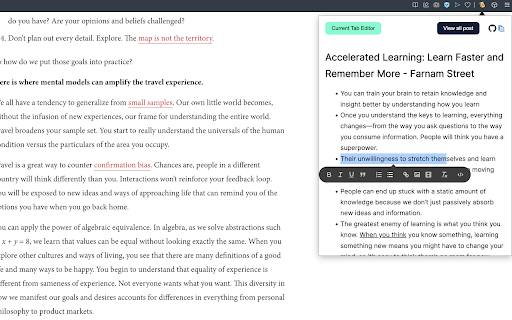

An extension that let you save you quick notes while browsing Outline help you to save quick notes while browsing on the internet. The process for taking notes with outline is simple. You simply need to install the extension. And start adding whatever you like on the internet. This project I created for my personal use but later I realise it can be used by anyone. So here it is available for everyone. Why Outline? 1. Privacy focused. The data can only read by you only. Its between you and your browser. Code is open sourced. So you can always look whats going. No one can recover your info. If it's gone, it's gone 2. Rich text formatting allowed. You can highlight according to your convenience. 3. Less clutter info: Not everything you read should be in your notes. Sometimes you just need some pointer which you can review later. You can think outline as quick draft which you can save all your info anywhere you want 4. Easy to find whatever you type Note: This extension rely chrome storage api. So it has its own limitation. If you do not need any specific notes, delete it. So that it does not give your storage warning. More you can read here: https://developer.chrome.com/docs/extensions/reference/storage/#property-local And much more feature will come soon... If you want new feature request or found any bug. Feel free to open ticket here: https://github.com/shubhamV123/outline

Page Notes Sidebar
Add notes to web pages and access them from the sidebar when you revisit. This extension helps you add notes to a webpage. You can click on the extension icon and open sidebar. In the sidebar you will see sections for Page, Site and All. You can add notes for page in Page section. Add notes to be visible throughout the site in Site section. And if you want to keep notes that are shown on all the pages, add them to All section. * Add notes for a web page, for entire website or to see it on all the pages * Notes are shown in chrome sidebar * Badge is shown to highlight if there is a note present for the page you are visiting. To make sure you see a badge, please pin the extension * Now supports dark mode

URL Notes: Best Tool to Take, Manage, and Export Notes While Browsing
Stay focused and organized with URL Notes! Effortlessly take, manage, and export notes directly from any webpage, even offline. URL Notes: The Ultimate Tool to Take, Manage, and Export Notes While Browsing Stay focused and organized with URL Notes, a powerful extension designed for users who want to effortlessly take, manage, and export notes directly from any webpage. Whether you're researching, working on projects, or simply collecting important URLs, URL Notes makes note-taking a breeze. Plus, you can access and manage your notes even when you're offline! ✔ Take Notes Directly from Any Webpage With URL Notes, you can jot down important thoughts, reminders, and insights as you browse. No more jumping between tabs or applications—simply take notes right from your current webpage with a single click. ✔ Manage Notes with Custom Statuses Organize your notes using customizable statuses like To-Do, In Progress, and Done. This feature is perfect for project management and keeping track of where you are in your tasks. ✔ View Existing Notes on Any Webpage Easily review all your saved notes related to the webpage you're currently browsing. Keep track of your research or important details without needing to leave the page. ✔ Offline Note Access No internet? No problem. URL Notes allows you to access, manage, and even create notes offline. When you regain internet access, everything syncs back seamlessly. ✔ Export Notes to Excel Need to organize or share your notes? You can export your filtered notes to an Excel file for quick access and backup. Sort notes by text, website name, or specific statuses like To-Do or Scheduled. ✔ Backup and Restore Keep your notes safe with backup and restore options. You can back up your notes to a secure storage solution like Google Drive, Dropbox, or a local device. If anything happens, restoring your notes is just a click away. ✔ Schedule Notes for Future Reminders Stay on top of your deadlines by scheduling reminders for specific notes. This makes URL Notes an ideal tool for managing personal and work projects alike. ✔ Advanced Search Functionality Find exactly what you're looking for with advanced search filters. Search by note text, webpage name, or status, allowing you to quickly locate any note in seconds. ✔ Organized and Efficient Interface Our intuitive interface is designed to keep your notes organized and easy to access. Filter by status or search by specific keywords for maximum efficiency. 🎯 How URL Notes Improves Your Productivity: 📝 Effortless Note-Taking Quickly jot down notes without disrupting your browsing experience. 📚 Organized Research Perfect for students, researchers, and professionals who need to keep track of multiple sources. 📊 Project Management Made Simple Assign statuses to your notes and keep your workflow on track. 🌍 Work Offline Access and manage your notes anywhere, anytime, even when you're not connected to the internet. 📤 Seamless Exporting Export your notes in Excel format to share with others or to keep a backup. 🔒 Secure Backups Keep your notes safe with local and cloud backup options, ensuring your data is always protected. 🎓 Students & Researchers Track your research sources, take notes, and stay organized while studying or writing papers. 🛠 Project Managers Organize tasks and track progress with note statuses. Export notes to Excel for easy sharing with your team. 💼 Freelancers & Professionals Save important URLs, notes, and ideas in one place. Perfect for client work, reports, and brainstorming. 💡 Content Creators Collect and manage ideas for blog posts, videos, and articles while browsing for inspiration. 🌐 Offline Access Unlike many note-taking extensions, URL Notes allows you to continue working offline, ensuring you never lose track of your thoughts, even without an internet connection. 🗂 Customizable Workflow Organize your notes with status labels, making it easier to manage ongoing projects or research tasks. 📂 Export and Share Need to share your notes with colleagues or friends? Easily export everything to Excel for quick collaboration. 🔐 Data Privacy First All your notes are stored securely in your browser. None of your data is uploaded to any external servers, ensuring complete privacy and control over your information. 1. Can I use URL Notes offline? Yes! You can access, manage, and even create notes while offline. Once you're back online, your notes will sync automatically. 2. Is my data safe? Absolutely. Your notes are stored locally in your browser, and no data is sent to any external servers. You also have the option to back up your notes to a cloud service like Google Drive or Dropbox. 3. Can I export my notes? Yes! You can export your notes to an Excel file for easy management, sharing, or backup. 4. Can I manage multiple projects with URL Notes? Definitely. With customizable statuses like To-Do, In Progress, and Done, you can easily manage multiple tasks or projects in one place. 5. What makes URL Notes different from other note-taking extensions? URL Notes offers offline functionality, customizable statuses for better project management, and the ability to export notes to Excel—all while keeping your data private and secure. 📥 Get Started with URL Notes Today! Whether you're researching for a school project, organizing your work tasks, or simply keeping track of your favorite websites, URL Notes is the perfect tool to help you stay focused and organized. Download URL Notes now and transform the way you take notes while browsing. 🛡 Privacy Policy: We take privacy seriously. All notes are stored locally on your device and never shared with external servers. For added security, you can export your notes and store them in a location of your choosing.

Page Pacer - read faster, stay focused
Trains you to read faster by setting a pace. Read Faster and Stay Focused with the Page Pacer! 🧠 1) Select the text you want to read. 📖 2) Input your desired reading speed (WPM). ⏱️ 3) Click "Start Reading" and watch as Page Pacer guides you through the text at a steady, efficient pace. ⚡ Reducing unnecessary eye movements is crucial for improving reading speed because it minimizes the time and effort spent on scanning and refocusing across the text. Typically, your eyes jump around the page, a process known as saccadic movement, which can slow down the overall reading process. By reducing these movements, you can focus more directly on the content, leading to quicker comprehension and less cognitive strain. Page Pacer 2.0 UPDATE: 🚀 Major Upgrade Alert! 🚀 NEW Premium Experience: Uncapped reading speeds up to 3000 WPM for PRO users Unlimited daily usage with PRO subscription Custom themes for personalized reading Improved Free Plan: Clearer FREE vs PRO feature indicators 1 free use per day Basic reading pace control up to 250 WPM Progress tracking with visual history Enhanced UI: Modern, sleek interface with intuitive controls Better visibility of remaining free usage time Premium upgrade prompts when limits are reached Limited Time Offer: 25% OFF Premium - Only $4.99/month! Try our 7-day Free Trial and experience the full power of Page Pacer 2.0! Version 1.4 UPDATE: *Updated Slider UI *Track your progress! Version 1.3 UPDATE: PAGE PACER PRO!!! Highlight any text and read with Page Pacer! Now compatible with: PDF Files, DOCX Files, PowerPoint .pptx Files, and anything you can highlight!!

Note It - Notes & OCR
A feature-packed note-taking extension with OCR support. With our note-taking app, you can take notes, convert images to text, download notes to PDF. You’ll be able to stay organized with a beautiful minimalist design. - ✍ Take notes in rich formatting. - 👀 Open the extension as a pop-up or re-sizable window. - 👀 Three different themes light, dark and dim - 📸 Take a screenshot of the active tab and: - ✂️ Copy the cropped image - 📜 Convert to text (OCR support) - ✔ Download the cropped image - 💾 Save notes on your local machine - 🗃 Notes folder - ⭐ Make notes as favorite - 📁 Download note in PDF format - 🗄 Convert your images to text (this feature works only when the extension is in window mode) This extension is open-source and does not store any user data on any server. All your data is on your local computer. Please get in touch with us if you find any bugs or have any features or recommendations. The GitHub link is available on the home page. Note It is a non-profit extension. We built and now maintain it during our free time, and we try our best to improve it and keep it up to date.
