
dkhngpdmjgnpjjbofhioackbnfponcgh

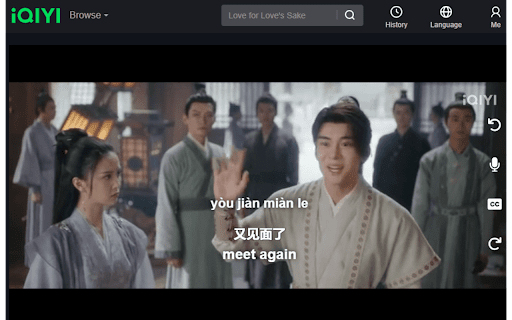
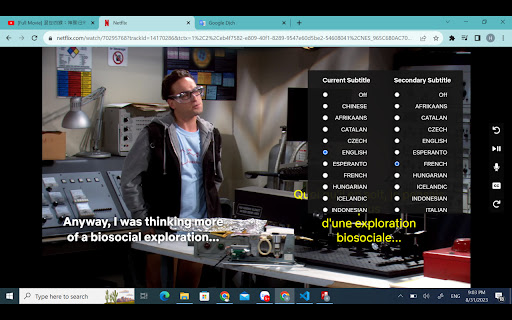
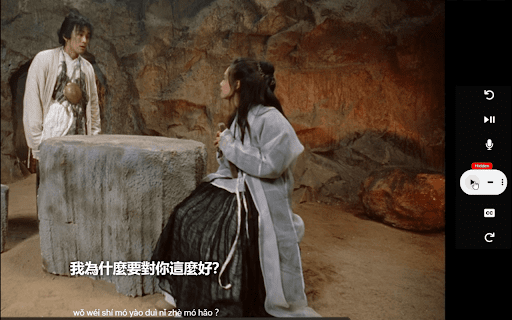

PinyinTube is a Chrome extension that helps users learn languages and improve their speaking skills while watching their favorite… PinyinTube is a Chrome extension that helps users learn languages and improve their speaking skills while watching their favorite movies online. The extension is now available on four different streaming platforms: Netflix, YouTube, iQIYI (iq.com) and Rakuten VIki (viki.com). Every platform has some free features and some premium features. For a detailed pricing comparison, please visit swapbrain.com . In the popup, there is a button to activate PinyinTube, as well as a button to purchase the premium version. In this new version, we added a free feature to automatically generate subtitle for any audio streams from all websites. This is particularly useful for news channels and podcasts where there are no provided subtitle. To activate this feature, toggle on the "Automatic Video Subtitles" in the pop-up. Then on the browser Translation window, click on CC to choose the languages for translating the subtitles. For movies channels with provided subtitles, you can Toggle on Activate PinyinTube to translate the current subtitle to a second language. To activate more free features, please sign on to our Forum by submitting your email address on the popup, then toggle activate button. Once activated, you will see a few buttons on the right edge of the videos. The Seek Back button goes backward sentence-by-sentence, helping you to repeat the actor's voice. The Dual Subtitle helps display a second subtitle that translates the current subtitle to your native language. When you turn on Chinese subtitle, the Pinyin pronunciation will also appear, helping you to read Chinese. Especially, there is a Voice Record button that works only for the Premium version, helping you to record your voice to compare with the actor's voice. The Seek Forward button goes forward by five seconds. Note, if the buttons do not work, please try refreshing the browser.

Pinyin Annotator
A browser extension overlays Hanyu Pinyin annotations over Chinese characters present in web pages and video closed captions. Pinyin Annotator is a browser extension that overlays Hanyu Pinyin annotations over Chinese characters in web pages and video closed captions, enhancing your Chinese language learning journey. - Enhanced Video Streaming: Integrate pinyin into Chinese subtitles (closed captions) on video streaming platforms such as Netflix, Disney+, YouTube, Bilibili, and more for an enriched viewing experience. - Support for Simplified (汉) and Traditional (漢) Chinese. - Easy Accessibility: Highlight text and click the extension icon to view the Pinyin of the selected text without disrupting the entire page. Click to look up the word in a dictionary. - Open-Source: Unlike many browser extensions that do not disclose their code, leaving you uncertain about their operations, this extension allows you to review every line of code. Furthermore, you can build it yourself or contribute to it on GitHub.

YouTube Pinyin Overlay
YouTube Pinyin Overlay helps Chinese learners improve their listening and pronunciation by automatically adding Pinyin (with tone marks) above Chinese subtitles on YouTube videos. Whether you're watching auto-generated, live, or manually uploaded Chinese captions, this lightweight extension runs in the background and overlays accurate Pinyin directly above each line of text — without disrupting playback or styling. 🔤 Key Features: • Converts visible Chinese subtitles to Pinyin with tone marks • Works with both simplified and traditional characters • Supports auto-generated, live, and most manual Chinese captions • Lightweight and fast — no configuration needed • Preserves YouTube’s original appearance and subtitle timing This tool is ideal for learners practicing Chinese pronunciation, tone recognition, or character reading in real-world video contexts. 🎓 Powered by the pinyin-pro library for high-accuracy tonal rendering. No data is collected or shared. The extension runs locally and does not track or store any user information.

LangPrint Subtitle Player
Display Chinese dual subtitles on video players with advanced Chinese segmentation, pinyin support,vocabulary generation Turn your favorite Chinese dramas into powerful language lessons—right inside your browser! With our Chrome extension for WeTV and iQIYI, you get immersive dual Chinese subtitles, real-time pinyin, and smart vocabulary tools that transform passive watching into active learning. 💡 Why Our Extension? Our tool is designed specifically for Chinese learners and built to handle the complexity of Chinese subtitles. It delivers accurate word segmentation, inline pinyin, and vocabulary break down for platforms like WeTV and iQIYI. • Chinese-English Dual Subtitles Watch with Chinese subtitles paired with English translations. Instantly understand meaning and context. • Advanced Word Segmentation Breaks down subtitles into meaningful Chinese words—not just characters—with smart spacing for better comprehension. • Auto Pinyin Overlay Pinyin appears right above Chinese words, making it easier to follow pronunciation without leaving the video. 🌍 Built for Chinese Learners This extension is ideal for Mandarin learners using: • WeTV • iQIYI • YOUKU

Langpal Subtitles: Better subtitles for Chinese videos
Adds Jyutping or Pinyin subtitles alongside more readable Chinese to YouTube videos with Chinese captions. Elevate your Chinese learning journey by enhancing subtitles for YouTube, Netflix, Disney+, Bilibili & more by: - Spacing out Chinese characters for better readability. - Adding custom AI generated (& human vetted) Cantonese or Mandarin captions to YouTube videos that have none (Only a select amount available during the testing phase) - Adding support for spoken Cantonese subtitles created by CantoCaptions.com (currently only available on select Bluey episodes on Disney Plus - but more to come!) - Login to your Langpal account and hide known characters - Easily edit and update custom subtitles 🥰 Why You'll Love It - Read Along Effortlessly: Follow the romanized text and learn to grasp pronunciations in real-time. - Customize Your Experience: Choose between Mandarin and Cantonese to suit your learning needs. - Learn While You Watch: Immerse yourself in authentic content and pick up new vocabulary naturally. - Custom YouTube captions allow you to engage in more Cantonese and Mandarin content than ever before: with future versions allowing you to request subtitle generations within minutes with a Langpal premium account - An initial look into true spoken Cantonese captions for Disney Plus that allows a whole new way of immersive Cantonese learning compared to the default SWC (Standard Written Chinese) subtitles 1) Install the Extension: Click "Add to Chrome" to get started. 2) Visit YouTube, Netflix, Disney+, Bilibili, or Viu Tv: Navigate to a video that has Chinese subtitles. Enjoy Enhanced Subtitles: Start learning as you watch! 3) Select your desired language (defaults to Mandarin): With the toggle found on the bottom right of a video toggle between "YUE" for Cantonese (Jyutping) or "ZH" for Mandarin (Pinyin). 4) When you want to stop using it simply toggle the "LP" button found next to the language toggle of your video player - When you navigate to any Youtube video now: a sparkle ✨ icon will now appear in the controls - When this icon turns to white that shows you that custom AI generated captions are available for that video In the future, requests can be made and generated within minutes using a Langpal premium account. But for the testing phase feel free to email devon@langpal.com.hk for free generation requests! Visit Langpal.com.hk for additional resources to boost your Mandarin and Cantonese skills. - Requesting custom generated captions for YouTube
