
ialphkdienehonhefoaiijoehccgcmhh

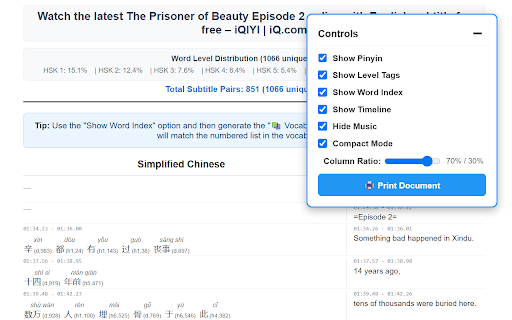

Display Chinese dual subtitles on video players with advanced Chinese segmentation, pinyin support,vocabulary generation Turn your favorite Chinese dramas into powerful language lessons—right inside your browser! With our Chrome extension for WeTV and iQIYI, you get immersive dual Chinese subtitles, real-time pinyin, and smart vocabulary tools that transform passive watching into active learning. 💡 Why Our Extension? Our tool is designed specifically for Chinese learners and built to handle the complexity of Chinese subtitles. It delivers accurate word segmentation, inline pinyin, and vocabulary break down for platforms like WeTV and iQIYI. • Chinese-English Dual Subtitles Watch with Chinese subtitles paired with English translations. Instantly understand meaning and context. • Advanced Word Segmentation Breaks down subtitles into meaningful Chinese words—not just characters—with smart spacing for better comprehension. • Auto Pinyin Overlay Pinyin appears right above Chinese words, making it easier to follow pronunciation without leaving the video. 🌍 Built for Chinese Learners This extension is ideal for Mandarin learners using: • WeTV • iQIYI • YOUKU

DualPiP – Picture-in-Picture Player | Subtitles & AI Translation
PiP video player with bilingual subtitles, AI translation, danmaku, and speed control. Supports YouTube, Netflix, Disney+, and more. DualPiP – Picture-in-Picture Player with Dual Subtitles, Translation & Live Comments Watch videos in Picture-in-Picture mode with dual subtitles, subtitle translation, live comments, thumbnail previews, and playback controls. Ideal for language learning, online courses, and multitasking. This update brings all-new in-page bilingual subtitles, letting you enjoy dual-language captions directly on web videos without entering Picture-in-Picture mode. We've also added multiple gesture controls and playback settings to significantly enhance your viewing experience. DualPiP is a Chrome extension designed for efficient video learning and an enhanced viewing experience. It builds on the browser’s native Picture-in-Picture (PiP) functionality by adding advanced subtitle, translation, and interaction features, allowing you to clearly understand video content even in a floating window. Whether you are watching foreign-language videos, online courses, TV shows, or live streams, DualPiP helps you stay focused and productive without switching tabs or interrupting your workflow. ⚡ One-click Picture-in-Picture mode with support for major video platforms 🌍 Dual subtitles and subtitle translation, ideal for language learning and foreign-language content 💬 Live comments (danmaku) support, preserving interactive viewing experiences 🔒 Runs entirely locally with a privacy-first design and no data collection 🎬 Enhanced Picture-in-Picture Player Play videos in an independent floating window with full playback controls. Freely move and resize the window for true multitasking. 🌐 Dual Subtitles & Subtitle Translation Automatically detects available subtitles and displays them in two languages, making it easier to understand foreign-language content across learning, educational, and international platforms. 🖼️ Timeline Thumbnail Preview Hover over the progress bar in Picture-in-Picture mode to preview video thumbnails and quickly navigate to important moments. 💬 Live Comments (Danmaku) Supports Bilibili, NicoNico, and selected live comment systems, displaying comments directly within the Picture-in-Picture window. ⚡ Keyboard Shortcuts & Optimized Controls Configurable keyboard shortcuts and streamlined controls reduce mouse usage and improve overall viewing efficiency. 🛡️ Privacy & Security All features run locally in your browser. No uploads, no tracking, and no analysis of your viewing activity. Who is DualPiP for? - Language learners and self-directed learners - Viewers of online courses, lectures, and educational videos - TV series, anime, and live stream enthusiasts - Multitaskers who want to watch videos while working With DualPiP, you can: - Continue watching videos while coding, taking notes, or working - Read and understand foreign-language subtitles directly in Picture-in-Picture mode - Maintain a balance between productivity and entertainment 👉 Install DualPiP now and experience a more efficient way to watch videos.

Video Dual Subtitles - Translator for Vimeo
Subtitle translator for Vimeo. Displays bilingual subtitles. Customize subtitles style & position. 🎯 Vimeo subtitle translator is a tool designed for translating subtitles in Vimeo videos. It enhances the original Vimeo subtitles by providing bilingual or dual subtitle options. 🌍 Vimeo subtitle translator is capable of translating the official subtitles/captions of videos hosted on the site vimeo.com into almost all widely used languages. 🛠 You have the flexibility to customize the styles of the subtitles. This includes setting styles for bilingual subtitles separately, such as font size, font color, font weight, opacity, background color, and more. 🚠 The subtitles are contained within a draggable box, allowing you to adjust their position according to your preference. 📂 Additionally, you can choose to download either the original or translated subtitles. With just one click, the subtitles will be saved to your local file. 👉 Key Features: ✅ Display bilingual subtitles ✅ Customizable subtitle styles ✅ Draggable subtitle position ✅ Download subtitles with one click ✅ Full-screen support 🏗 If you have any questions, feel free to reach out to me at support@videodualsubtitles.com. Disclaimer: This Chrome Extension is an independent creation and is not affiliated with Vimeo Inc. It operates separately and enhances the Vimeo experience without any official endorsement or association.

Prime Video Dual Subtitles - Subtitle Translator
Translate subtitles, display bilingual subtitles, customize subtitle style and position, and download subtitles. Translate, Customize, and Download Prime Video Subtitles Effortlessly! Introducing the ultimate Subtitle Translator for PrimeVideo.com, designed to enhance your video-watching experience by translating official subtitles, displaying bilingual subtitles, and offering a range of customization options. Whether you're learning a new language or simply want to enjoy content in your preferred language, this extension is made for you! 1. Translate Official Subtitles: Instantly translate the original Prime Video subtitles into your desired language. Stay engaged with content from around the world, breaking language barriers with just one click! ✨ Supports multiple languages, ensuring you never miss a detail. 2. Display Bilingual Subtitles: Watch videos with both the original and translated subtitles displayed simultaneously. This feature is perfect for language learners or bilingual viewers who want to follow along in two languages. 🗣 Improve your language skills while enjoying your favorite content! 3. Customizable Subtitle Style & Position: Make your subtitles your own! Customize the font size, color, and positioning of the subtitles to fit your preferences. Whether you prefer larger text, specific colors, or moving the subtitles to a different part of the screen, you’re in control. 🎨 Tailor subtitles to your viewing comfort. 4. Download Subtitles: Save subtitles directly to your device with the built-in download option. Whether for language study, archiving, or personal use, having a local copy of subtitles has never been easier. 💾 Take subtitles offline and use them whenever you want! 5. Clear and Simple to Use: Designed with simplicity in mind, this extension ensures a smooth and easy user experience. The intuitive interface allows anyone, regardless of technical skill level, to use the features without hassle. 🚀 Set up and start translating subtitles in seconds! This Prime Video Dual Subtitles & Subtitle Translator is perfect for anyone who loves international content or is on a journey to learn a new language. Bilingual subtitles make understanding foreign language videos easier than ever, and the subtitle customization options ensure that watching is as comfortable as possible. The seamless functionality allows you to download subtitles for further use—be it for language study or personal archives. 🔥🔥🎯🎯 Easy Installation & Setup: No complicated configurations or permissions required. Just install the extension, and it’s ready to go. Enjoy a world of content on Prime Video with the subtitles you need! 🔥🔥🎯🎯 Get started today and experience Prime Video like never before! Download Prime Video Dual Subtitles & Subtitle Translator now to unlock a truly global video experience. Whether you’re a student, a language enthusiast, or just love watching foreign videos, this extension is your perfect companion!

Pinyin Annotator
A browser extension overlays Hanyu Pinyin annotations over Chinese characters present in web pages and video closed captions. Pinyin Annotator is a browser extension that overlays Hanyu Pinyin annotations over Chinese characters in web pages and video closed captions, enhancing your Chinese language learning journey. - Enhanced Video Streaming: Integrate pinyin into Chinese subtitles (closed captions) on video streaming platforms such as Netflix, Disney+, YouTube, Bilibili, and more for an enriched viewing experience. - Support for Simplified (汉) and Traditional (漢) Chinese. - Easy Accessibility: Highlight text and click the extension icon to view the Pinyin of the selected text without disrupting the entire page. Click to look up the word in a dictionary. - Open-Source: Unlike many browser extensions that do not disclose their code, leaving you uncertain about their operations, this extension allows you to review every line of code. Furthermore, you can build it yourself or contribute to it on GitHub.
