
ddkmobcljbfggkmibabekgpbighaogpn

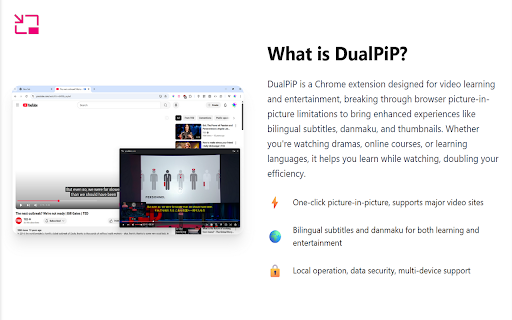

PiP video player with bilingual subtitles, AI translation, danmaku, and speed control. Supports YouTube, Netflix, Disney+, and more. DualPiP – Picture-in-Picture Player with Dual Subtitles, Translation & Live Comments Watch videos in Picture-in-Picture mode with dual subtitles, subtitle translation, live comments, thumbnail previews, and playback controls. Ideal for language learning, online courses, and multitasking. This update brings all-new in-page bilingual subtitles, letting you enjoy dual-language captions directly on web videos without entering Picture-in-Picture mode. We've also added multiple gesture controls and playback settings to significantly enhance your viewing experience. DualPiP is a Chrome extension designed for efficient video learning and an enhanced viewing experience. It builds on the browser’s native Picture-in-Picture (PiP) functionality by adding advanced subtitle, translation, and interaction features, allowing you to clearly understand video content even in a floating window. Whether you are watching foreign-language videos, online courses, TV shows, or live streams, DualPiP helps you stay focused and productive without switching tabs or interrupting your workflow. ⚡ One-click Picture-in-Picture mode with support for major video platforms 🌍 Dual subtitles and subtitle translation, ideal for language learning and foreign-language content 💬 Live comments (danmaku) support, preserving interactive viewing experiences 🔒 Runs entirely locally with a privacy-first design and no data collection 🎬 Enhanced Picture-in-Picture Player Play videos in an independent floating window with full playback controls. Freely move and resize the window for true multitasking. 🌐 Dual Subtitles & Subtitle Translation Automatically detects available subtitles and displays them in two languages, making it easier to understand foreign-language content across learning, educational, and international platforms. 🖼️ Timeline Thumbnail Preview Hover over the progress bar in Picture-in-Picture mode to preview video thumbnails and quickly navigate to important moments. 💬 Live Comments (Danmaku) Supports Bilibili, NicoNico, and selected live comment systems, displaying comments directly within the Picture-in-Picture window. ⚡ Keyboard Shortcuts & Optimized Controls Configurable keyboard shortcuts and streamlined controls reduce mouse usage and improve overall viewing efficiency. 🛡️ Privacy & Security All features run locally in your browser. No uploads, no tracking, and no analysis of your viewing activity. Who is DualPiP for? - Language learners and self-directed learners - Viewers of online courses, lectures, and educational videos - TV series, anime, and live stream enthusiasts - Multitaskers who want to watch videos while working With DualPiP, you can: - Continue watching videos while coding, taking notes, or working - Read and understand foreign-language subtitles directly in Picture-in-Picture mode - Maintain a balance between productivity and entertainment 👉 Install DualPiP now and experience a more efficient way to watch videos.

PiP Pro: Picture-in-Picture productivity tools
Boost your productivity, maximize your screen real estate, and stop tab-switching with PiP Pro - the ultimate Picture-in-Picture productivity extension for Chrome! PiP Pro is a complete productivity toolkit that lets you Picture-in-Picture ANYTHING. From full browser tabs to custom-selected sections, native video PiP, floating notes, task management, and a Pomodoro focus timer - PiP Pro keeps your essential tools always visible while you work in other tabs. ▶️ Universal PiP - Float ANY Content, Not Just Videos! • Full Screen PiP: Capture entire browser windows including websites, PDFs, documents, and web apps • Smart Video Detection: Automatically detects videos on the page and lets you PiP them with one click - perfect for YouTube, Twitch, Netflix, and any video site • Video/Tab Toggle: Choose between native video PiP (better quality, lower resource usage) or full tab capture based on your needs • Custom Section Selection: Choose exactly what portion of the screen you want to keep in view at any aspect ratio - perfect for monitoring dashboards, spreadsheets, or specific content areas 📝 Floating Notes • Take quick notes without switching tabs or windows • Access your notes in an always-on-top floating PiP window • Clean, distraction-free minimal interface • Automatic timestamps for better organization • Pro: Unlimited notes with cross-device sync ✅ Floating Todos & Task Manager • Manage your tasks in a floating always-visible window • Check off tasks without leaving your current work • See completed tasks and clear them with one click • Pro: Add due dates, recurring tasks (daily/weekly/monthly), and unlimited todos with cross-device sync • Celebration animation when you complete all your tasks! ⏱️ Pomodoro Focus Timer • Built-in productivity timer using the proven Pomodoro Technique • Beautiful countdown display that stays on top while you work • Automatic session tracking and work/break transitions • Desktop notifications when sessions complete • Pro: Customize focus/break intervals, view detailed stats & history, sync across devices 💡 Perfect For: 📚 Students: Follow video tutorials while coding, reference lecture notes while taking exams, watch lectures in PiP 💼 Remote Workers: Take meeting notes, track tasks, stay focused with Pomodoro timer 📈 Day Traders: Monitor live stock tickers, charts, or news while researching ✍️ Writers & Researchers: Reference documents while writing emails, papers, or reports 👨💻 Developers: Watch coding tutorials in PiP while coding, monitor logs, track task lists 🎮 Streamers: Keep chat or alerts visible as an overlay floating window while gaming 📊 Analysts: Monitor dashboards, spreadsheets, or data feeds while multitasking 🎥 Video Watchers: PiP any video from YouTube, Twitch, Netflix, or any streaming site 🏠 Anyone with limited screen space who needs powerful multitasking tools 🚀 Why Choose PiP Pro? ✅ Smart Video PiP - Automatically detects and PiPs videos from any website with one click ✅ Beyond Video PiP - Unlike other PiP extensions limited to video content, PiP Pro empowers you to float ANY web content. Include captions! ✅ All-in-One Productivity - Notes, Todos, Timer, and PiP in one lightweight extension ✅ Always On Top - Your floating overlay windows stay visible no matter what you're working on ✅ Works Everywhere - Seamless integration across all websites, PDFs, web apps, YouTube, Netflix, Twitch, and more ✅ Generous Free Tier - Full Screen PiP unlimited, Video PiP unlimited, 5 notes, 10 todos, standard Pomodoro timer - completely free forever 🔒 Privacy & Performance: PiP Pro respects your privacy and system resources. The extension is optimized for smooth performance without compromising your browsing speed. I do NOT collect or sell any data - your notes, todos, and usage stay private. 🛠️ Continuous Improvement: PiP Pro is an independent developer-run project, and I (the developer) am committed to constant improvement. I value user feedback and actively incorporate suggestions to make PiP Pro the best productivity tool it can be. 📬 Support & Feedback: For bug reports, feature requests, or questions, reach out to @dc1b3l on Twitter/X. Your input is invaluable in shaping the future of PiP Pro! Love PiP Pro? Please rate it in the Chrome Web Store - it helps other users discover this productivity tool! Take control of your screen space and supercharge your productivity - Add PiP Pro to Chrome now! What's New in PiP Pro v1.1.0 - 01/26/2026 🎬 🎥 New Feature: Smart Video PiP Instantly PiP any video on the page with automatic detection! • Smart Video Detection: Automatically finds videos on YouTube, Netflix, Twitch, and any website • One-Click Video PiP: Toggle between Video mode and Full Tab mode with the new mode selector • Auto-Select: Video mode is automatically selected when videos are detected on the page • Native Quality: Uses browser's native PiP for better video quality and lower CPU usage • Works Everywhere: YouTube, Twitch, Netflix, Vimeo, educational sites, and any page with video 🔄 Renamed: Full Tab PiP → Full Screen PiP • Clearer naming to distinguish from video-specific PiP • Same great functionality for capturing entire tabs 🛠️ Improvements • Better extension state management after PiP exits • Improved content script injection reliability • Fixed edge cases with extension reload What's New in PiP Pro v1.0.0 - 01/16/2026 🎉 🚀 PiP Pro 1.0 is here! Our biggest update yet with a complete productivity suite: ✅ New Feature: Floating Todos Manage your tasks in an always-on-top Picture-in-Picture window! • Create, complete, and delete tasks without leaving your current tab • Collapsible completed section with one-click clear • Beautiful celebration animation when you finish all your tasks • Pro: Due dates with smart relative display (Today, Tomorrow, Overdue) • Pro: Recurring tasks - daily, weekly, or monthly • Pro: Unlimited todos with cross-device sync ⏱️ New Feature: Pomodoro Focus Timer Stay focused with our built-in productivity timer! • Classic Pomodoro technique: 25 min focus / 5 min break / 15 min long break • Beautiful gradient countdown display • Session tracking with automatic work/break transitions • Desktop notifications when sessions complete • Works even when PiP window is closed • Pro: Customize all intervals (1-120 minutes) • Pro: Detailed focus stats and full history • Pro: Sync settings and stats across devices 💎 New: Pro Tier with Premium Features • Unlimited custom section PiP (free tier: 15 min/day) • Unlimited notes with cross-device sync • Unlimited todos with due dates, recurring tasks, and sync • Custom timer intervals with full stats and sync • Support at $1.99/month or $9.99 lifetime 🔄 Cross-Device Sync (Pro) Your notes, todos, and timer settings now sync across all your Chrome browsers automatically. 🎨 UI Improvements • Redesigned popup with clear Free/Pro feature sections • New navigation between PiP tools • Smooth animations throughout • Aurora celebration effects 🛠️ Under the Hood • Improved performance and reliability • Better error handling • Daily usage reset system • Background timer support with Chrome alarms • Create and edit notes in a floating PiP window • Clean, minimal interface • Quick access scrollable notes list • Automatic date stamping • Easy deletion and management Reach out to me on twitter for any comments or ideas! (@dc1b3l)

Danmaku mini player - picture-in-picture video player
Adopt the latest picture-in-picture API functions for a better picture-in-picture playback experience. Click the plug-in icon, or move the mouse into the video and click the floating button in the upper left corner to pop up the picture in picture. Main functional features: ✅ Drag or keyboard to control the progress bar, volume, playback rate, etc. of the picture-in-picture window ✅ Danmaku playback and send - bilibili video + live broadcast - Douyu Live - Animation Crazy - Huya Live - youtube live broadcast - twitch live - Douyin Live ✅ Special feature support for Bilibili, YouTube, and Netflix - Video playback sidebar, you can directly switch playlists and recommended videos in picture-in-picture - Subtitle list of websites - Preview function of progress bar (Netflix does not support it yet) ✅ Support plug-in .xml .ass danmaku files - It also has the built-in function to download danmaku by entering the bilibili URL ✅ Subtitle function - Support .srt .ass plug-in function - Subtitle translation + bilingual function ✅ Long press the right button to double the speed, fast forward and backward frame by frame, screenshot and other functions + custom shortcut keys ✅ Replace web video player with video player with extension ✅ Supports most https websites, and even supports Crunchyroll, Youtube embedded videos ** If you have any questions, please go to https://github.com/apades/dmMiniPlayer/issues to submit the issue, do not mention it in the comments** * If you are using edge and the tab bar is red, it is recommended to upgrade your browser to 126.0.2592.102 or above * It is recommended to use Chrome 116 or above to support all the above functions * This plugin also supports local playback, but it is a bit irreversible 1. Right-click the plug-in in the plug-in bar and click [Manage Extensions] 2. Open [Allow access to file URL] 3. Drag the video into the browser to enable the picture-in-picture function

Picture in Picture - floating video player
Watch videos while surfing the web with Picture in Picture (PiP) mode. Floating video player for Web! Picture-in Picture Extension (PiP) lets you play any video in floating video player mode, and it works on all platforms. PiP is a popped-out, always-on-top video player that floats on top of other windows. You can also reposition it along the screen border while you continue to surf the internet. Now stream your favorite movies, series or sports on any tab. Install Picture in Picture Chrome extension to enable the floating video. We support this feature on every streaming site. What is the mode and how it will be useful for you? You can also reposition it along the screen border while you continue to surf the internet. Allows you to watch videos in a floating window (always on top of other windows) so you can keep track of what you are watching when interacting with other sites or applications. Just click on the app icon to display the video player on YouTube or any other websites on the Web. This window will play the video on all pages of the browser on which there is a video resource. How do I play a video in a floating player? Open the YouTube video on the mini player in floating image-in-image mode. Supports video players This window will play videos on all pages of the browser. How Extension works: 1. Find the video and run it. 2. Click the extension icon to reduce the video player on YouTube and other sites. 3. Select the “Floating Picture in Picture” and you're done. Just click on the Floating Player and Video Control icon to display the video player on YouTube or any other websites on the Web. This window will play the video on all pages of the browser on which there is a video resource. Pic-in-pic mode supports all video formats and works with popular video hubs like HBO Max, Netflix and many others. Important Note: YouTube is a trademark of Google Inc. Use of this trademark is subject to Google permissions. The floating image mode in Picture mode for YouTube is not created, is not associated with Google Inc. or not supported. We really hope that our Picture Viewer will be useful to you! We look forward to your feedback and ratings! Also write your suggestions for improving the functionality.

Picture in Picture with subtitles — Piphover
Picture in Picture with subtitles. Increase your productivity while continuing watching what you love. Picture in Picture with subtitles (Finally). Increase your productivity while continuing watching what you love in any language. BROWSER ✅ If you are one of those who use different browsers, don't worry, you can use Piphover in other browsers besides Chrome. MULTI-DEVICE ✅ You can access your account on multiple devices at the same time. TECHNICAL SUPPORT ✅ We are here to help you in case of any technical problem.
