
dkbgodmmblfcnfledmedmepimmpebnjo

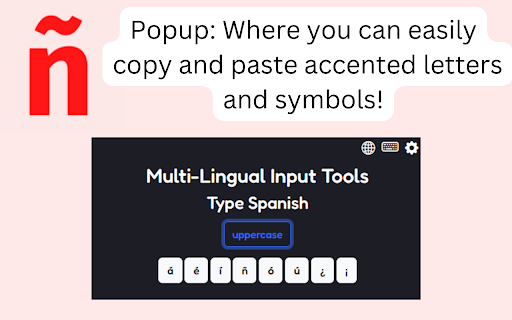

Quickly copy & paste accented letters and symbols from a variety of languages! This extension allows you to easily and effortlessly copy and paste accented letters and symbols from a variety of languages (currently Spanish, French, German, Romanian, Dutch, and Portuguese)! Need to easily type languages mentioned above for your work, school, or anywhere else around the web? This extension is perfect for you. There are many accented letters and special symbols that can be copied and used from a variety of languages.

Easy Accent Marks
For world language class to sending messages, Easy Accent Marks is the simplest solution to type accent marks. From world language classes to sending messages, Easy Accent Marks is the simplest solution to effortlessly type accent marks. Simply click on an accent, and it is automatically copied and inserted to the built-in text area. With this chrome extension, you have access to all the accent marks in these languages:

VoiceRules - Click To Call for CRM Tools
Make & receive more sales and support calls, track all calls. VoiceRules - Cloud-based Virtual Phone Systems for Small Business | make a call from anywhere. Make calls to any phone number across the globe at a single click with the VoiceRules virtual phone system. VoiceRules is a cloud-based VoIP (Voice over Internet Protocol) system for businesses of all sizes. VoiceRules uses cloud computing to deploy a flexible telephony network over the internet. Create and manage your own international call center, global support, or sales team within seconds and minutes. You can replace your old-school telephony systems with new-age, scalable, and reliable phone systems. With a click of a button, take your business global. Improve your perception and make your international clients comfortable by providing them with a local number to call. Empower your sales team to explore global sales opportunities and keep a close and real-time track of their activity and performance. You don't need any new hardware or cable or sim. All you need is a VoiceRules account and your phone or computer. Make calls using our app or website or this extension and receive calls directly on your phone number. Let's get started with VoiceRules now. ABOUT THIS EXTENSION VoiceRules Chrome Extension works with your VoiceRules.com account. It allows you to add click to call and click to text buttons beside valid phone numbers in your CRM (that VoiceRules integrates with). It also notifies you when there is an incoming phone call on your VoiceRules phone number. You can answer incoming calls directly from your Chrome browser. Click to Call dialing from web pages, integration with any softphone, screen pops in HubSpot and other CRMs. Click to Call, also known as Click2Call, or Click to Dial allows you to click a phone number on any web page and make a phone call. Click to Call CTI for CRM extension by VoiceRules converts phone numbers on web pages into clickable links to allow quick dialing and integrates with various CRMs and Service Desk applications. With Click to Call CTI for CRM extension you can: ■ Use Click to Call while you work inside your CRM Login into your web based CRM, and Click to Call CTI for CRM extension will find callers or contacts on active calls and display contact or lead information (screen pop). ■ Choose one of the popular CRMs - HubSpot, Salesforce, Zoho, Zendesk, Freshdesk and others If you tell us about your CRM and we will be happy to add it to Click to Call CTI for CRM extension. ■ Easily add call notes to CRM. You can add call notes for all the incoming and outgoing calls ■ Combine Click to Call CTI for CRM extension with VoiceRules This way you can use Click to Call CTI for CRM extension for Click2Call ( Click to Call ) and VoiceRules t for voice calls, instant messaging, voice conferencing, and CRM integration. Visit https://VoiceRules.com for more information about VoiceRules. Requirement: This extension requires VoiceRules paid account. Pricing starts at $16/month. TERMS and PRIVACY POLICY By using this Chrome Extension, you agree to the VoiceRules Terms & Conditions available at https://www.voicerules.com/terms_conditions and Privacy Policy available at https://www.voicerules.com/privacy_policy CHROME PERMISSION USAGE DISCLOSURE: This chrome extension requires following permissions from your Chrome browser: 1. notifications: Used to send you notification for incoming phone call and sms. DISCLAIMER: This extension uses Google Analytics to collect extension usage statistics to help improve user experience. If you want to opt-out of Google Analytics tracking, please visit http://tools.google.com/dlpage/gaoptout or you can set up a filter in Adblock Plus or similar ad blocker tools like AdBlock, uBlock or Adblock Pro.

Multi-language Keyboard for Google Drive™
Multi-language Virtual Keyboard for Google Chrome Do you want to type in your native language? Not used to typing in english? If you are having trouble using an english language keyboard, try changing this keyboard interface instead to type. Disclaimer: Please note this extension is NOT made by Google and is made by an independent development team. All copyrights belong to their respective owners. Google doesn’t endorse or sponsor this Chrome extension. Multi-language Virtual Keyboard for Google Drive™ is not owned by, is not licensed by and is not a subsidiary of Google Inc.

Weblin
Avatars and Things on Web Pages See the people who are already on the same web pages as you. Chat, hang out, video call, on any site. Anonymous. No account. There are real people on every web page you visit at the same time as you. You just can't see them. Weblin fixes that. Install Weblin and see who else is there. After you install the extension, a small avatar appears at the bottom of your browser: that's you. Other Weblin users on the same page show up next to you. Wave, talk in chat bubbles, open a chat window, or start a video conference. No app to download, no room link to share, being on the same URL is the room. WHAT YOU GET ● Your avatar on every web page, on every site. ● Real-time chat with anyone else on the same page. ● One-click video conferences, public or private. ● Customizable 3D animated avatars. ● An inventory of virtual items you can drop on pages, trade, or collect. WHY PEOPLE INSTALL IT ● Watch a livestream on Twitch or YouTube together with strangers and friends. ● Turn any product page, news article, or blog post into a conversation. ● Host an event or meetup on your own site, no Zoom link, no Discord server. ● Rally around a cause on the pages that matter to it. ● Find people who share your niche interests, because you're on the same page, literally. PRIVATE BY DESIGN ● 100% anonymous, no signup, no email, no profile. ● Free and open source. ● EU-based, GDPR-compliant. ● The URL you visit is hashed locally before it ever leaves your computer. ● It's a browser extension: disable it anytime with one click. ● No native software, no system access, no tracking. HOW TO START 1. Install the extension. 2. Your avatar appears at the bottom of every page. 3. Click your avatar to set a name and pick how you look. 4. Visit a page. If someone else is there, you'll see them. Say hi. ALSO GREAT FOR ● Communities who want to engage members across the whole web, not just one domain. ● Streamers who want their viewers visible during a stream. ● Event organizers who want attendees to meet on the event page itself. ● Web games: hypercasual gaming beyond the time players spend on your domain. ● Social networks: extend your reach from your domain silo to the entire web It's anonymous. It's on every web page. There are real people.
