
cgfkfhdinajjhfeghebnljbanpcjdlkm

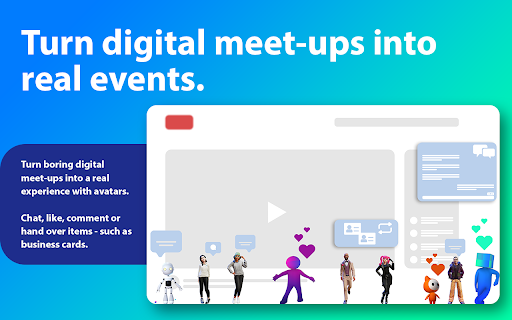


Avatars and Things on Web Pages See the people who are already on the same web pages as you. Chat, hang out, video call, on any site. Anonymous. No account. There are real people on every web page you visit at the same time as you. You just can't see them. Weblin fixes that. Install Weblin and see who else is there. After you install the extension, a small avatar appears at the bottom of your browser: that's you. Other Weblin users on the same page show up next to you. Wave, talk in chat bubbles, open a chat window, or start a video conference. No app to download, no room link to share, being on the same URL is the room. WHAT YOU GET ● Your avatar on every web page, on every site. ● Real-time chat with anyone else on the same page. ● One-click video conferences, public or private. ● Customizable 3D animated avatars. ● An inventory of virtual items you can drop on pages, trade, or collect. WHY PEOPLE INSTALL IT ● Watch a livestream on Twitch or YouTube together with strangers and friends. ● Turn any product page, news article, or blog post into a conversation. ● Host an event or meetup on your own site, no Zoom link, no Discord server. ● Rally around a cause on the pages that matter to it. ● Find people who share your niche interests, because you're on the same page, literally. PRIVATE BY DESIGN ● 100% anonymous, no signup, no email, no profile. ● Free and open source. ● EU-based, GDPR-compliant. ● The URL you visit is hashed locally before it ever leaves your computer. ● It's a browser extension: disable it anytime with one click. ● No native software, no system access, no tracking. HOW TO START 1. Install the extension. 2. Your avatar appears at the bottom of every page. 3. Click your avatar to set a name and pick how you look. 4. Visit a page. If someone else is there, you'll see them. Say hi. ALSO GREAT FOR ● Communities who want to engage members across the whole web, not just one domain. ● Streamers who want their viewers visible during a stream. ● Event organizers who want attendees to meet on the event page itself. ● Web games: hypercasual gaming beyond the time players spend on your domain. ● Social networks: extend your reach from your domain silo to the entire web It's anonymous. It's on every web page. There are real people.

CrecenTech Utilities
It's a simple chrome extension which will hide password showing method.It will also hide code inspection with all ways like short cut keys etc.

Navatar
Navatar is a video social platform for virtual identities. In this trial version you can select an animated free avatar to do Google meet for you. You can use it for video call, virtual party, or use it to provide customer support or sales service without disclosing your real identity. Navatar captures users’ real time facial expression to animate the avatars. For more details: https://navatar.live Data collection: We do NOT collect your facial image and store it in our server. The whole navatar application is edge based and will NOT send anything to our server. If some data needed to be collected to perform certain functions in future versions, we will ask for permission within the navatar application.

GimmeThat - Universal Wishlist for Shopping
Simplify shopping with a universal wishlist. Save anything you want to buy from any store globally. See your favorites with a click! Tired of forgetting things you want to buy? Too many open tabs and bookmarked product pages? Give GimmeThat a try! It's a universal wishlist that lives right in your browser. You can save anything you want to buy from any store worldwide. All your favorites in one handy wishlist: see them with one click. Save time and stay organized while shopping. GimmeThat puts a handy button next to your browser's address bar. Seen something you like - but aren't quite ready to buy? Those cool shoes? That new phone? Click the GimmeThat button to add it to your universal wishlist. You can save from any store. Want to see your wishlist? Click the GimmeThat button again. You’ll see all your saved products right away. Ready to buy something? Click on the product, and you'll go straight to its store page. Get started with GimmeThat today. Click 'Add to Chrome' at the top of this page. It's easy, and there's a quick guide to get you started. ➤➤ Your Questions Answered Yes. You can save products from stores worldwide. Just click the GimmeThat button on the product's store page to add it to your wishlist. GimmeThat works its magic and grabs all the product's details from the store page. You can fix things easily if needed. Yes. GimmeThat is free to use. And no annoying ads - we make money from affiliate links. We can earn a commission when you click on product links in your wishlist. There may be paid accounts in future for extra features. ➤ Why does GimmeThat need to "Read and change all your data on all websites"? We need some permissions to work, and only ask for what's needed. When you save a product to your wishlist, this permission lets us fetch the product's image from the website. That's it! Yes. Keeping your data safe and private is top priority. We only store the data needed to work, like your email and products you save. All data is securely stored on our cloud servers. GimmeThat only works for desktop and laptop browsers right now. But we do work to make things better, so watch out for updates. If you have any questions, suggestions or problems, email us at support@gimmethat.me. We're here to help!

FLOZABLE Tab Monitor
Boost focus with timers, block distractions, get study tips, and stay updated with group alerts using FLOZABLE. Supercharge your focus and productivity with the FLOZABLE Study Focus Chrome Extension. Seamlessly integrated with your browser, this extension is your go-to tool for cultivating efficient study habits and making the most out of your online learning experience. Time Management Mastery: Effortlessly track your study time with our intuitive timer. Set focused intervals, challenge yourself, and stay on top of your study goals. Distraction-Free Browsing: Activate the distraction-free mode to limit access to non-educational websites during your study sessions. Say goodbye to procrastination and hello to enhanced concentration. Personalized Study Plans: Receive AI-generated study suggestions based on your learning habits and preferences. Tailored recommendations to keep your study sessions engaging and effective. Group Study Alerts: Stay connected with study groups seamlessly. Receive instant notifications for group study invitations, challenges, and achievements directly through the Chrome Extension. Progress at a Glance: Get a quick overview of your study progress with a personalized dashboard. See your daily, weekly, and monthly study trends, empowering you to stay motivated and accountable.
