
dkapjhgpncbeiebegegdbpgfoabdkilh
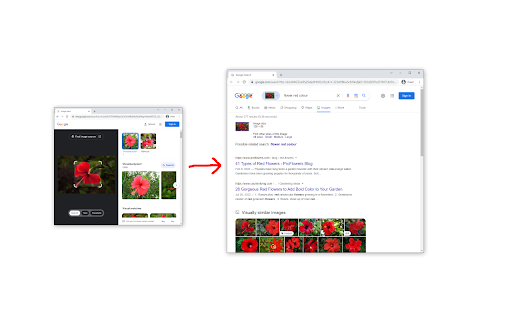


Redirects Google Lens to the normal image results This extension bypasses "Google Lens" results and takes you to the normal image results like how it used to be. It also adds a "Search Google for image" context menu item that will open the image results in a new tab. Post-installation instructions for manually removing the old "Search image with Google Lens" context menu item (the one that opens results in the Side Bar) can be found at https://github.com/fanfare/disablegooglelens/blob/master/CHROME.md

RevEye Reverse Image Search
Perform a search by image. Choose between the image search engines Google, Bing, Yandex, TinEye, or user-defined engines. This extension allows to perform an inverse image search by right-clicking onto any image in a web site. You can configure the context menu to contain either a single button with your default search engine, or a cascaded menu with all included search engines. You can also add custom search engines through the options menu. RevEye is free and open source software. To minimize its memory footprint in your browser, it is written in pure vanilla JavaScript and it does not use any of the fancy JavaScript frameworks. RevEye does not track any of your data, and it does not include ads. Source code and more info: https://github.com/steven2358/reveye Changelog: - v2.0.0 (2024-08-30): Updated to manifest v3. Added option to add custom search engines. Refactored code. - v1.5.2 (2022-11-13): Replaced Google Image Search by Google Lens. - v1.5.1 (2021-01-19): Fixed a bug in upgrade/initialization script. - v1.5.0 (2021-01-18): Add checkboxes to enable/disable individual search engines. Removed Baidu (for now). - v1.4.8 (2020-11-24): Fixed Yandex search. - v1.4.7 (2019-06-14): Removed unnecessary permissions. - v1.4.6 (2019-06-14): Fixed Yandex search. - v1.4.5 (2017-07-23): Fixed Baidu search. - v1.4.4 (2015-05-20): Re-included Yandex and Baidu search. - v1.4.3 (2015-05-19): Included Bing image match. - v1.4 (2013-06-28): Performed security changes and updated manifest to v2. Removed Yandex, Baidu, Cydral. - v1.3 (2011-06-17): Included Google (brand new and kicking), Yandex and Baidu image search engines. Removed GazoPa as they discontinued their B2C service. - v1.2 (2011-05-30): Name change to comply with Google's branding policies. Added Cydral search engine. Added option to choose between default engine or cascaded submenu. - v1.1 (2011-03-01): Added option to select between TinEye and GazoPa search engines. - v1.0 (2010-03-02): Added context menu. - v0.2 (2009-12-14): Included new logo. - v0.1 (2009-12-13): Initial version. Performs reverse image search of all images on a page using TinEye.

Screenshot Search
select and capture any area on a web page, then effortlessly perform reverse image searches on Google Images With a single click on the extension icon, effortlessly capture any region of a webpage that piques your interest. No need to save or download images – just select and release. The extension offers two capture modes: - Auto-detect mode: Automatically identifies and highlights webpage elements as you hover over them. Simply click when the desired element is highlighted. - Manual selection mode: Click and drag to select any custom region on the page. Toggle between modes by pressing the Alt key during selection, or set your preferred default in the options page (right-click the extension icon). Watch the magic happen as your captured image is instantly sent to Google Images for a seamless visual search experience. Discover similar images, the origin of your captured image and get more information about the image. Why not rely on Chrome's default 'Search image with Google' feature? Because conducting a direct search on Google Images often yields distinct results. There are instances where navigating through Google Lens and selecting 'find image source' fails to provide any results whatsoever. - Celebrity Name Discovery: Easily uncover the name of a celebrity by capturing their face. - Online Video Item Identification (people, locations, objects): Identify and locate an item that caught your eye while watching an online video by pausing then capturing its image. - Selective Capture for Precision Search: Refine your search by capturing only the specific part you're interested in while excluding the rest, ensuring precise and focused results. - Search Inaccessible Web Images: Seamlessly search images that are otherwise difficult to access on web pages like backgrounds and programmatically restricted images using the mouse capture feature. - Online Shopping: Shoppers can capture product images they like and quickly find similar items or better deals across different websites. - Skip The Google Lens Step: Eliminate the need to go through google lens "Search image with Google" option each time you want to make a search on Google Images.

Search image with Yandex
Search for similar images in Yandex with open source code, without advertising and analytics. A very lightweight extension for image search via Yandex. This extension is open-source and distributed "as is", without any warranties or guarantees. The author of this extension has no affiliation with Yandex and does not endorse or promote the company in any way. GitHub page: https://github.com/tenRabbits/extension-search-image-with-yandex/tree/master Version 2.0.1 - The search tab opens to the right of the active one

Pixiv Toolkit Next
Download ugoira, illustrations, manga and novel on Pixiv, Pixiv Fanbox and Pixiv Comic. Some thing to say... There have been constant problems since the 6.0.0 version update, and the main reason is that the upgrade was too hasty and led to some mistakes in decision-making. After this period of repairs, it should be back to road. Thank you for continuing to use and report problems. Due to some personal affairs that need to be dealt with later, the later plan is to deal with issues in every two weeks. Please understand 🙏. You can use this extension to convert the ugoira on Pixiv to animation like gif or video like mp4, or download the images of manga or save novel as file. You can also download images from Pixiv Comic and Pixiv Fanbox (Notice: You need to have access to the post or comic you want to download in order to download the resource). You can feel free to open issue on GitHub if you have any questions. Github: Pixiv Toolkit: https://github.com/leoding86/webextension-pixiv-toolkit ---------------------------------------------- v6.4.2 Remove the listener for event onDeterminingFilename; Fixed issues (#271, #284, #288). v6.2.0 Simplify the process of adding task. Now the download manager will be opened automatically and task will be added; Add default types for generating Pixiv animated images, including GIF/APNG/MP4/WEBM; Add task download progress indicator on the target page. v6.1.0 Added a option for controlling the feature about packing multiple images in download item to a zip file. v6.0.0 Notice: This version include some break changes so you maybe encounter some problems, feel free to open an issue if you feel something wrong; Adapted manifest v3; Change the way for managing downloads, download tasks are managed by Download Manager, please open Download Manager before downloading anything; Refactor the visit history feature, and because of manifest v3 the visit histories in old version will be lost after this update; Refactor the logic of generating ugoria animation, deprecated gif.js and whammy and replace them by ffmpeg; Fix issue about downloading Pixiv Comic Episode; For more detail for this version, please visit the project page https://github.com/leoding86/webextension-pixiv-toolkit/blob/master/readme.md ---------------------------------------------- Please report bugs and tell me what you need. Thanks!
