
dgaldkfnmoabpfflfpjgbjajopalkcpl
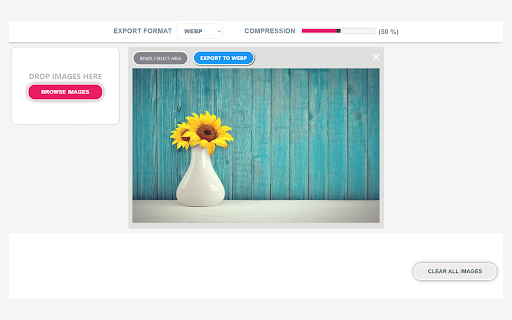


Extension for converting / saving website or computer images to AVIF, WEBP JPEG, PNG, PDF A simple extension to convert web or computer images to multiple formats including avif, webp, jpeg, png and pdf. The simple and minmal user-interface makes using this extension less confusing and straight forward. AVIF is a new image format that helps to reduce the file size while maintaining the image quality. Any image Converter is a perfect tool to save your web images as avif format.

Take Webpage Screenshots Entirely - FireShot
Take FULL webpage screenshots. Capture, edit and save them to PDF/JPEG/GIF/PNG, upload, print, send to OneNote, clipboard or email. FireShot helps you: • Save receipts, tickets, and order confirmations • Capture long articles, ChatGPT, research, and documentation • Share design reviews, bug reports, and product ideas • Keep permanent records of web pages that may change or disappear 🔒 Screenshot is done instantly and stored locally. It never leaves your computer, so it's 100% safe for storing a sensitive information. FireShot can work offline. 🏆 Awarded as "The Best Free Google Chrome Extension (Full Page Screenshot Tool)" by PCMAG.COM 🛑 No spyware and unnecessary permissions - you're just in a couple of clicks away from an ideal screenshot. 1️⃣ Save screenshot to disk as PDF (with links), PNG, and JPEG 2️⃣ Capture entire page, visible part of the web page or just a selection 3️⃣ Automatically capture all tabs to PDF or image 🔥 (https://getfireshot.com/demos/capture-all-tabs.php) 4️⃣ Provide a list of URLs for an automatic batch capturing process 🔥 (https://getfireshot.com/demos/capture-website-urls.php) 5️⃣ Attach screenshot to Gmail 6️⃣ Copy screenshot to clipboard 7️⃣ Print ### An upgrade is available. Activate it directly from the menu and: ✓ PDF with direct links and text, can be saved as a single page or split to pages ✓ Capture specific elements, such as scrolling areas on web pages (https://getfireshot.com/selection.php) ✓ Capture all tabs in one click and save to single PDF (https://getfireshot.com/demos/capture-all-tabs.php) ✓ Edit: crop, resize, add text and arrow annotations, blur areas and apply other effects ✓ Send to OneNote (Pro version) ✓ Save captures to disk as PNG, GIF, JPEG, BMP ✓ Upload to Twitter, ImageShack, Flickr, EasyCaptures, custom FTP or HTTP servers ✓ Copy to clipboard ✓ Print ✓ E-Mail ✓ Export captures to external editor ✓ Add page information to screenshot (URL, title, time, domain, etc)

MConverter - File Converter: AVIF, JXL, WebP
Extension features: ➡Right-click on most images, videos, and audio players to extract their displayed files and convert them. For example, you can right-click on WebP images and save as JPG by quickly converting them.* ➡Click the toolbar icon to see all "from" and "to" formats ➡Start typing "Convert ..." or "Convert to ..." in the address bar and you will see a list of file formats as suggestions. Click or hit Enter on any of them to quickly convert that type of files. MConverter web app features: ✓ Convert in bulk files between most video, audio, image, e-book, office & archive formats ✓ Batch convert large files up to 10 GB** ✓ Drag and drop folders, in addition to files ✓ Use Ctrl+V to paste files from the clipboard, folders too ✓ Select files from Google Drive, Microsoft OneDrive, and Dropbox ✓ Directly choose files to convert from other apps - integrates with your device's Share menu, if installed as a PWA ✓ Save converted files to any custom folder - use the SAVE TO... button ✓ Easy to use ✓ Small app size - as MConverter is an optimized web app (PWA) ✓ All popular file formats are supported ✓ New formats are also available: AVIF, JPEG XL and WebP images ✓ Compress PDF files in bulk so that they take up less storage. Pick between basic, strong, and extreme compression: up to 90% reduction in size, depending on your file ✓ Free up space by converting images to more efficient formats like WebP, AVIF, JPEG XL (JXL) ✓ Open 7ZIP, RAR archives more easily by converting them to ZIP ✓ Convert Office files, no matter if they were created with Microsoft or LibreOffice ✓ PDF support: convert images to PDF (JPEG to PDF, PNG to PDF), but also export Word documents, Excel spreadsheets, and PowerPoint presentations to PDF ✓ Export PDF to editable Word document: if the original PDF file had text data, then you will be able to edit the converted DOC or DOCX file ✓ Export PDF to image: PDF to JPG, PDF to TIFF, and more ✓ Can convert TSV and CSV to XLSX (Excel spreadsheet) ✓ Extract music from video by converting MP4 to MP3, AVI to MP3, FLV to MP3 etc. ✓ High quality audio formats supported: FLAC, WAV and WMA; To free up space, convert to MP3 or AAC ✓ Create GIF animations from videos: up to 1 minute long GIFs ✓ Optimize GIF animations to have a smaller file size: convert GIF to MP4 video ✓ In addition to static images, MConverter also supports making animated WebP files, as well as converting WebP animations to a video format or GIF ✓ Open iPhone photos: convert HEIC to JPG, HEIC to PNG, HEIC to WebP and more ✓ Extract image frames from videos: MP4 to JPG, MP4 to PNG, AVI to PNG etc. ✓ Convert to more compatible formats: WebP to PNG, WebP to JPEG, WebM to MP4, DOCX to DOC and others ✓ Convert Minecraft game files: mcaddon, mcpack, mcworld, and mctemplate ✓ Subtitles (closed captions) converter: SRT, SMI (SAMI), SUB (MicroDVD), VTT (WebVTT) ✓ .tini to zip file converter: convert ChromeOS Crostini Linux container backups to other archive formats ✓ View .drawio diagrams: convert .drawio to PDF, PNG images ✓ Comic book converter: CBR, CBZ to PDF ✓ Raw image formats from professional cameras: convert ARW/DNG/CR3 to JPEG, PSD and more ✓ Convert Jupyter Notebooks (IPYNB) ✓ Recognize and open unknown file types: If you have a file with a missing or corrupted filename extension, MConverter will analyze the file, try to guess its real format and offer to convert it to other formats you can already use on your device. Ideal for files which trigger the "How do you want to open this file? Look for an app in the Microsoft Store." popup dialog on Windows. ✓ Supported formats: To see all supported file formats, please open the extension from the toolbar. * The MConverter extension cannot download videos from YouTube, because it is against the Terms of Use of YouTube. We cannot do anything about this. ** MConverter Plus, Pro & Max can convert files over 100 MB and in batches of up to 1000 files at once. The paid plans of the file converter remove all ads, have no daily conversion limit, and allow you to keep the original file names.

Save Image as Type — JPG PNG WebP PDF Converter
Save images as JPG, PNG, WebP, or PDF. Crop, convert WebP and AVIF instantly. 100% local, no data collection. Looking for a save image as type chrome extension that actually works? SaveAs lets you right-click any image on a webpage and instantly save it as JPG, PNG, WebP, or PDF. No complicated menus, no sign-ups, no limits. Whether you need to convert WebP to JPG, save WebP as PNG, or simply download images in the format you prefer, this lightweight image format converter handles it all. It works with WebP, AVIF, and every common image format your browser can display. 1. Right-click on any image on a web page 2. Select "Save image as..." from the context menu 3. Choose your format: JPG, PNG, WebP, or PDF 4. The image downloads instantly in your chosen format You can adjust JPG and WebP quality in the extension settings, and choose whether to be prompted for a save location. ✅ Save image as JPG — perfect for photos and universal compatibility ✅ Export to PNG — ideal for screenshots and images with transparency ✅ Download as WebP — when you need smaller file sizes ✅ Save image as PDF — turn any web image into a printable document ✅ Convert WebP and AVIF — stop struggling with formats Chrome forces on you ✅ Adjustable JPG quality — control the balance between file size and quality ✅ Default format setting — set your preferred format once, save faster every time ✅ "Ask where to save" option — choose your download location or auto-save ✅ Crop & save — built-in image crop tool with aspect ratio presets (1:1, 16:9, 4:3, and more) ✅ Download images from social media — save images from Twitter/X, Instagram, Facebook, Pinterest, and Reddit in original quality ✅ Works on overlays and backgrounds — save CSS background images, canvas elements, and images hidden behind other page elements No paywall, no trial, no limits. Some image converter extensions let you convert a few images, then lock features behind a subscription. SaveAs has zero restrictions — convert as many images as you need, always. Lightweight. While some alternatives weigh over 5MB, SaveAs is a fraction of that size. No bloat, no unnecessary code, just the conversion engine. 100% local conversion. Your images never leave your device. No server uploads, no external processing, no cloud dependency. Everything happens right in your browser using the Canvas API. This also means it works offline. No host_permissions. Unlike many similar extensions that request broad access to your browsing data, SaveAs deliberately avoids unnecessary permissions. 52 languages. The interface is fully translated to serve users worldwide. Input: Any image your browser can display. Output: JPG, PNG, WebP, or PDF. Common use cases: • WebP to JPG or PNG for compatibility with older software • AVIF to JPG when you need a universally supported format • PNG to JPG to reduce file size for email attachments • Save image as PDF for archiving, printing, or sharing • Any web image saved in the exact format your workflow requires • Download Twitter images in original quality — no more compressed thumbnails • Save images from Instagram directly to your device • Download Facebook and Pinterest images in full resolution • Crop any web image to exact dimensions before saving Who Is This For? Designers and creatives who need images in specific formats for their projects. Developers who want consistent file types for testing and assets. Students and researchers organizing reference materials. Content managers collecting visuals from the web. Anyone tired of Chrome saving images as WebP when they need JPG or PNG. If you've been looking for a reliable save image as type extension that respects your privacy and doesn't charge for basic functionality, SaveAs is built for exactly that. Q: Why are my images saving as WebP? A: Modern browsers like Chrome often serve images in WebP format for better compression. While WebP is efficient, not all software supports it. This extension solves the problem — just right-click and save as JPG or PNG instead. Q: How to save WebP as JPG? A: Install this extension, right-click any image on a webpage, select your preferred format from the context menu, and choose JPG. The conversion is instant and happens locally on your device. Q: How to save WebP as PNG? A: Same process — right-click, pick PNG from the menu. Transparency is preserved during conversion. Q: How to save an image as PDF? A: Right-click any image and select PDF from the menu. The image is converted to a full-page PDF document, perfect for printing or archiving. Q: Does this work with AVIF images? A: Yes. If your browser can display it, SaveAs can convert and save it in any of the supported output formats. Q: Is this a replacement for extensions that were removed from the store? A: SaveAs provides the same core functionality — right-click to save images in your preferred format. It has no paywall, and all processing stays on your device. Q: How to download images from Twitter or X? A: Right-click any image on Twitter/X and choose your format. SaveAs automatically requests the original quality version instead of the compressed thumbnail that Twitter normally serves. Q: How to save images from Instagram? A: Same as any other image — right-click and pick your format from the SaveAs menu. The extension works directly on the page without needing any special permissions or host access. Q: Can I crop an image before saving? A: Yes. Right-click any image, select Crop & Save from the menu. This opens a crop tool where you can draw a selection area, choose an aspect ratio preset, pick your output format, and save. Q: Does this work with images behind overlays or CSS backgrounds? A: Yes. SaveAs detects images even when they are covered by overlay elements, used as CSS background images, or displayed in canvas elements. Right-click anywhere and SaveAs will find the nearest image automatically.

Save images as Type
Save images as PNG, JPG, WebP, and SVG. File Convert tool for converting images to different formats. ✨ Transform your images instantly with our powerful file conversion tool! ✨ Save images as Type is the ultimate browser extension for quickly converting images between popular formats. With just a few clicks, transform any image to PNG, JPG, WebP, or SVG format. 🔄 Simple & Intuitive Interface: Easy-to-use design for both beginners and professionals 📊 Multiple Format Support: Convert to PNG, JPG, WebP, and SVG formats 📦 Batch Conversion: Process multiple images simultaneously to save time 👁️ Preview Before Saving: See how your converted image will look before downloading 🔌 No Internet Required: All conversions happen locally in your browser 🔒 Privacy Focused: Your images never leave your device 👍 Perfect For: 🎨 Web designers needing different image formats for websites 🖌️ Digital artists saving work in various file types 📱 Content creators optimizing images for social media 💻 Anyone who needs to quickly change image formats without installing software Whether you need to reduce file size with WebP, maintain transparency with PNG, ensure compatibility with JPG, or scale infinitely with SVG, Save images as Type handles it all with ease. ✨ With our extension, you can easily convert between any of these formats with just a few clicks! No matter what image format you have, Save images as Type has you covered! ✨ ⬇️ Download now and simplify your image conversion workflow! ⬇️
