
ppfngkdknicokcdembnnlpahnpanlcko
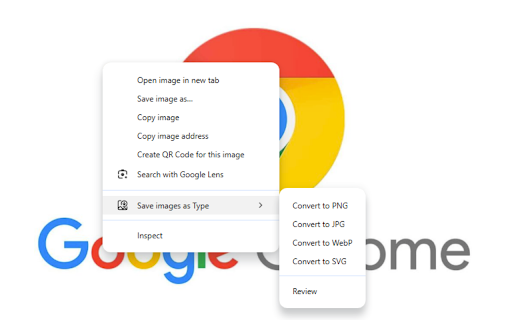
Save images as PNG, JPG, WebP, and SVG. File Convert tool for converting images to different formats. ✨ Transform your images instantly with our powerful file conversion tool! ✨ Save images as Type is the ultimate browser extension for quickly converting images between popular formats. With just a few clicks, transform any image to PNG, JPG, WebP, or SVG format. 🔄 Simple & Intuitive Interface: Easy-to-use design for both beginners and professionals 📊 Multiple Format Support: Convert to PNG, JPG, WebP, and SVG formats 📦 Batch Conversion: Process multiple images simultaneously to save time 👁️ Preview Before Saving: See how your converted image will look before downloading 🔌 No Internet Required: All conversions happen locally in your browser 🔒 Privacy Focused: Your images never leave your device 👍 Perfect For: 🎨 Web designers needing different image formats for websites 🖌️ Digital artists saving work in various file types 📱 Content creators optimizing images for social media 💻 Anyone who needs to quickly change image formats without installing software Whether you need to reduce file size with WebP, maintain transparency with PNG, ensure compatibility with JPG, or scale infinitely with SVG, Save images as Type handles it all with ease. ✨ With our extension, you can easily convert between any of these formats with just a few clicks! No matter what image format you have, Save images as Type has you covered! ✨ ⬇️ Download now and simplify your image conversion workflow! ⬇️

Save image as Type
Save image as Type — Save Any Web Image as PNG, JPG, or WebP — Instantly, Privately, Locally ▶ TAKE CONTROL OF HOW YOU SAVE IMAGES FROM THE WEB Tired of downloading images in the wrong format? Frustrated by websites forcing WebP files on you when you need a PNG or JPG? Fed up with uploading your private images to shady online converters just to change a file format? Save image as Type puts you back in control. Right-click any image on any webpage and save it instantly as PNG, JPG, or WebP — converted on the spot, right inside your browser. No uploads. No servers. No nonsense. --- ▶ KEY FEATURES • Right-click context menu integration — A clean submenu appears whenever you right-click an image: "Save as PNG", "Save as JPG", "Save as WebP". Fast, familiar, frictionless. • True client-side conversion — Images are converted using the browser's own Canvas API. The conversion happens entirely inside your browser tab. Your images never leave your device. • Set your default format — Open the extension popup and pick your preferred format once. From then on, a single right-click is all you need — your chosen format is always ready to go. • Custom download subfolder — Specify a subfolder name (for example "Saved Images" or "Design Assets") and every image you save lands neatly in that folder inside your Downloads directory. No more hunting through a cluttered Downloads folder. • Works on any image, on any webpage — Product photos, blog illustrations, social media images, banners, WebP thumbnails — if you can see it, you can save it in the format you want. • Works 100% offline — No internet connection required for the conversion. Once the extension is installed, it works anywhere, anytime. • Lightweight and fast — No background processes, no memory bloat. The extension does nothing until you actually right-click an image. Zero idle resource usage. • No account, no sign-up, no setup — Install and go. There is nothing to configure beyond your optional format preference and subfolder name. --- ▶ SUPPORTED FORMATS ◉ PNG — Lossless compression. Perfect for screenshots, logos, icons, graphics with transparency, and any image where pixel-perfect quality matters. ◉ JPG / JPEG — Widely compatible, compact file size. Ideal for photographs, product images, and anything you plan to share or upload to a platform that expects JPEG. ◉ WebP — Google's modern format offering excellent compression with quality retention. Great when you want smaller files without visible quality loss. --- ▶ HOW IT WORKS 1. Find any image on any webpage. 2. Right-click the image to open the browser context menu. 3. Hover over "Save image as Type" to see the format submenu. 4. Click "Save as PNG", "Save as JPG", or "Save as WebP". 5. The extension draws the image onto an invisible canvas inside your browser, exports it in your chosen format, and triggers an automatic download. 6. The file lands in your Downloads folder — or in your custom subfolder if you set one up. That's the entire workflow. No dialog boxes, no waiting, no redirects. Want it even faster? Open the extension popup, set your default format, and from then on the very first option in the submenu is already your preferred format — one click and done. --- ▶ YOUR PRIVACY IS FULLY PROTECTED This is where Save image as Type is fundamentally different from online image converters and many other extensions. Zero server communication. The image data never leaves your browser. There are no API calls, no remote processing, no cloud storage. Everything happens locally using standard browser technology (the HTML5 Canvas API). Minimal permissions. The extension requests only two permissions: — downloads — needed to save the converted file to your disk. — contextMenus — needed to add the right-click menu options. That's it. No access to your browsing history. No access to your tabs or personal data. No reading of page content beyond the specific image you click on. No analytics. No telemetry. No crash reporting. There are no hidden trackers, no usage statistics sent anywhere, no third-party SDKs phoning home. The extension is completely silent when you are not actively using it. No account required. There is no sign-up, no login, no email address collected. You install it and it works — anonymously, always. --- ▶ WHY NOT JUST USE AN ONLINE CONVERTER? Online image converters require you to upload your image to their server. This means: ✗ Your image leaves your device and is processed on someone else's computer. ✗ You have no control over how long they keep your file. ✗ You need an active internet connection for the conversion itself. ✗ You have to leave the page, open a new tab, upload, wait, download. Save image as Type does none of that. The conversion is instant, local, and completely private. It is especially valuable for sensitive images — internal screenshots, confidential documents, personal photos — where you simply cannot afford to upload files to an unknown third party. --- ▶ WHY NOT JUST USE "SAVE IMAGE AS" IN THE BROWSER? Chrome's built-in "Save image as" saves the file in whatever format the website serves it — often WebP, sometimes with a misleading extension. You get what the website decides to give you. Save image as Type gives you the choice. You decide the format, every time, with one click. --- ▶ PERFECT FOR • Designers and developers who need images in a specific format for their workflow • Anyone annoyed by WebP files that won't open in older software • Bloggers and content creators building image libraries • People who want organized downloads with automatic subfolders • Privacy-conscious users who refuse to upload personal images to online tools • Anyone who simply wants a faster, cleaner way to save web images --- ▶ GET STARTED IN SECONDS Click "Add to Chrome", right-click any image, and save it exactly the way you want. No tutorials, no configuration required, no strings attached. Your images. Your format. Your device. Every time.

Save Image As Type
Save images as PNG, JPG, or WebP with custom quality settings. Save Image as Type allows you to quickly save any image in PNG, JPG, or WebP format directly from the right-click menu. With a fast and lightweight workflow, the extension allows you to choose your preferred image format instantly and streamline how images are downloaded. Everything runs locally in your browser, keeping performance high and your data private. Built for designers, developers, content creators, and everyday users who download images frequently, this extension gives you precise control without clutter or complexity. 🤩 If you like Save Image As Type, give us a 5-star rating! 🤩 Features: • Save images as PNG, JPG, or WebP • Right-click to choose the format instantly • See image size (width × height) on hover • Lightweight, fast, and easy to use • Works entirely offline in your browser • No ads, no tracking, no data collection 📝 Note::- Save Image as Type does exactly what it promises - quick, clean, and flexible image saving, built for speed and simplicity.. (Installing or uninstalling this extension may display promotional content.)

Save Image As...
Right-click any image to save it as PNG, JPG, or WebP. Batch-download all images on a page. Save Image As... lets you quickly convert and download images in your preferred format — right from the right-click menu. • Save as PNG, JPG, or WebP — Right-click any image and choose your format • Copy as PNG — Copy any image directly to your clipboard, ready to paste • Batch Download — Click the toolbar icon to scan the entire page, select images, and download them all at once in your chosen format • Original Quality — When saving in the same format as the source, the original file is preserved with zero quality loss • Smart Naming — Files are automatically named based on the original image URL • Cross-Origin Support — Handles images from external domains with graceful error handling To download all images on a page: 1. Click the extension icon in the toolbar 2. Select the images you want (or click "Select All") 3. Pick a format and click Download • contextMenus — To add the right-click menu • downloads — To save files to your computer • activeTab — To access images on the current page • notifications — To show success/error alerts No data is collected. No analytics. Everything runs locally in your browser.

Save image as PNG, JPG, WebP...
It can easily help you save web image as PNG, JPG or WebP.. It can easily help you save web image as PNG, JPG or WebP.. And it supports custom quality (compression) options, And it provides an image editor for web image.
