
hpjdhhlocahjkhhmcdfbggiegokpljgf
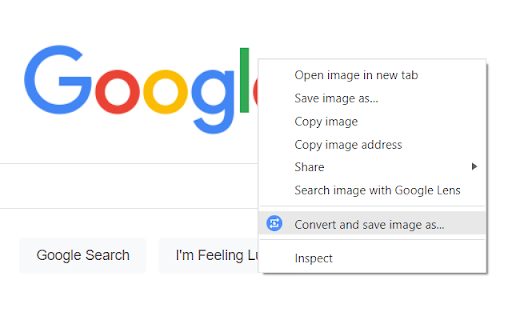


Extension features: ➡Right-click on most images, videos, and audio players to extract their displayed files and convert them. For example, you can right-click on WebP images and save as JPG by quickly converting them.* ➡Click the toolbar icon to see all "from" and "to" formats ➡Start typing "Convert ..." or "Convert to ..." in the address bar and you will see a list of file formats as suggestions. Click or hit Enter on any of them to quickly convert that type of files. MConverter web app features: ✓ Convert in bulk files between most video, audio, image, e-book, office & archive formats ✓ Batch convert large files up to 10 GB** ✓ Drag and drop folders, in addition to files ✓ Use Ctrl+V to paste files from the clipboard, folders too ✓ Select files from Google Drive, Microsoft OneDrive, and Dropbox ✓ Directly choose files to convert from other apps - integrates with your device's Share menu, if installed as a PWA ✓ Save converted files to any custom folder - use the SAVE TO... button ✓ Easy to use ✓ Small app size - as MConverter is an optimized web app (PWA) ✓ All popular file formats are supported ✓ New formats are also available: AVIF, JPEG XL and WebP images ✓ Compress PDF files in bulk so that they take up less storage. Pick between basic, strong, and extreme compression: up to 90% reduction in size, depending on your file ✓ Free up space by converting images to more efficient formats like WebP, AVIF, JPEG XL (JXL) ✓ Open 7ZIP, RAR archives more easily by converting them to ZIP ✓ Convert Office files, no matter if they were created with Microsoft or LibreOffice ✓ PDF support: convert images to PDF (JPEG to PDF, PNG to PDF), but also export Word documents, Excel spreadsheets, and PowerPoint presentations to PDF ✓ Export PDF to editable Word document: if the original PDF file had text data, then you will be able to edit the converted DOC or DOCX file ✓ Export PDF to image: PDF to JPG, PDF to TIFF, and more ✓ Can convert TSV and CSV to XLSX (Excel spreadsheet) ✓ Extract music from video by converting MP4 to MP3, AVI to MP3, FLV to MP3 etc. ✓ High quality audio formats supported: FLAC, WAV and WMA; To free up space, convert to MP3 or AAC ✓ Create GIF animations from videos: up to 1 minute long GIFs ✓ Optimize GIF animations to have a smaller file size: convert GIF to MP4 video ✓ In addition to static images, MConverter also supports making animated WebP files, as well as converting WebP animations to a video format or GIF ✓ Open iPhone photos: convert HEIC to JPG, HEIC to PNG, HEIC to WebP and more ✓ Extract image frames from videos: MP4 to JPG, MP4 to PNG, AVI to PNG etc. ✓ Convert to more compatible formats: WebP to PNG, WebP to JPEG, WebM to MP4, DOCX to DOC and others ✓ Convert Minecraft game files: mcaddon, mcpack, mcworld, and mctemplate ✓ Subtitles (closed captions) converter: SRT, SMI (SAMI), SUB (MicroDVD), VTT (WebVTT) ✓ .tini to zip file converter: convert ChromeOS Crostini Linux container backups to other archive formats ✓ View .drawio diagrams: convert .drawio to PDF, PNG images ✓ Comic book converter: CBR, CBZ to PDF ✓ Raw image formats from professional cameras: convert ARW/DNG/CR3 to JPEG, PSD and more ✓ Convert Jupyter Notebooks (IPYNB) ✓ Recognize and open unknown file types: If you have a file with a missing or corrupted filename extension, MConverter will analyze the file, try to guess its real format and offer to convert it to other formats you can already use on your device. Ideal for files which trigger the "How do you want to open this file? Look for an app in the Microsoft Store." popup dialog on Windows. ✓ Supported formats: To see all supported file formats, please open the extension from the toolbar. * The MConverter extension cannot download videos from YouTube, because it is against the Terms of Use of YouTube. We cannot do anything about this. ** MConverter Plus, Pro & Max can convert files over 100 MB and in batches of up to 1000 files at once. The paid plans of the file converter remove all ads, have no daily conversion limit, and allow you to keep the original file names.

Online File Converter
Online Convert PDF, image, video, document, audio and other files to other formats. Support for 20247 format conversions. Online Convert PDF, image, video, document, audio and other files to other formats. Support for 20247 format conversions.

Video converter online VideoConvertPlus
Video converter online for multiple video formats This extension is a video converter to convert video formats between each other. It allows users to upload their videos to be automatically converted to the video format chosen by the users. It is based on the tool ffmpeg and HandBrake. HandBrake is used to convert any MOV related video file. The rest of the video formats are converted using FFMPEG online. In addition to the video conversion functionality, the videos converted remained in a cloud space area from where the users can download them or delete them. Moreover, if the video format chosen for conversion is MP4, VideoConvertPlus adds an option to import such MP4 videos to the online movie maker MovieStudio. This app, a movie maker online, allows to edit the video, add texts, images and audios in different video layers. Refer to the RedcoolMedia MovieStudio documentation for further details.

waView, Image Viewer and Editor
Fast, offline image viewer built with WebAssembly technology. You can open 200 image formats including JPG, PNG, TIFF, JXR, RAW. Fast, offline image viewer built with WebAssembly technology. This Viewer is an app which is designed specifically to open and view the multiple image formats in your browser. It is quite easy to use and comprehend this extension. This Viewer does not save or share the file you select. It only works locally without going through the server. (HTML WebAssembly) You can open 200 image formats including JPG, PNG, TIFF, PPM, JXR, RAW from your computer or your Google Drive. This extension also allows you to save the opened image to JPG, PNG, PDF format in your browser directly, and extracts/displays the Exif information in the image file. With this viewer you can open mutiple image, dwg, dxf formats and view its contents very easily. Edit/Effect image, Convert to vector format, OCR, Quick page-turning, Zoom in/out to read the files the way you like. Support for viewing multiple files (only jpg,png,gif,webp). Select or Drop multiple jpgs, pngs. Support jpg,png,gif,bmp,webp image files compressed with zip,rar,7z archive format.

Converter Video
Convert any video file to one of several supported formats (for example, mp4) from your browser! The "Converter Video" extension allows you to convert any video format to another with ease. The FFmpeg library, which is compiled from the C/C++ language to JavaScript using the Emscripten compiler, is used. Emscripten is a source-to-source compiler that converts native C/C++ instructions to JavaScript. To acquire further information about the Emscripten compiler, see this Wikipedia article. To use this add-on, just open the app UI and drag a video file to the designated area. Then input your FFmpeg command into the input file and press the Run button. The link to download the video file will be available at the bottom of the UI once the conversion is finished. Please keep in mind that depending on the video size and type of conversion selected, conversion might take some time. In order for you to start working with this add-on, there are some sample commands (as buttons) offered in the app UI that you may utilize. Because this add-on uses the browser version of FFmpeg, it is slower than desktop applications/libraries. The usage of the extension is simple, however. Simply place it in your browser and it will begin to operate immediately without the need for any extra plugins. It's only suited for simple conversions and has a restricted number on codecs.
