
mcbpblocgmgfnpjjppndjkmgjaogfceg
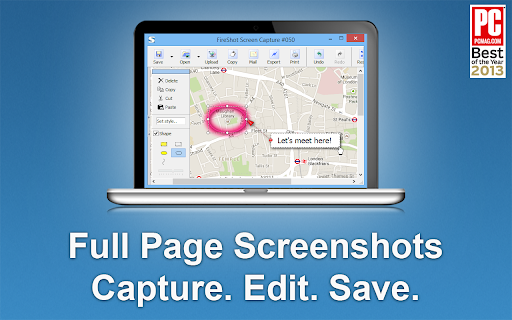

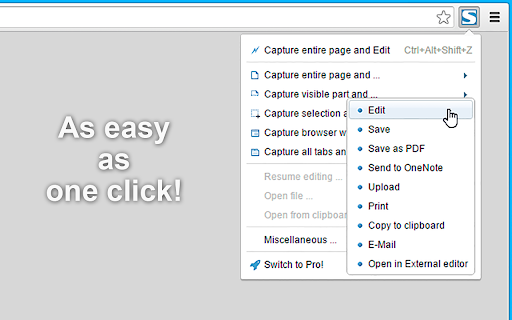
Take FULL webpage screenshots. Capture, edit and save them to PDF/JPEG/GIF/PNG, upload, print, send to OneNote, clipboard or email. FireShot helps you: • Save receipts, tickets, and order confirmations • Capture long articles, ChatGPT, research, and documentation • Share design reviews, bug reports, and product ideas • Keep permanent records of web pages that may change or disappear 🔒 Screenshot is done instantly and stored locally. It never leaves your computer, so it's 100% safe for storing a sensitive information. FireShot can work offline. 🏆 Awarded as "The Best Free Google Chrome Extension (Full Page Screenshot Tool)" by PCMAG.COM 🛑 No spyware and unnecessary permissions - you're just in a couple of clicks away from an ideal screenshot. 1️⃣ Save screenshot to disk as PDF (with links), PNG, and JPEG 2️⃣ Capture entire page, visible part of the web page or just a selection 3️⃣ Automatically capture all tabs to PDF or image 🔥 (https://getfireshot.com/demos/capture-all-tabs.php) 4️⃣ Provide a list of URLs for an automatic batch capturing process 🔥 (https://getfireshot.com/demos/capture-website-urls.php) 5️⃣ Attach screenshot to Gmail 6️⃣ Copy screenshot to clipboard 7️⃣ Print ### An upgrade is available. Activate it directly from the menu and: ✓ PDF with direct links and text, can be saved as a single page or split to pages ✓ Capture specific elements, such as scrolling areas on web pages (https://getfireshot.com/selection.php) ✓ Capture all tabs in one click and save to single PDF (https://getfireshot.com/demos/capture-all-tabs.php) ✓ Edit: crop, resize, add text and arrow annotations, blur areas and apply other effects ✓ Send to OneNote (Pro version) ✓ Save captures to disk as PNG, GIF, JPEG, BMP ✓ Upload to Twitter, ImageShack, Flickr, EasyCaptures, custom FTP or HTTP servers ✓ Copy to clipboard ✓ Print ✓ E-Mail ✓ Export captures to external editor ✓ Add page information to screenshot (URL, title, time, domain, etc)

Alt & Meta viewer
This extension show alt and meta.

Screenshot Master: Full Page Capture
Easy, free and full-featured screenshot app to capture, edit and save your screenshots. An easy-to-use, yet functionally powerful screenshot tool! Lets you capture the whole page screenshot with just one click. It works just like the native feature of Google Chrome to capture screen but in a more optimized way. ✍ Advantages: ☑︎ Easy and user-friendly interface ☑︎ No restrictions on use ☑︎ Create full-page screenshot ☑︎ Create visible area screenshot ☑︎ Keyboard Shortcuts ☑︎ Best Quality, High-Resolution screenshots, PNG, JPG, and WEBP formats. Built-in image editor is an added feature of this extension. You can use the simple image editor, which offers a dozen different features. ✍ Screenshot Editor features: ☑︎ Write text ☑︎ Cropping ☑︎ Use arrows ☑︎ Include rectangular boxes or lines ☑︎ Saving in PNG, JPG, and WEBP formats.

Extension Manager
Manage extensions, Quickly enable/disable, Support batching operation, Smart sorting. Fast, Simple and Secure. 1. One Key fast enable/disable extension 2. Lightning Group: Quickly enable/disable extension groups according to the scene (except for locked or theme class extensions) 3. Smart Sort: intelligent sorting according to your frequency of use (default sort by name) 4. Right-click Menu: provides shortcut functions such as lock, uninstall, option configuration, home page, APP running, etc. 5. Smart Search: Quickly find the extension you need with keywords or phrases 6. Reminder: display the extended status in real time, remind reset after use, reduce resource consumption (except for locked or theme class extension) 7. View Selection: Provide list view and grid view, in line with user habits 8. Group management: general group and fixed group, flexible management 9. Extension Naming: Give your extension an alias you like 10. Automatic matching: You can turn extensions on and off according to different websites 11.Support dark mode

FeHelper - JSON格式化、编解码、二维码、开发者工具箱
FeHelper is a powerful developer tool designed for front-end developers. It integrates various practical tools to help developers improve work efficiency. However, FeHelper strictly adheres to the principle of single function activation. By default, FeHelper only provides the JSON auto-formatting function, and all other functions are disabled by default. If users need them, they can go to the plugin configuration page to install and enable them. The following are the main functions of FeHelper: ## JSON Tools: - JSON beautifier: Automatically detects and formats JSON data, supports manual formatting, decoding of messy codes, sorting, BigInt processing, editing, downloading, and skin customization, greatly facilitating developers' processing of JSON data. - JSON comparison tool: Supports automatic key-value comparison of two JSON contents, highlights differences, and helps developers quickly identify data changes. ## QR Code Tool: - QR code generator: Supports custom color and icon QR code generation, suitable for a variety of application scenarios. - QR code decoder: Supports multiple modes of QR code decoding, including decoding after pasting a screenshot, which is convenient and fast. ## Encoding tool: - String encoding and decoding: Supports multi-format information encoding and decoding, such as Unicode, UTF-8, URL, Base64, MD5, etc., to meet different encoding requirements. Code beautification tool: Supports code beautification for multiple languages, including Javascript, CSS, HTML, XML, and SQL, helping developers maintain clean and tidy code. Code compression tool: Provides simple code compression functionality, supports HTML, Javascript, and CSS code compression, and optimizes web page loading speed. ## Developer Tools: - AI assistant: A super intelligent dialogue tool powered by AI, supporting code writing, code modification, scheme design, and other tasks to improve development efficiency. - Simple Postman: An interface debugging tool that supports GET/POST/HEAD request methods, automatically formats JSON content, and simplifies the API testing process. - Websocket tool: supports packet capture testing for Websocket interfaces, including connection testing for ws services, message sending testing, result analysis, and more. ## Other tools: - Time (stamp) conversion: mutual conversion between localized time and time stamp, supporting second/millisecond, world time zone switching, clock display in various time zones, etc. - Random password generation: Generate passwords by randomly combining various characters, supporting specified length and character type to ensure password security. - My sticky notes: A sticky notes tool that supports creating directories to categorize and manage notes. Notes can be exported/imported with one click for convenient information management. - Markdown conversion: Markdown editing/preview tool, supports direct conversion of HTML fragments to Markdown, and supports downloading content in PDF format. - Webpage screenshot tool: It can take screenshots of any webpage, supporting both visible area screenshots and full-page scrolling screenshots. The final result can be previewed before being saved. - Page color picker tool: You can directly collect color values for any element on the webpage. Move the cursor to the location where you want to pick the color, and click OK.
