
dfdnmbkcfddekonmblhmagdggecjboeb
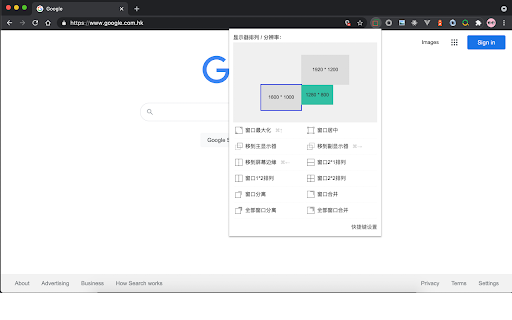
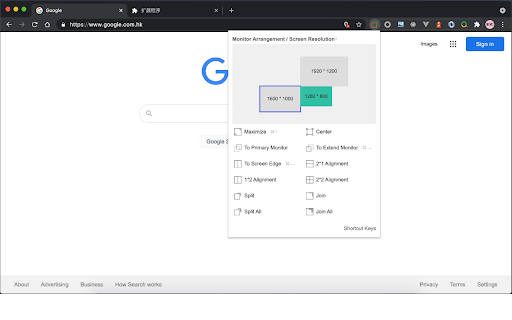
The extension supports window switching, maximization, centering, vertical / horizontal arrangement, tab separation / merging from… 1. The window can move among multiple displays without dragging; 2. Window maximization, centering and edge; 3. The windows arrange in 1x2, 2x1 and 2x2; 4. The window tab is separated and merged from the window; When your computer is connected with an extended display, it is very easy to adjust the window position and size The following shortcut keys are supported by default: 1. Switch between multiple monitors (Windows: Ctrl + →, MAC: ⌘ + →) 2. Resize the window size (Windows: Ctrl + ↑, MAC: ⌘ + ↑) 3. Move the window to the screen left、top、right and bottom (Windows: Ctrl + ←, MAC: ⌘ + ←) Other shortcut keys can be customized.

Quicker Connector
Native message connector with Quicker application. !!! Do not download if you are not using Quicker application from https://getquicker.net. This extension was designed to work with Quicker (A windows tool that can automate operations and softwares).

Re-newtab
A redesigned, productive and pragmatic new tab alternative. Overview: This extension provides 19 desktop widgets, plus bookmarks manager, history manager, extensions manager, downloaded files manager and quick search function in your new tab page (so chrome will show you these permissions when you install it). The core idea of this extension is to help user quickly find web pages that you want to open. The home panel shows links, information and functions by different widgets. Of course, you can customize these widgets. Sometimes if you just want to see a wallpaper on new tab, there is a wallpaper mode that hide all elements on the page and only show the wallpaper and a toggle button. 0. Quick Search You can use keyboard shortcuts to search for bookmarks, history, opened tabs and downloaded files, similar to Alfred. 1. Home Panel Home panel contains many versatile widgets(cards), like clock, calendar, recently closed tabs. You can add/remove widgets, drag and drop widget to a new position, change widget's title and color. Main widgets: • Most Visited: show default newtab most visited pages. • Bookmarks Bar: show Bookmarks. • Todo List: a simple but powerful todo(task) list. • Opened Tabs: a simple tabs manager, which shows all current opened tabs. You can jump to or close a tab by click, and more functions in context menu. • Recently Closed: recently closed tabs. • Analog clock and digital clock: highly customizable clocks. • Calendar: A month view calendar. • Calculator: A super calculator powered by math.js. • Google Drive widget: quick access recent, starred, shared drive files or search files. • Google Calendar widget: list your Google Calendar events. • Translate: a Google Translate widget. • Notepad: a simple notepad. • Search Engine: search via your browser's default search provider. • YouTube Subscriptions: list video updates for all your subscriptions. • Google Sites: top google services. • Office: ms office web apps. • Chrome Misc: chrome internal pages. 2. Bookmarks Manager Bookmarks are an important concept, because they are your own collections and what you need. This extension provides a more productive bookmarks manager. Similar to Mac Finder in columns view, you can manage and navigate bookmarks by mouse or keyboard shortcuts, for example: • Navigate all bookmarks using mouse or arrow keys. • Open a bookmark by double click or enter key. • Open all bookmarks in a folder by context menu. • Drag and Drop a bookmark to a new location. • Create, edit or delete bookmark or folder by context menu. • Select multi bookmarks to move, delete or open. • Copy/cut/paste bookmarks(except folders) by shortcuts. • Sort bookmarks by name • Support many keyboard shortcuts. 4. Downloads Manager Show your downloaded files. You can open downloaded files or open their folders, and clear download history. 6. Extensions Manager Manage all extensions and apps. You can enable/disable/remove the extensions and open their options.

搜索拐杖
在Google,百度,必应等等搜索引擎间进行快捷切换,搜索关键词无需重输! 1、在Google,百度,必应,Rambler,雅虎和好搜等搜索引擎间进行快捷切换,搜索关键词无需重输。 2、当Google搜索结果页面跳转中断时,支持Google引用页重试直接访问。 3、支持自定义的搜索引擎切换。 4、支持设置单击图标来切换搜索引擎。 5、支持快捷键切换搜索引擎,默认切换前一个(Ctrl+Shift+Y,linux:Ctrl+Shift+B)、后一个(Ctrl+Shift+U)。 6、支持数据云同步,可手动备份和恢复数据。

Extension Manager
Professional Chrome extension management tool. Quickly enable/disable extensions, set favorite extension mode, and search all your… 1. Manage extensions, disable/enable your extensions with one click 2. Set common extensions, you can open the common extension mode 3. Quickly search for your extensions and configure them 4. View extensions in the chrome app store 5. Open the expanded configuration page 6. Uninstall the extension 7. Added some shortcuts If you have a better UI design and function recommendations, please leave a message yo. Test phase, welcome to comment.
