
ccfjmnfklnaofoggkolocloghafpoccc
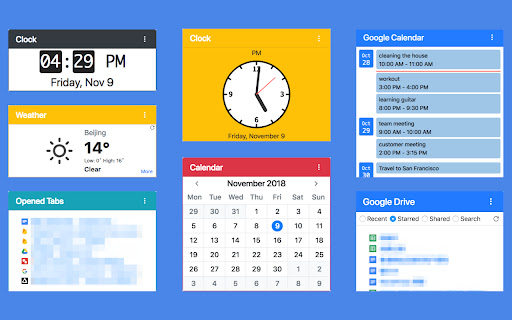
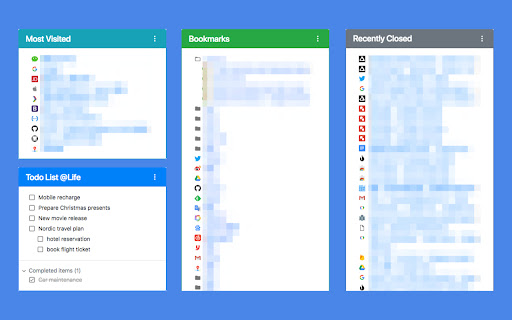


A redesigned, productive and pragmatic new tab alternative. Overview: This extension provides 19 desktop widgets, plus bookmarks manager, history manager, extensions manager, downloaded files manager and quick search function in your new tab page (so chrome will show you these permissions when you install it). The core idea of this extension is to help user quickly find web pages that you want to open. The home panel shows links, information and functions by different widgets. Of course, you can customize these widgets. Sometimes if you just want to see a wallpaper on new tab, there is a wallpaper mode that hide all elements on the page and only show the wallpaper and a toggle button. 0. Quick Search You can use keyboard shortcuts to search for bookmarks, history, opened tabs and downloaded files, similar to Alfred. 1. Home Panel Home panel contains many versatile widgets(cards), like clock, calendar, recently closed tabs. You can add/remove widgets, drag and drop widget to a new position, change widget's title and color. Main widgets: • Most Visited: show default newtab most visited pages. • Bookmarks Bar: show Bookmarks. • Todo List: a simple but powerful todo(task) list. • Opened Tabs: a simple tabs manager, which shows all current opened tabs. You can jump to or close a tab by click, and more functions in context menu. • Recently Closed: recently closed tabs. • Analog clock and digital clock: highly customizable clocks. • Calendar: A month view calendar. • Calculator: A super calculator powered by math.js. • Google Drive widget: quick access recent, starred, shared drive files or search files. • Google Calendar widget: list your Google Calendar events. • Translate: a Google Translate widget. • Notepad: a simple notepad. • Search Engine: search via your browser's default search provider. • YouTube Subscriptions: list video updates for all your subscriptions. • Google Sites: top google services. • Office: ms office web apps. • Chrome Misc: chrome internal pages. 2. Bookmarks Manager Bookmarks are an important concept, because they are your own collections and what you need. This extension provides a more productive bookmarks manager. Similar to Mac Finder in columns view, you can manage and navigate bookmarks by mouse or keyboard shortcuts, for example: • Navigate all bookmarks using mouse or arrow keys. • Open a bookmark by double click or enter key. • Open all bookmarks in a folder by context menu. • Drag and Drop a bookmark to a new location. • Create, edit or delete bookmark or folder by context menu. • Select multi bookmarks to move, delete or open. • Copy/cut/paste bookmarks(except folders) by shortcuts. • Sort bookmarks by name • Support many keyboard shortcuts. 4. Downloads Manager Show your downloaded files. You can open downloaded files or open their folders, and clear download history. 6. Extensions Manager Manage all extensions and apps. You can enable/disable/remove the extensions and open their options.

Speed Dial | Bookmark Manager for New Tab with Sync
Speed Dial and Bookmark Manager with Sync that Helps You Organize Your New Tab Page Across Browsers, Devices and Platforms Speed Dial and Bookmark Manager with Sync that Helps You Organize Your New Tab Page Across Browsers, Devices and Platforms Speed Dial | Bookmarks Manager with Sync for New Tab Page Logreel is a personalized start page and a powerful bookmark manager with sync that fits all your needs. You’re able to sync your bookmarks fast and easy with step by step instructions! You're able to access your bookmarks from any platform that has internet access. Logreel is not just a bookmark organizer — it's also a tab manager, session saver, and productivity tool. You can save, organize, and restore your tabs, or group them just like a simplistic tab manager. Everything is designed to help you stay focused and efficient. Access your bookmarks and sessions from any platform with internet access. If you're looking for a replacement for Papaly, this is the best alternative. Get one of the best tools for productivity, bookmark syncing, and tab management on Chrome! With Logreel, you can use features including: Access your bookmarks from any platform with internet access. Logreel is one of the best productivity tools for Chrome! ★ Import & Export Bookmarks – Easily transfer your saved links between different browsers and devices. ★ Reduce Open Tab Clutter and Save Memory – Store and restore tabs to optimize memory usage. ★ Customizable New Tab Page – Replace the default Chrome new tab with a personalized dashboard. ★ Convenient Search – Quickly find your bookmarks and search the web. ★ Social Bookmarks – Connect your social media for one-click access. ★ Custom Themes & Layouts – Adjust colors, font sizes, Show Tooltip, Show screenshots site, change Font Size and others. Replaces the default new tab page with a bookmarked page. The main advantage over the standard page is the ability to independently add links to the necessary sites for quick access to them? And also sort the tiles of already added links. Some other features: populate Boards from Browser's Bookmark, sync Searches and Bookmarks Cross Browsers, explore Content, New Tab page Speed Dial Functionality, drag and Drop Searches with Bookmarks, customizable Themes, bookmark Manager Edit Mode, rename Categories and Links, bookmarking Made Easy, display Name Customization Access your bookmarks anytime via: 🌐 addon.logreel.xyz ================================ Start Page Application Download: https://chrome.google.com/webstore/detail/ffmnhagkabopbjedijdbhhaabdnibpji ================================

MONKNOW New Tab - Personal Dashboard
This is the new tab you are dreaming of. Support website URL group management, data sync, dark theme mode. • Search & Speed Dial. • Data Sync, just create an account then all your data will be synced. • Icon groups, sort your speed dial icons based on your needs. • Match official icon image automatically when you are adding a custom icon. • Customize icon, you can upload jpg, png, svg, even gif for your own icon. • Customize icon layout, you can set icon size, gap, opacity and so on. • Customize wallpaper, you can upload jpg, png for your own wallpaper. • Thousands of icons in official icon library. • Thousands of HD wallpapers in official wallpaper library. • Display the standby page when you are inactive or every time when you open the new tab. • Support light theme mode and dark theme mode. • ToDo gives you focus. • Tabs (NECESSARY), When you click the MONKNOW toolbar button, the extension needs this permission to get current tab's URL and title so that you can add this website as an icon to your extension. This is not sent or stored elsewhere. • Bookmarks (OPTIONAL), To import your browser bookmarks to MONKNOW New Tab, the extension needs this permission to read your bookmark data. This is not sent or stored elsewhere. For more information on privacy and the security of your data visit https://www.monknow.com/privacy-policy.

Finder Bookmarks
This extension will replace Chrome's default bookmarks manager. It's very useful if you have lots of bookmarks. Similar to Mac Finder in columns view, you can manage and navigate bookmarks by mouse or keyboard shortcuts, for example: • Navigate all bookmarks using mouse or arrow keys. • Open a bookmark by double click or enter key. • Open all bookmarks in a folder by context menu. • Drag and Drop a bookmark to a new location. • Create, edit or delete bookmark or folder by context menu. • Select multi bookmarks to move, delete or open. • Copy/cut/paste bookmarks(except folders) by shortcuts. • Sort bookmarks by name. • Support many keyboard shortcuts. How to use: • Click this extension's icon • Click menu item at Chrome -> Bookmarks -> Bookmark Manager • Use Chrome keyboard shortcuts, Windows/Linux is Ctrl + Shift + o, Mac is ⌘ + Option + b This extension is a part of another extension "Re-newtab" that contains this bookmarks manager in Chrome newtab.

Bookmanize - Advanced bookmark manager
Advanced bookmark manager provides tagging, instant sorting, and filtering among all bookmarks on a full list view. Bookmark manager with a clean user interface where all bookmarks can be easily accessed in one full list view with tagging, instant sorting, and filtering. Organize your bookmarks with custom tags and faster navigates between them. We are an independent team of developers who love what they do:) If you want to improve or expand anything - email us bookmanize@gmail.com Support us with a cup of coffee - https://www.buymeacoffee.com/bookmanize ★ All bookmarks on one screen ★ Fast access to all main functions ★ Instant searching, filtering, sorting, adding, deleting bookmarks ★ Drag n drop bookmarks and folders All the features that the default bookmarks have (add, delete, sort, drag and drop bookmarks) in a more user-friendly interface with high performance for a large number of bookmarks Note: Your data (history and bookmarks) is not saved or stored anywhere else but on your computer. Hotkeys: - ctrl+shift+f or command+shift+f — focus the search field
