
bgenmocoeejdpobiakjlppafcdimnfho

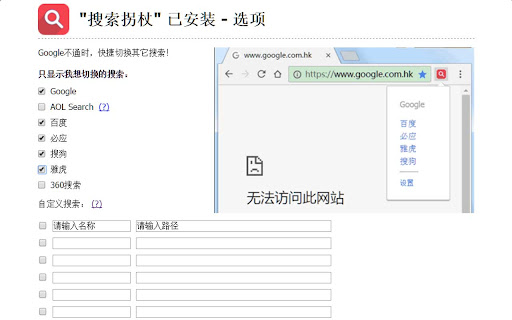

在Google,百度,必应等等搜索引擎间进行快捷切换,搜索关键词无需重输! 1、在Google,百度,必应,Rambler,雅虎和好搜等搜索引擎间进行快捷切换,搜索关键词无需重输。 2、当Google搜索结果页面跳转中断时,支持Google引用页重试直接访问。 3、支持自定义的搜索引擎切换。 4、支持设置单击图标来切换搜索引擎。 5、支持快捷键切换搜索引擎,默认切换前一个(Ctrl+Shift+Y,linux:Ctrl+Shift+B)、后一个(Ctrl+Shift+U)。 6、支持数据云同步,可手动备份和恢复数据。

Extension Manager
Manage extensions, Quickly enable/disable, Support batching operation, Smart sorting. Fast, Simple and Secure. 1. One Key fast enable/disable extension 2. Lightning Group: Quickly enable/disable extension groups according to the scene (except for locked or theme class extensions) 3. Smart Sort: intelligent sorting according to your frequency of use (default sort by name) 4. Right-click Menu: provides shortcut functions such as lock, uninstall, option configuration, home page, APP running, etc. 5. Smart Search: Quickly find the extension you need with keywords or phrases 6. Reminder: display the extended status in real time, remind reset after use, reduce resource consumption (except for locked or theme class extension) 7. View Selection: Provide list view and grid view, in line with user habits 8. Group management: general group and fixed group, flexible management 9. Extension Naming: Give your extension an alias you like 10. Automatic matching: You can turn extensions on and off according to different websites 11.Support dark mode

有道云笔记网页剪报
一键保存精彩网页,多终端同步,永久珍藏 有道云笔记网页剪报 Chrome 插件帮助您轻松地将网页内容保存到有道云笔记中。支持右键划选部分网页,也可以自动提取正文进行保存。同时,还能方便地同步到有道云笔记桌面版、手机版,随时随地查看。

Saladict - Pop-up Dictionary
Look up and translate selected text with multiple dictionaries, flexible selection modes, vocabulary notes, and PDF lookup. Saladict is a free, open-source browser extension for focused cross-language reading. Select text on a web page or in the built-in PDF viewer to open a dictionary panel with results from multiple dictionaries and translation services. Core features: - Look up and translate selected text on web pages and in PDFs. - Use flexible selection modes, including icon-triggered lookup, double-click lookup, modifier keys, and instant capture. - Combine multiple dictionaries and tune which dictionaries appear by language and word count. - Keep search history and save words to the vocabulary notebook. - Open a standalone quick-search panel for clipboard text or manual lookup. - Configure supported sync or export workflows with services such as WebDAV, Shanbay, Eudic, and Anki Connect. - Customize profiles, panel appearance, context menus, blacklists, whitelists, and keyboard shortcuts. Dictionary content and translation results come from the third-party dictionary services you enable.

Menu fish
Menu fish is a versatile Chrome extension that allows users to customize multiple search engines. On the configuration page, you can add as many search engines as you like. When you highlight text or images on a webpage, simply right-click to choose from your configured search engines to perform a search. This extension addresses the limitation of Chrome allowing only one default search engine, making your search experience more flexible and convenient.
