
deddbiddnnjfdimhokibmmekfckfidfe

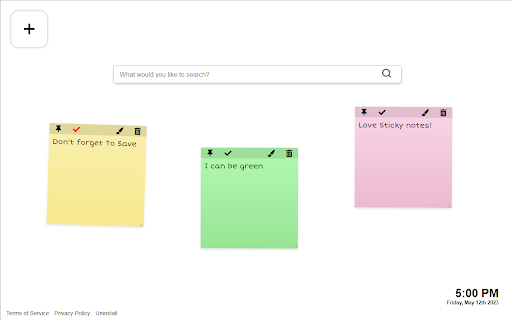
Sticky notes are the best and now you can easily leave sticky notes on your new tab. This extension adds a sticky note function to your new tab, where it's easy to access and add notes on the go while browsing online. To add a new note, simply click the [+] button and add a new note, move it around and make sure to save by clicking the check mark. This extension is free to download from the Chrome Web store, and you can uninstall it at any time. By clicking "Add to chrome", I accept and agree to installing the Sticky Notes Tab extension and setting chrome new tab search provider to Microsoft Bing as described by the service in terms of use https://stickynotestab.com/terms and Privacy Policy https://stickynotestab.com/privacy Please review our Privacy Policy for details regarding the information we collect when you install and use the extension. For more information please check:

Zombie new tab
Enjoy your new zombie Tab on every new tab Open each new tab to a haunting background of animated zombies in the rain. Navigate seamlessly with the included search bar and watch as your cursor transforms into a chilling zombie head across all websites. Elevate your browsing experience with a touch of apocalyptic excitement! By clicking "Add to Chrome," I accept and agree to installing the Space Ship Extension and enabling spaceship-themed mouse tracking as described in the service's terms of use https://zombies-new-tab.com/terms and privacy policy https://zombies-new-tab.com/privacy. For more information, please refer to our:

MemoTab - New Tab Notes
Turn your new tab into a sticky note board Enable the persistence of your notes across all newly opened tabs. 🗂️ Multiple Boards Support – Switch between different boards for various projects or contexts. ✍️ Draggable and Resizable Notes – Move and scale your notes effortlessly 🎨 Customizable Note Colors – Color-code your notes to suit your workflow. 🔤 Tailored Font Styles – Apply custom fonts for a note-taking experience that fits your style. 🗃️ Archive Functionality – Keep your workspace tidy without losing past notes. ⌨️ Keyboard Shortcuts – Add new notes and navigate your board faster with handy shortcuts. 📁 Persistent Across Tabs – Notes stay in place no matter how many tabs you open. 📝 Markdown & Plaintext Support – Write notes in Markdown for rich formatting or stick to simple plaintext. 🔍 Search Within Notes and Boards – Instantly find the content you're looking for. 📤 Export and Import Notes – Backup your data or move your boards across devices effortlessly.

Converter Tab
Your effortless new tab for converting anything you want Converter Tab adds a simple and easy multiple units converters function to your new tab. You just need to pick a category and select the converter you need. When a user installs the Converter Tab extension, it will change the new tab layout with multiple units converter and change the new tab search engine to provide new tab search results by Microsoft Bing. This extension is free to download from the Chrome Web store, and you can uninstall it at any time. By installing and using Converter Tab you agree to the Terms of Use and Privacy Policy. Please review our Terms and Privacy Policy for more information, please check:

The Weather Tab
The Weather Tab is a Chrome Extension for the New Tab Stay up to date on the weather in your area directly from you new tab. This extension changes your existing new tab page and changing the search engine in the new tab to Bing and provides the features below: - Clean new tab look - Weather information for your current location - Changing weather backgrounds - Links to popular sites - Convenient web search powered by Bing.com search results. With it, you can easily search for your favorite topics, images, videos, and news This extension is free to download from the Chrome Web store, and you can uninstall it at any time. By installing and using The Weather Tab you agree to the Terms of Use and Privacy Policy. Please review our Privacy Policy for details regarding the information we collect when you install and use the extension. For more information please check: - About Us https://the-weather-tab.com/about Terms of Service: https://the-weather-tab.com/terms
