
kpgekjdafapjabehpcjcgfnlmfgmjcmb
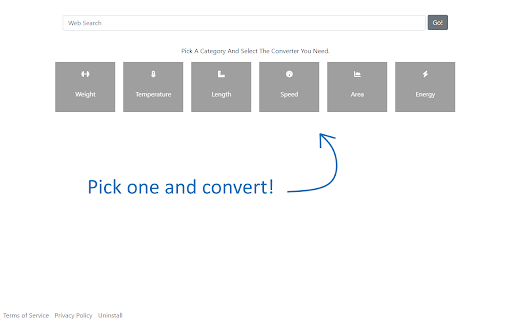

Your effortless new tab for converting anything you want Converter Tab adds a simple and easy multiple units converters function to your new tab. You just need to pick a category and select the converter you need. When a user installs the Converter Tab extension, it will change the new tab layout with multiple units converter and change the new tab search engine to provide new tab search results by Microsoft Bing. This extension is free to download from the Chrome Web store, and you can uninstall it at any time. By installing and using Converter Tab you agree to the Terms of Use and Privacy Policy. Please review our Terms and Privacy Policy for more information, please check:

Custom New Tab
Customize the New Tab URL. Change New Tab to point to any URL or local file you want. Chrome does not let you customize the new tab page. The new tab page always opens a custom Google Search page, and Chrome extensions do not work on this page. This extension lets you point the new tab page to a URL of your choice. It can be Google.com, your company's homepage, or a blank page. It is lightweight on your browser (

Beyond Tab
Transform New Tab to Beyond Tab , with Beyond Tab you can customize your New Tab in every aspect. Transform New Tab To Your Personal World With Beyond Tab. • 100% Safe And Secure (CSP) • Different View Option • Clock • Weather Status • Quick Access Website Hub • To Do List • Main Focus • Popup Quick Access (Weather Status, To Do List And More..) • Special Day Celebration (Birthday And More..) • Personal Preferences (Interface Customization, Content Customization And More..) • Multi Language Support (EN, TR, DE, FR, RU, ZH) • Background Style Customization (Video, Image And More..) • Theme Style Customization (Icon, Text And More..) • Random Background - Offline (In Your Collection) • Random Background - Online (Everyday One New Image And Video With Refresh Option) • Screensaver Mode • Background Download Option • Search Type Customization • Search Auto Suggestion • Direct Search On Popular Platforms (YouTube, Reddit And More..) • Search Engine Customization • Top Visited Websites • SYNC Between Devices (To-Do List, Quick Access Website Hub And More..) • And More.. Note-1: If You Are Going To Use "Beyond Tab" On Multi PC With Synchronization , Be Sure Signed In To Browser Also Check The Synchronization Status In Your Account To Avoid Any Data Lose. Note-2: If You Encounter Any Issues You Can Report To "beyondtabask@gmail.com".As Temporary Solution You Can Restart The Browser.This May Help Until Bug Fix Update Release. Whats The New ? -Upgraded To Manifest V3 (More Fast And More Secure) -General Revisions

KanbanTab — New Tab To-Do List
Turn your New Tab into a fast & private Kanban board KanbanTab is a clean, distraction-free to-do list built specifically for individuals. Manage your daily workflow, write notes, and track habits in a space that syncs effortlessly across all your devices with absolutely zero loading screens. Speed & simplicity 🔵 Instant Loading: KanbanTab is engineered from the ground up for speed, meaning absolutely zero loading screens. 🔵 Power-User Shortcuts: Navigate, reorder, and color-code your workflow without ever touching your mouse. 🔵 Works Offline: Keep working without an internet connection. Changes will sync automatically when you are back online. 🔵 No Account Needed: Start organizing immediately without having to sign up. Powerful organization 🔵 Multiple Boards: Keep your work, personal life, and side projects perfectly separated. 🔵 Card Notes: Add detailed descriptions, links, and nested checklists to any card. 🔵 Automation & Routines: Set up recurring tasks or automatically clear completed items. 🔵 Universal Search: Find any card across all your boards and notes. Built for privacy 🔵 Real-Time Sync: Log in to securely sync your boards between your browser and phone. 🔵 End-to-End Encryption: Protect your tasks with zero-knowledge encryption directly on your device. 🔵 Guest Mode: Keep your data 100% local. It never leaves your device.

Minimal New Tab Clock
A simple, ultra-lightweight clock to replace your tab menu. V1.8.1 - Added rudimentary ability to change the clock's font V1.7.0 - Updating colour picker to include HEX and HSL input - Added ability to close menus with 'Escape' key - Fixing issue with analogue clock hands not being styled correctly on custom theme - Updating style scripts to reduce the amount of 'flash-of-unstyled-content' V1.6.1 - Adding additional icon sizes for hdpi screens V1.6.0 - Fixed an issue with the second hand glitching - Clock face size is a bit more responsive - Improved performance & memory leaks - Improved keyboard controls - Menu now stays open after making selections - Trimmed unneeded code and other files - Use locale-specific dates instead of hardcoded English V1.5.0 - Add scaling to clock, fade out menu, and performance improvements V1.4 - Added a theme picker - Custom colour can be picked from the theme picker - Current day now updates when your system clock changes to the next day - Minor performance improvements V1.3.1: - Fixed an issue with 12hr format clock and AM/PM display - Performance improvements - Fixed keyboard interaction issues - Added a link to colour change functionality questionnaire V1.3: - Removed leading zero on 12hr format - Moved second hand to the top of the stack V1.2: - Dark theme (click the lightbulb to use) - Analogue clock - 12 hour digital clock
