
enpijohckdmkmgioohkhckpilgmjmcde
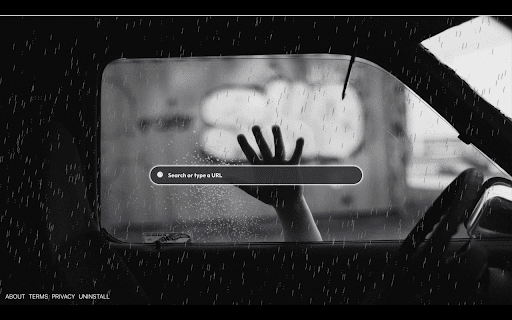
Enjoy your new zombie Tab on every new tab Open each new tab to a haunting background of animated zombies in the rain. Navigate seamlessly with the included search bar and watch as your cursor transforms into a chilling zombie head across all websites. Elevate your browsing experience with a touch of apocalyptic excitement! By clicking "Add to Chrome," I accept and agree to installing the Space Ship Extension and enabling spaceship-themed mouse tracking as described in the service's terms of use https://zombies-new-tab.com/terms and privacy policy https://zombies-new-tab.com/privacy. For more information, please refer to our:

Scoreboard Tab
Scoreboard brings you scores from NFL Football, NBA Basketball, NCAA Basketball, MLB Baseball, NCAA Football, NHL Hockey, WNBA Basketball, English Premier League Soccer, La Liga Soccer, Champions League Soccer, PGA Golf and every major league and competition. By clicking "Add to chrome", I accept and agree to installing the Scoreboard Tab extension and setting Chrome New Tab search to that provided by the service. The search will be powered by Bing. With Scoreboard, you get live views of every game in every new tab. You can see the latest scores for the sport you care about. You’ll have the ability to instantly see live scores from around all of the sports leagues and the ability to search the web right within your new tab window. Need help or have feedback for us? Reach out to us at scoreboardtab@gmail.com

Sticky Notes Tab
Sticky notes are the best and now you can easily leave sticky notes on your new tab. This extension adds a sticky note function to your new tab, where it's easy to access and add notes on the go while browsing online. To add a new note, simply click the [+] button and add a new note, move it around and make sure to save by clicking the check mark. This extension is free to download from the Chrome Web store, and you can uninstall it at any time. By clicking "Add to chrome", I accept and agree to installing the Sticky Notes Tab extension and setting chrome new tab search provider to Microsoft Bing as described by the service in terms of use https://stickynotestab.com/terms and Privacy Policy https://stickynotestab.com/privacy Please review our Privacy Policy for details regarding the information we collect when you install and use the extension. For more information please check:

My News 4 Free
The extension will update your search settings and will change your new tab search provider to Microsoft Bing. Get quick & easy access to popular news sites, right from your new tab! This tool contains links to external websites that are not provided or maintained by or in any way affiliated with our company or this product. Please note that our company or this tool does not guarantee the accuracy, relevance, timeliness, or completeness of any information on these external websites. For more information visit our Terms of Use page listed below. By clicking "Add to Chrome", I accept and agree to installing the My News 4 Free Chrome extension and setting Chrome New Tab to that provided by the service and the Terms of Use and Privacy Policy. Uninstall Instructions: https://www.mynews4free.com/uninstall.html EULA/Terms of Use - https://www.mynews4free.com/terms.html Policy - https://www.mynews4free.com/policy.html Contact Us: http://www.mynews4free.com/terms.html#terms-contact To remove our extension from Google Chrome: 1) Click on the three horizontal lines icon in the upper right-hand corner of your Chrome browser. 2) Go to "Settings". 3) In the menu that appears click on "Extensions". 4) From the list of installed Extensions, find the name of the toolbar extension you wish to uninstall. 5) Click on the trash can icon to the right of "Enable" (for the toolbar extension you wish to uninstall). 6) Close your browser completely and reopen it. Our toolbar extension should be removed from your Chrome browser.

Sticky Note Board Extension
Sticky notes have unlimited possibilities. Run a retrospective, start brainstorming, or plan out your roadmap. The perfect extension to help you stay organized and focused on your goals. The Sticky Note Board extension gives you the option to add sticky notes to your home page, that are stored and shown every time a new window or tab are opened. Each note contains a main title and an additional body of text, and can be edited or removed at anytime. On top of that, users will also have an active clock on the bottom right hand corner of the homepage and the current date on the left, as well as the option to shuffle between available backgrounds by clicking the shuffle button on top right corner. By clicking “Add to Chrome”, you accept and agree to the following: -Installing the Sticky Note Board extension -Setting the Chrome™ New Tab search to Microsoft Bing -Monetize Engine's privacy policy and terms of use Privacy Policy: https://monetizengine.com/privacy-policy/ Terms of Use: https://monetizengine.com/terms-and-conditions/ You may uninstall the Sticky Note Board anytime To remove our extension from your browser: 1) Click on the three dots in the upper right corner of your browser 2) Go to "Settings" 3) Click on "Extensions" in the left menu that appears 4) From the list of installed Extensions, locate the extension you would like to uninstall
