
dcmdlllimglfijapdplafahfjfgpgcam
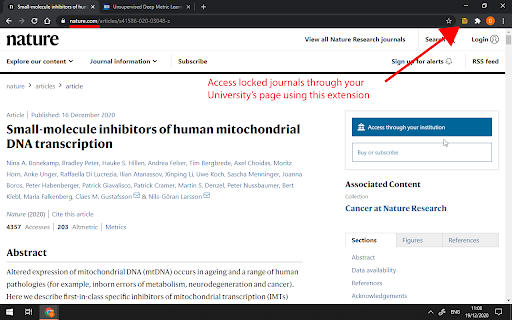
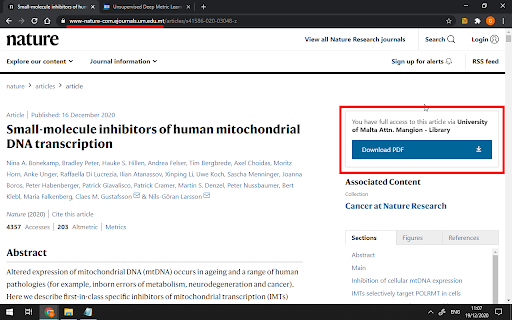
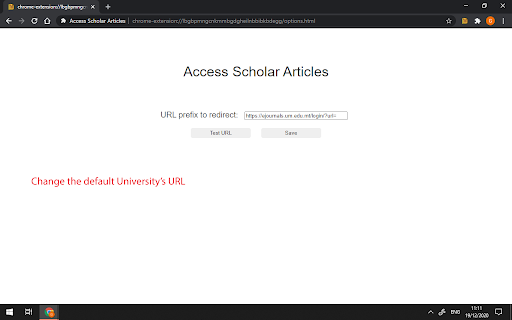
Get access to journals and articles using your university's credentials. This lightweight extension allows students and researchers at the University of Malta (and other universities) to access restricted scholar articles. Same Universities offer their students/staff access to several journals and websites. Unfortunately it can be cumbersome to unlock a scholar article since you would have to go through the University's library website. Using this extension you can easily redirect to the unlocked version of the scholar article with one click, without having to leave the article that you want to read. For example, this locked article: https://www.nature.com/articles/s41586-020-03048-z would be redirected to the unlocked version in one click: https://www-nature-com.ejournals.um.edu.mt/articles/s41586-020-03048-z The default university access page is set to the University of Malta. This extension works with other universities - to do so, change the URL redirection to an EZproxy URL in the options. This extension works with several scholar websites, including (but not limited to): IEEE Xplore, Nature.com, ProQuest, ACM Digital Library and SpringerLink. This extension provides a very lightweight addition to the browser, while improving significantly the researching experience. Disclaimer: This extension was developed independently and is not affiliated with University of Malta or other entities mentioned above.

SScholar
此工具可以加快學術研究人員快速瀏覽學術內容。4xDev(4-x.tw) SScholar 是一款整合Google 學術搜尋與 Sci-Hub學術搜尋的實用工具。 使用方法: 1. 在當前 Paper 頁面透過右鍵可以直接前往 Google 學術搜尋。 2. 在當前 Paper 頁面直接點擊右上的擴充功能圖示按鈕便會開啟新分頁前往該 Paper 內容。 3. 在當前 Paper 頁面使用鍵盤快速鍵 Ctrl+Shift+K 即可直接搜尋當前頁面學術文章。(Mac 使用者為 Command+Shift+K) *擴充功能已更新至 Manifest V3 *注意:本工具啟用後會自動抓取Sci-Hub最新Domain,如有失效問題,請寄信回報給作者謝謝。(作者信箱:4xsc.tech@gmail.com)

Scientific Paper Advisor
Present information about connotations of the article in the scientific field. A tool for easier exploration of Google Scholar archives. It shows how a particular research article occurs in its domain by displaying a graph of its citation connotations and by mapping it on a linguistic similarity plane with other related publications. ➤ How it works? It sends to our server the research paper that you are about to read. Next, we are collecting all the information about publications connected with it by citations and domain. Then we display it to show you the contexts in which this article occurs. ➤ Category Field It is the first plot that you will see after pressing the extension button. It creates points in 3D space that are representing your article and others from its domain. The similarity is measured in two ways. The default mode displays future directions of study in the current category. You can also compare those publications based on their titles and abstracts, which may show you more papers similar to the current one. ➤ Connection Graph The majority of scientific papers are based on the accomplishments of other researchers. It is reflected in bibliographies which are showing the influence of one publication on others. Those relations enable the creation of a directed graph from the oldest papers to the latest ones. Our extension reveals some parts of this huge Connection Graph by displaying connotations of the currently analyzed record. You can easily track how this particular scientific domain has developed and expanded over the years by moving forward and backward in time from your chosen publication. ➤ Is it too slow? Well, let's see… The first plot renders almost instantly even tho it requires running a complex transformer model for text analysis. The graph of connections might seem like a waste of time. But let’s see the numbers. If one publication on average cites 30 others and is cited by 30, then in a default view we have to scrape from the web 60 often not-so-small articles. On deeper levels, the problem grows exponentially more complex. We also have to decide which research papers are worth mentioning, as the graph is too small to contain all the information. If you are still concerned, think about a time of doing it manually 😉

Kindle Scholar
Send to Kindle and more! - Send web articles to your Kindle and enjoy comfortable and distraction free reading - Save, tag and sort articles - Build a personal knowledge base Great for students, writers, researchers, and those that want to organize web articles and leverage the Kindle reader. Simply add Kindle Scholar to your Chrome Browser to start your scholarly pursuits!

Google Scholar OJC Checker
This extension connects ResearchIC.com to Google Scholar, which will allow users to check if there is existing Online Journal Club events on ResearchIC.com related to found academic publications on Google Scholar. It also allows the user to create a new Online Journal Club event on ResearchIC, if there isn't a record.
