
acdoekaclfhenlfdfkfbpddjlcinghii


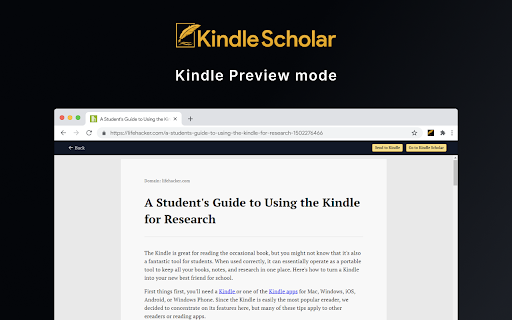

Send to Kindle and more! - Send web articles to your Kindle and enjoy comfortable and distraction free reading - Save, tag and sort articles - Build a personal knowledge base Great for students, writers, researchers, and those that want to organize web articles and leverage the Kindle reader. Simply add Kindle Scholar to your Chrome Browser to start your scholarly pursuits!

Access Scholar Articles
Get access to journals and articles using your university's credentials. This lightweight extension allows students and researchers at the University of Malta (and other universities) to access restricted scholar articles. Same Universities offer their students/staff access to several journals and websites. Unfortunately it can be cumbersome to unlock a scholar article since you would have to go through the University's library website. Using this extension you can easily redirect to the unlocked version of the scholar article with one click, without having to leave the article that you want to read. For example, this locked article: https://www.nature.com/articles/s41586-020-03048-z would be redirected to the unlocked version in one click: https://www-nature-com.ejournals.um.edu.mt/articles/s41586-020-03048-z The default university access page is set to the University of Malta. This extension works with other universities - to do so, change the URL redirection to an EZproxy URL in the options. This extension works with several scholar websites, including (but not limited to): IEEE Xplore, Nature.com, ProQuest, ACM Digital Library and SpringerLink. This extension provides a very lightweight addition to the browser, while improving significantly the researching experience. Disclaimer: This extension was developed independently and is not affiliated with University of Malta or other entities mentioned above.

Send web articles to Kindle by KTool
Send web articles, Twitter threads, RSS and newsletters to Kindle 👉 Send news articles and newsletters to Kindle 👉 Reduce screen time. Improve productivity. You spend too much time on computer screens. It damages our eyesight and hurts our comprehension. KTool helps you read everything on Kindle instead. 1. Installing this extension will add a KTool button to your Chrome browser 2. Sign up for an account 3. Click the Send to Kindle menu item on an article that you'd like to read on your Kindle. Send long web articles to your Kindle to read later. Read anywhere: on your Kindle e-reader or the Kindle app on your iPhone, iPad, or Android device. Articles are available for offline reading once delivered to the Kindle. ✨ New: Added support for comic sites ✨ New: ADHD Reader Mode — helps you read faster by highlighting the beginning of every word of the article ✨ New: Send RSS feeds to Kindle automatically (premium feature) ✨ New: Forward email newsletters to Kindle automatically (premium feature) ✅ Send PDF, Markdown & DOCX documents to Kindle (premium feature) ✅ Send Hacker News discussions to Kindle ✅ On-demand article conversion using Kindle's built-in web browser ✅ Automatically import devices from Amazon.com ✅ Dark Mode ✅ Send ebooks on Standard Ebooks to Kindle ✅ Send Wikipedia articles to Kindle ✅ Preview the article before sending ✅ Browse and search send history ✅ Speedy delivery to your Kindle ✅ Image support ✅ Emoji support ✅ Keyboard short-cut support ✅ Send Twitter thread to Kindle ✅ Send email newsletters to Kindle KTool can send to the following devices: Please check https://ktool.io/pricing for details This extension does not do anything unless you click the Send to Kindle button. We do not monitor or inject any scripts into your pages while you browse. When you click the Kindle icon, this extension sends the contents of the page and its URL to the KTool service. The KTool service then packages the contents into a reader-ready format and delivers it to your Kindle. Content which you process with the KTool service will be cached on the server for a short period. More information on our privacy page: https://ktool.io/privacy. Feel free to contact us if you have any questions.

Yac Voice Messages
Share voice messages via email, social networks, and millions of other websites. Say hello to Yac. Thought at the speed of sound. You've discovered a faster way to communicate across the Web. - Post voice messages to any website including social networks. - Send voice messages via email that are more personal and genuine, and even get a higher open rate. It's ultra-fast, easy, and free.

Kindle Notes Exporter
This plugin will convert the current selected kindle notes of user's logged in Kindle note page to a CSV file. User can import the CSV into a notion table by using "merge with CSV" in Notion, as well as into other software as long as it supports CSV. Currently only support US kindle account.
