
pfilcjfeoihhgomdcdegipgphajoedim


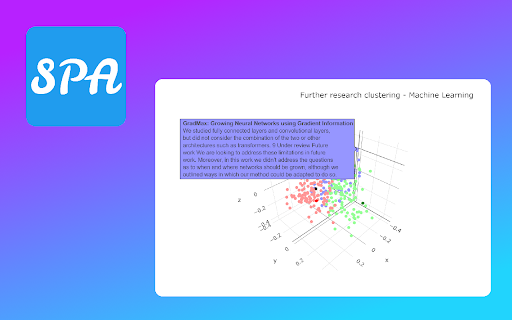
Present information about connotations of the article in the scientific field. A tool for easier exploration of Google Scholar archives. It shows how a particular research article occurs in its domain by displaying a graph of its citation connotations and by mapping it on a linguistic similarity plane with other related publications. ➤ How it works? It sends to our server the research paper that you are about to read. Next, we are collecting all the information about publications connected with it by citations and domain. Then we display it to show you the contexts in which this article occurs. ➤ Category Field It is the first plot that you will see after pressing the extension button. It creates points in 3D space that are representing your article and others from its domain. The similarity is measured in two ways. The default mode displays future directions of study in the current category. You can also compare those publications based on their titles and abstracts, which may show you more papers similar to the current one. ➤ Connection Graph The majority of scientific papers are based on the accomplishments of other researchers. It is reflected in bibliographies which are showing the influence of one publication on others. Those relations enable the creation of a directed graph from the oldest papers to the latest ones. Our extension reveals some parts of this huge Connection Graph by displaying connotations of the currently analyzed record. You can easily track how this particular scientific domain has developed and expanded over the years by moving forward and backward in time from your chosen publication. ➤ Is it too slow? Well, let's see… The first plot renders almost instantly even tho it requires running a complex transformer model for text analysis. The graph of connections might seem like a waste of time. But let’s see the numbers. If one publication on average cites 30 others and is cited by 30, then in a default view we have to scrape from the web 60 often not-so-small articles. On deeper levels, the problem grows exponentially more complex. We also have to decide which research papers are worth mentioning, as the graph is too small to contain all the information. If you are still concerned, think about a time of doing it manually 😉

AskPaper – Research ChatGPT for any article
AskPaper is an highly customizable research tool designed to provide quick and accurate information from websites and PDF documents AskPaper is an innovative and highly customizable research tool designed to provide quick and accurate information from websites and PDF documents. It offers users the ability to ask questions and receive intelligent, comprehensive responses based on the content of the source material.

Scholar Plus
Utilities for Google Scholar This extension is motivated to reduce annoying routines to manage bibliography. - Make a button (🔖) to copy a bibtex citation. - Save a PDF file as the name corresponding to the bibtex identifier.

Article Selection Navigator
Helps users select articles for literature review Transform Your Literature Review Experience with the Article Selection Navigator Are you overwhelmed with spreadsheets during literature reviews, losing track amidst rows and columns of data? This common struggle leads to unnecessary frustration, inefficiency, and physical discomfort. Before the Article Selection Navigator, my reality mirrored yours: tedious sorting of articles, constant corrections, and a feeling of being swamped by data. This process was not just time-consuming but also mentally and physically taxing. In search of relief, my colleague and I created the Article Selection Navigator. This Chrome extension transformed our workflow. No more spreadsheet chaos; instead, we found a path to streamlined efficiency and clarity. Now, envision a shift from the mire of confusion and fatigue to a clean, intuitive process. This is the core of what the Article Selection Navigator promises. - Efficient Article Management: Swiftly organize and review articles, transforming a cumbersome process into a seamless experience. - Comfort and Ease: Free yourself from the physical and mental strain associated with traditional literature review methods. - PRISMA Standard Compliance: Ensure your reviews meet critical industry standards, enhancing the credibility of your work. - Professional Community Engagement: Connect and collaborate with industry peers on LinkedIn, sharing insights and advancing in your field. Join us in this new era of literature review. Download the Article Selection Navigator Chrome Extension now. It's a path to a more efficient, enjoyable, and professional research experience – and it's entirely free. Start your journey to a better literature review process today!

ScholarQuest
Unlock achievements with your academic success and view them on Google Scholar! ScholarQuest tracks the data on your Google Scholar profile page and awards achievements once you reach various milestones, such as publishing 10 papers, or gaining 100 citations. Academia gamified! Disclaimer: When this extension is installed, it will open your personal Google Scholar profile page and read the public data that you have displayed on it: your name, your Google Scholar profile ID number, the number of papers you have written, and the number of citations each of those papers has received. This will be used to recognize when you are on your own page, and to determine whether you have unlocked any new achievements. This information will be updated each time you visit your own Google Scholar profile. This information will be stored only within your Google Chrome user storage. It will not be shared with the developer nor with any other users.
