
pgmiljfohpamophnnmhnfjncehonmpid

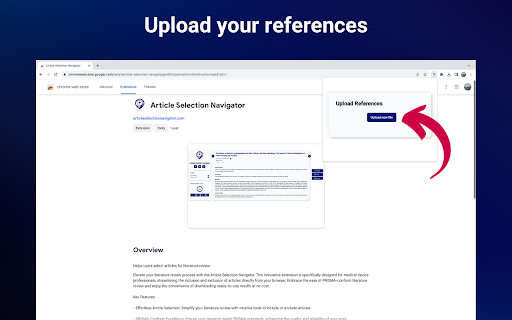


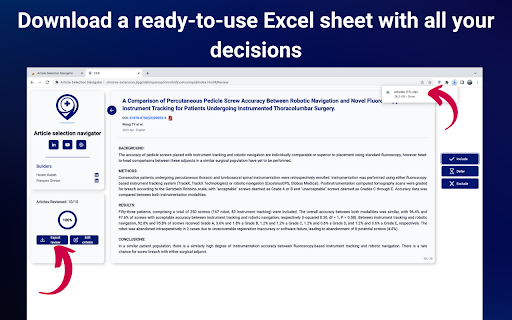
Helps users select articles for literature review Transform Your Literature Review Experience with the Article Selection Navigator Are you overwhelmed with spreadsheets during literature reviews, losing track amidst rows and columns of data? This common struggle leads to unnecessary frustration, inefficiency, and physical discomfort. Before the Article Selection Navigator, my reality mirrored yours: tedious sorting of articles, constant corrections, and a feeling of being swamped by data. This process was not just time-consuming but also mentally and physically taxing. In search of relief, my colleague and I created the Article Selection Navigator. This Chrome extension transformed our workflow. No more spreadsheet chaos; instead, we found a path to streamlined efficiency and clarity. Now, envision a shift from the mire of confusion and fatigue to a clean, intuitive process. This is the core of what the Article Selection Navigator promises. - Efficient Article Management: Swiftly organize and review articles, transforming a cumbersome process into a seamless experience. - Comfort and Ease: Free yourself from the physical and mental strain associated with traditional literature review methods. - PRISMA Standard Compliance: Ensure your reviews meet critical industry standards, enhancing the credibility of your work. - Professional Community Engagement: Connect and collaborate with industry peers on LinkedIn, sharing insights and advancing in your field. Join us in this new era of literature review. Download the Article Selection Navigator Chrome Extension now. It's a path to a more efficient, enjoyable, and professional research experience – and it's entirely free. Start your journey to a better literature review process today!

CoCites [Beta]
CoCites is an entirely new method for searching scientific literature. The method finds and ranks articles that are frequently cited together with a selected article. Articles that are frequently cited together tend to be of similar topics. CoCites finds co-cited articles and presents a ranking of most frequently co-cited articles. CoCites is ideal for students, as well as for scientists interested in topics outside their field of expertise—it helps them find relevant literature without the struggle of finding or even knowing the right keywords. This browser extension adds CoCites buttons to articles in PubMed and Google Scholar. One click shows the articles that are frequently cited together with the selected article. No registration is needed unless you want to export the search results. Read below about the permission that CoCites needs to install the extension. After you install the browser extension, the tool is ready for use. Go to PubMed or Google Scholar and CoCites is already working for you. For more information about the method and download, visit www.cocites.com. Further information: If you have any questions, email us at info@cocites.com. Why we need the permission? We ask permission to: Read and change all your data on the websites you visit We need to read your data to find out: - when you visit the PubMed and Google Scholar webpages. Many users visit PubMed within their university environments. The URLs of PubMed vary. We need to read your browser activity to recognize the URL of your PubMed. - for which articles you want a CoCites search button. We need to read the data on the PubMed or Google Scholar page to find out for which articles you want a CoCites search button. We don’t store any of your information or browser history. The university-specific URL of PubMed is temporarily stored in a session cookie, which is deleted after you close the browser.

R Discovery: Academic Research
Read quick summary of a research article, find related articles and patents, save an article to your reading list to be read later This browser extension enables you to obtain new recommendations or factually validated answers to your questions from 250Mn+ research artifacts. All of these, and more, while you are reading an article from any publisher on your browser. With the help of Quick Summary you would be able to understand "What the article is about " and "Why is it important" along with key takeaways. This browser extension is an add-on to our mobile application, RDiscovery, a free app for students and researchers to find and read research papers. When in a hurry, you can save the article to the Library from the browser extension and listen to it from the mobile app on the go. Subscribers to RDiscovery Prime have unlimited access to audio listening, paper translation, Ask RDiscovery and more. Visit https://discovery.researcher.life/

Science Search | Instant AI-Powered Research on Text & Videos
Select any text or video and get AI-curated research summary with the most relevant academic papers that best match your query. Science Search is your free AI research companion that instantly connects everyday reading and video content to academic knowledge. Whether you're exploring an article, watching YouTube videos, checking facts, or diving deep into research, Science Search helps you discover relevant scientific papers and insights with just one click. Key Features: 🔍 Instant Access to Science Select any text/Youtube video while browsing to get AI-curated research from relevant academic papers, powered by Semantic Scholar's vast database of over 200 million publications from leading publishers like arXiv, Springer Nature, Wiley, PubMed, and IEEE. 🎬 Video Transcript Research Extract valuable knowledge from YouTube videos by selecting specific segments directly on the progress bar. Simply click and drag across any portion of a video to instantly access the transcript content for academic citations and research purposes. 🤖 AI Knowledge Assistant Ask questions about any topic and get research-backed answers drawn from peer-reviewed academic sources. Science Search analyzes your queries using advanced Machine Learning to deliver the most relevant scientific insights. 🗣️ Realistic Text-to-Speech Listen to your research and papers with lifelike voices, enhancing accessibility and enabling a hands-free way to consume information. 📚 Smart Research Management (coming soon) Build your personal knowledge base by saving papers and insights as you explore, creating an organized collection of scientific discoveries for future reference. Seamless Accessibility: • Works instantly on any webpage, PDF, or YouTube video • Customizable site preferences and domain filters • Compatible with all chromium-based browsers Perfect for: • Casual readers seeking scientific context • Students verifying information or citing video content • Researchers streamlining literature reviews • Anyone curious about the science behind what they read or watch 🌍 Science Search is and will always remain free, counting on collective contributions to ensure curiosity will never be limited by access to knowledge.

EVIDENCE Automated Review
This extension helps documenting the details of the literature searches for screening in Evidence Systematic Review. This extention helps documenting the details of the literature searches for screening in Evidence Systematic Review.
