
kjnhiadmccnbfbfjkmkhinglkaolnhcj

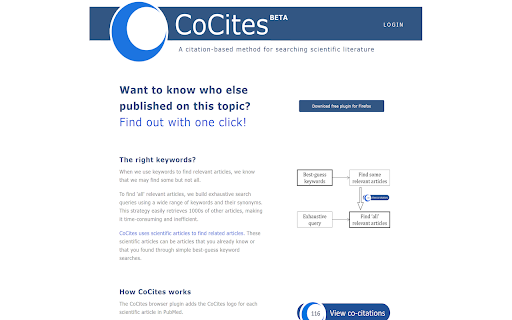
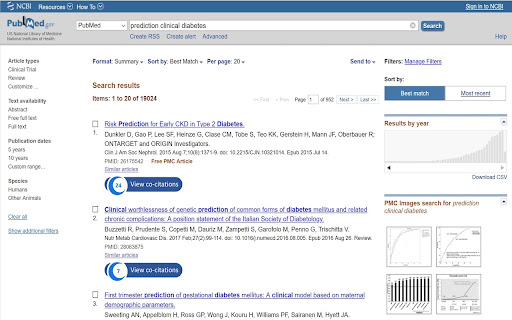
CoCites is an entirely new method for searching scientific literature. The method finds and ranks articles that are frequently cited together with a selected article. Articles that are frequently cited together tend to be of similar topics. CoCites finds co-cited articles and presents a ranking of most frequently co-cited articles. CoCites is ideal for students, as well as for scientists interested in topics outside their field of expertise—it helps them find relevant literature without the struggle of finding or even knowing the right keywords. This browser extension adds CoCites buttons to articles in PubMed and Google Scholar. One click shows the articles that are frequently cited together with the selected article. No registration is needed unless you want to export the search results. Read below about the permission that CoCites needs to install the extension. After you install the browser extension, the tool is ready for use. Go to PubMed or Google Scholar and CoCites is already working for you. For more information about the method and download, visit www.cocites.com. Further information: If you have any questions, email us at info@cocites.com. Why we need the permission? We ask permission to: Read and change all your data on the websites you visit We need to read your data to find out: - when you visit the PubMed and Google Scholar webpages. Many users visit PubMed within their university environments. The URLs of PubMed vary. We need to read your browser activity to recognize the URL of your PubMed. - for which articles you want a CoCites search button. We need to read the data on the PubMed or Google Scholar page to find out for which articles you want a CoCites search button. We don’t store any of your information or browser history. The university-specific URL of PubMed is temporarily stored in a session cookie, which is deleted after you close the browser.

easyScholar
显示各种文献排名,并且提供翻译、文献收藏功能,助力科研。 工欲善其事,必先利其器。好的科研工具,能够让您提升数倍的学习效率。 【显示期刊等级】 - 支持在谷歌学术、知网、pubmed、web of science、scopus、Aminer、ScienceDirect等20+主流论文搜索网站上,显示文章的来源期刊等级。 - 显示的等级包括:SCI分区(Clarivate),SCI影响因子(Clarivate),SCI分区(中科院),SCI期刊预警(中科院),CCF, 南大核心,北大核心等30+数据等级。足以满足日常科研、工作、评奖评优需要。 - 自定义数据集:若您有自己的目标期刊,可以自定义属于您的数据集。此外,在自定义数据集社区中,还可以选择:《国家自然科学基金委管理科学部认定的重要期刊》、《西南交通大学学术期刊分级目录(2022版)》、《澳大利亚ABDC期刊2022》、《吉林大学哲学社会科学高水平中文学术刊物参考目录(试行)》、《中国计算机学会推荐国际学术会议(2022年)》、《中国人文社会科学A刊引文数据库》等100+由网友制作的数据集。 【在线翻译】 - 在所有网站上,选中一段文本后,按T翻译,按Y隐藏。(edge用户最好将选择文本后弹出的迷你小菜单隐藏,才能更好的触发翻译事件) - 可以选择谷歌翻译、搜狗翻译、有道翻译、彩云小译、小牛翻译等多种主流翻译源。 【文献管理】 - 在论文搜索的详情页内,提供"easyScholar文献收藏按钮",快速的为文献添加类别。从此不再需要使用浏览器收藏夹保存网页。 感谢您看到了这里,如果您喜欢这款产品,或者认可我们的努力,可以和身边的小伙伴分享。当您使用了邀请码,或发朋友圈分享,您将会获得一定的奖励,具体的规则可以在网站的后台(https://www.easyscholar.cc/console/user/invite)查看。

EndNote Click
The official EndNote browser extension. Access millions of research paper PDFs in one click on Web of Science, Meta, PubMed, arXiv, Scopus and thousands more academic websites. Save time navigating paywalls, logins and redirects. EndNote Click helps you get to your full-text PDFs faster by securely connecting you to your library’s journal subscriptions and open access content. Once you have the PDF, you can easily export it to your favourite reference management tool or download it to your desktop. EndNote Click integrates with Mendeley, EndNote, Dropbox and Zotero Get started in two minutes and find out why researchers at thousands of universities are already using EndNote Click. Try it for yourself. Please check with your librarian or IT department for recommendations regarding the use of browser plugins.

R Discovery: Academic Research
Read quick summary of a research article, find related articles and patents, save an article to your reading list to be read later This browser extension enables you to obtain new recommendations or factually validated answers to your questions from 250Mn+ research artifacts. All of these, and more, while you are reading an article from any publisher on your browser. With the help of Quick Summary you would be able to understand "What the article is about " and "Why is it important" along with key takeaways. This browser extension is an add-on to our mobile application, RDiscovery, a free app for students and researchers to find and read research papers. When in a hurry, you can save the article to the Library from the browser extension and listen to it from the mobile app on the go. Subscribers to RDiscovery Prime have unlimited access to audio listening, paper translation, Ask RDiscovery and more. Visit https://discovery.researcher.life/

Scholarcy Browser Extension
Scholarcy™ is the solution to that pile of papers on your virtual desk. It can save up to 70% of the time needed to get the key information from an article, helping you with literature screening and reviews. This Extension gives you the key points of any article or research paper you have open in your browser. It creates a referenced summary with important points highlighted and generates a background reading list for those new to a field. Need to see how a paper builds on previous research? Our new 'Comparative Analysis' engine highlights this for you. Subscribers to our premium app, Scholarcy Library, will get unlimited use of this Extension and can also save, share, annotate and export their Summary Flashcards. Scholarcy locates open-access PDFs for each reference from Google Scholar, arXiv and elsewhere, and can also be configured to extract figures and tables. To provide this service, our Extension needs to read and process the contents of the current web page. Alternatively, it will locate the PDF for the article. Use the new 'Source priority' option to switch between the HTML and PDF processing. For PDF files, the article must be open access. For more information on how we use this data, please read our FAQ: https://www.scholarcy.com/faq/ and Privacy Policy: https://www.scholarcy.com/privacy-policy/
