
oekgknkmgmaehhpegfeioenikocgbcib
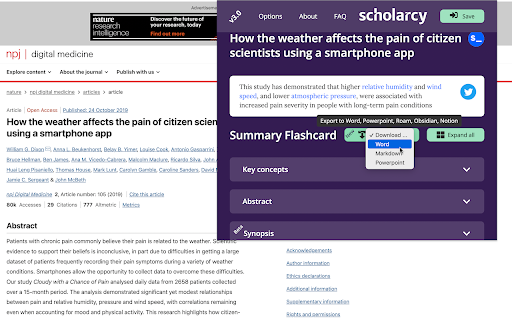


Scholarcy™ is the solution to that pile of papers on your virtual desk. It can save up to 70% of the time needed to get the key information from an article, helping you with literature screening and reviews. This Extension gives you the key points of any article or research paper you have open in your browser. It creates a referenced summary with important points highlighted and generates a background reading list for those new to a field. Need to see how a paper builds on previous research? Our new 'Comparative Analysis' engine highlights this for you. Subscribers to our premium app, Scholarcy Library, will get unlimited use of this Extension and can also save, share, annotate and export their Summary Flashcards. Scholarcy locates open-access PDFs for each reference from Google Scholar, arXiv and elsewhere, and can also be configured to extract figures and tables. To provide this service, our Extension needs to read and process the contents of the current web page. Alternatively, it will locate the PDF for the article. Use the new 'Source priority' option to switch between the HTML and PDF processing. For PDF files, the article must be open access. For more information on how we use this data, please read our FAQ: https://www.scholarcy.com/faq/ and Privacy Policy: https://www.scholarcy.com/privacy-policy/

Genio Notes
The Chrome extension for Genio Notes We’re making it easier to use Genio Notes for online learning and video content, eliminating the need for multiple tabs and windows. Maximize your focus and retention with our handy integrated side panel to take notes directly alongside your online lectures and videos. 'It was great having everything in one spot and not using split screen to be able to watch and take notes at the same time!' You must be a Genio Notes user (excluding our Genio Notes Teams plan) to access this extension. Not used Genio Notes before? Try it free for 30 days at https://app.genio.co/try

Summarize the Internet
Displays a summary of the text or article on the current page. Clicking the taskbar button will summarize the current page in a popup. This summarizer stands out from others by focusing on the writer's choice of words to extract their most important points while filtering out weak arguments, speculation and asides. (Also available for Firefox)

Crammer: Save time using AI
Provides text analytics to the webpage using artificial intelligence to quickly find what you are looking for and save time We read on average 15 articles a day but how much do we take from each of them. We often lose interest quickly and don't read the part of the article that matters. Crammer is a Chrome extension tool that uses Artificial Intelligence to analyse and find the key phrases of an article you are reading online. It then shows you the locations of key phrases you select so you can quickly find what you are looking for. ⚡ Think of it as a way of having a contents or glossary for a web page. 🔎 A popup appears over the web page once the text analytics has completed. The great part is that this popup is fully re-sizable and can be dragged anywhere when clicking on the 'Key Phrases' title. If it is getting in the way at all, there is a toggle switch button to hide and show the popup window. BONUS #1 🎁: Able to perform analysis in 7 languages 🌍 and many more languages are on the way! BONUS #2 🎁: Now shows a badge for each phrase displaying how many times it is mentioned on the web page!

Paper Of The Day
ARCHIVE NOTICE Paper Of The Day ran from 2018 to 2021. The Mendeley API that powered this extension has been decommissioned. The extension now displays cached paper data and remains available as an archive of the project. ----- Paper Of The Day replaced your new tab with trending academic papers across disciplines — from computer science and medicine to economics and psychology. Features • Browse papers by subject category • Beautiful background images from Unsplash • Keyboard navigation (arrow keys, number keys) • Swipe gestures for touch devices • Accessibility options (reduce motion, high contrast, text size) How it worked Each new tab displayed a randomly selected trending paper with its title, authors, abstract, and a link to read more. ------ Thank you to everyone who supported this project. It was a lot of fun. Created by Adrian Raudaschl
