
daafgeilbkllajbkopnbjlmdkgmnpcph

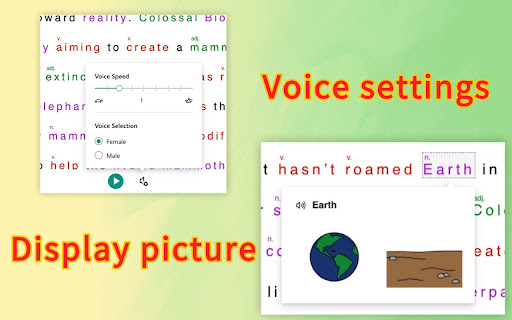
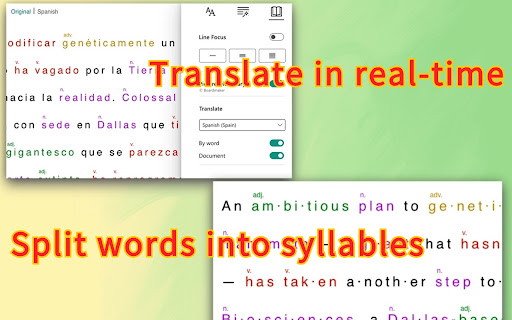
Improve reading comprehension for new readers, language learners, and people with learning differences such as dyslexia. Unlock the power of seamless reading comprehension Immersive Reader. Whether you're a new reader, language learner, or someone with learning differences like dyslexia, this tool is your key to effortless understanding. Immersive Reader transforms the reading experience on any webpage with its intuitive features: 1. Enhanced Readability: Isolate content for improved focus and comprehension, making reading a breeze for all. 2. Visual Vocabulary Aid: Instantly grasp the meaning of words with picture representations for commonly used terms. 3. Grammar and Parts of Speech: Understand the intricacies of language effortlessly with highlighted verbs, nouns, pronouns, and more. 4. Text-to-Speech: Let the words come alive with speech synthesis. Select any text to be read aloud, enhancing auditory comprehension. 5. Real-time Translation: Break language barriers with our multilingual translation feature. Seamlessly translate text into numerous languages on the fly. 6. Syllable Breakdown: Improve readability and pronunciation by breaking words into syllables, ideal for learners and those encountering unfamiliar vocabulary. Experience a new dimension of reading with Immersive Reader. Elevate your comprehension, empower your learning journey, and unlock the world of knowledge at your fingertips. Download now and embark on a transformative reading experience. Please contact me at hi@markzhao.com if you have any questions or suggestions.

Immersive Reader
Provides a clean, focused reading experience by extracting the core content of a webpage. Instantly convert cluttered web articles into a clean, streamlined reading mode. "Immersive Reader" is focused on enhancing your online reading experience. Smart Content Extraction: Automatically identifies and extracts the main article content, blocking ads and other clutter. Distraction-Free Reading: Provides a clean, quiet reading environment, allowing you to focus on the content itself. Customizable Reading Layout: Themes: Switch between Light, Sepia, and Dark modes. Fonts: Supports both Sans-Serif and Serif fonts. Layout: Freely adjust the font size, content width, and line height. Install "Immersive Reader" and make every online reading session a pleasure.

Brisk Teaching - AI that Works Where Teachers Work
Brisk works inside Google Docs, Slides, and YouTube, saving teachers 10+ hours weekly on planning, feedback, and resource creation. More than 1 million teachers have installed Brisk. Here's what they use it for: Create Build lesson plans, quizzes, Google Docs, Forms, and Slides in 30+ languages. Everything saves straight to your Google Drive. Give Feedback Write personalized, rubric-aligned feedback on student work for one student or the whole class at once. Inspect Writing See how students built their work. Replay their writing process to understand their thinking beyond the final draft. Boost Student Activities Create interactive, standards-aligned activities with AI guardrails you set. You monitor progress while students work. Brisk reads the page you're on and works with what's there. Nothing to export, copy, or paste. Why teachers stick with Brisk It fits how you already teach. You don't have to learn a new platform or rework your process. Creating a quiz from a slide deck takes minutes. So does turning a YouTube video into a lesson plan, or writing feedback for 30 students. You stay in control. You set the rubric, the standards, the guardrails. 1. Add the Brisk extension to Chrome and pin it to your toolbar. 2. Open any Google Doc, Slide, or webpage. 3. Click the Brisk icon and start building. Ready to save time and boost your teaching game? Visit www.briskteaching.com and join the 1 million+ teachers who’ve made teaching Brisk!

Reader Line
Use Reader Line app to guide and enhance your experience with reading ruler to maintain your focus with reading line. Introducing Reader Line: revolutionising your reading experience! 📕 🚀 Quick start tips 1. Click "Add to Chrome" to install the extension seamlessly into your browser. 2. Open any webpage or document where you want to enhance your reading experience. 3. Adjust the color, height, and opacity of the read ruler to your preferences. 4. Move the reading ruler with your mouse cursor to focus on specific lines or paragraphs. 5. Dive into your reading material with improved clarity and focus, courtesy of reading help! 💎 Enhance your reading journey with reader ruler Reader line serves as your trusted reading companion, offering a range of features to cater to your unique reading needs. Whether you're a student, professional, or simply enjoy diving into a good book, focus ruler is here to elevate your reading journey. ⚙️ Customizable reading guide Here are the options of read ruler you can easily customize in extension settings: ✴️ Color and opacity. Changing reading ruler color enhance readability on websites with different backgrounds. ✴️ Ruler height. By setting height of the reading guide user can adapt to different font sizes and line spacing for optimal reading experience. ✴️ Reading mode. Reader line offers two modes of reading: line and focus. These specialized modes offer tailored solutions to enhance your reading experience. ✨ Seamless integration and accessibility 💡 Reader line seamlessly integrates into your Chrome browser, ensuring accessibility and ease of use for users of all skill levels. 💡 Enable or disable the extension with just a click, giving you full control over your reading experience. 💡 Designed with inclusivity in mind, reader line prioritizes accessibility, making it a valuable tool for individuals with diverse reading needs. 🛠 Future features 1️⃣ Focus mode. The focus mode feature enhances concentration by highlighting a single reader line, ideal for dyslexia. It utilizes the reading ruler to guide the reader's attention, making the reading line clearer and minimizing distractions, thus improving readability for dyslexic users. 2️⃣ PDF support. Seamlessly integrate read ruler's features into pdf files, offering a consistent reading experience across different formats and platforms. Whether you're studying academic papers, reviewing reports, or enjoying leisure reading, reading help will be there to provide invaluable support and assistance. ❓ Frequently asked questions 📌 What is reader line? Reader line is a Chrome extension designed to improve your reading experience by providing a customizable line guide to help you navigate through text. Once installed, reading helper adds a virtual reading ruler to your browser window. You can adjust its color, height, and opacity to suit your preferences. 📌 Can it help with specific reading challenges? Yes, reader line offers specialized modes such as dyslexia helper and focus line to assist individuals facing reading difficulties. 📌 Is reading line easy to use? Absolutely! Reader line features an intuitive interface and can be enabled or disabled with just a click, making it accessible to users of all skill levels. Reading helper can be easily disabled or re-enabled with a single click, giving you full control over your reading experience. 📌 Can I customize the appearance of the reading guide? Yes, you can customize the color, height, and opacity of the reading ruler to match your preferences and reading environment. 📌 Does reader line work on all websites? Reading ruler is compatible with most websites and web-based documents, providing a consistent reading experience across various platforms. 📌 How can reading guide improve my reading speed and comprehension? By providing a visual guide and minimizing distractions, reading ruler assist users focus on the text, leading to improved reading speed and comprehension. 📌 Is reader line suitable for students? Yes, read ruler is an excellent tool for students, helping them stay focused while studying, researching, and reading academic texts.

Read text out loud
Read text out loud is a Chrome extension that converts written text into clear and natural-sounding speech. 🔍 Introducing Read Text Out Loud Chrome Extension! 📖 Are you looking for a convenient way to have text read out loud? Look no further! With the "Read Text Out Loud" Chrome extension, you can transform any written content into an immersive audio experience. Whether you're a student, professional, or simply someone who enjoys listening to articles, this extension is perfect for you. 🌟 Why Choose "Read text out loud" Extension? 🔹 Enhanced Accessibility: This extension is perfect for individuals with visual impairments, reading difficulties, or those who simply prefer to listen to content rather than read it. 🔹 Productivity Boost: Save time and multitask by having web content read aloud to you while you focus on other tasks. Whether you're researching, studying, or simply browsing the web, this extension can improve your productivity. 🔹 Language Learning Aid: Use the extension to listen to foreign language content and improve your pronunciation and comprehension skills. It's a great tool for language learners of all levels. 🔹 Multilingual Support: "Read text out loud" supports multiple languages, allowing you to enjoy text-to-speech functionality in various contexts and across different websites. 🔹 User-Friendly Interface: The extension's intuitive interface makes it easy to use, even for those who are not tech-savvy. Enjoy a seamless and hassle-free reading experience with this user-friendly tool. 🔊 Text to Speech Made Easy ✨ Say goodbye to straining your eyes and let our extension do the reading for you. "Read Text Out Loud" utilizes advanced text-to-speech technology to convert written content into natural-sounding speech. Simply select the lines you want to hear and let the extension take care of the rest. 🎙️ Experience the Joy of Reading Aloud 🌟 Reading aloud has never been easier! "Read Text Out Loud" allows you to listen to your favorite articles, blog posts, and documents while you multitask. Whether you're cooking, exercising, or simply relaxing, this extension provides a seamless and enjoyable reading experience. 🚀 Key Features The Read text out loud Chrome extension offers a range of features to enhance your reading experience: 📚 Read Aloud: Simply highlight any word on a webpage and let the extension read it out loud to you. 📝 Text Reader: Copy and paste text from other sources, such as documents or emails, and have the extension read it to you. 🗣️ Language Support: Enjoy text-to-speech functionality in multiple languages, including English, Spanish, French, and more. 🎧 Customizable Settings: Adjust the speech rate, volume, and voice to personalize the reading experience to your liking. 📌 Bookmarking: Bookmark specific sections of a webpage to easily return to them later and have them read aloud. 🌐 Webpage Compatibility: The extension works seamlessly with most websites, allowing you to listen to content across the web. 🎯 Text Reader for Enhanced Productivity 💡 Boost your productivity by turning text into speech! "Read Text Out Loud" assists you in absorbing information more effectively. Take advantage of the extension's features to: 💯 Listen to important articles while commuting or taking a walk. 💯 Review study materials by listening to them repeatedly. 💯 Proofread documents by hearing the content read aloud. 💯 Easily consume online content without the need for extensive screen time. 🌐 Seamless Integration and Accessibility 💫 "Read Text Out Loud" integrates seamlessly into your Chrome browser, ensuring a smooth and hassle-free user experience. Accessible with just a few clicks, this extension brings the power of text-to-speech technology to your fingertips. 📖 A Smart Text Reader Experience the convenience of a smart text reader right in your browser. "Read text out loud" intelligently detects and reads text from various sources, including websites, PDFs, and online documents. Whether you're researching, studying, or simply browsing the web, this extension ensures that you never miss out on important information. 🔊 A World of Possibilities Unlock a world of possibilities with "Read text out loud." Whether you're a student, professional, or simply an avid reader, this Chrome extension revolutionizes the way you consume written content. Dive into the immersive experience of having a document come to life through speech and make your browsing sessions more engaging and efficient. 🥷🏻 How "Read text out loud" Works: 1️⃣ Install the "Read text out loud" Chrome extension from the Chrome Web Store. 2️⃣ Once installed, an intuitive toolbar will appear in your browser. 3️⃣ Highlight any text on a webpage that you want to be read aloud. 4️⃣ Click on the "Read text out loud" icon in the toolbar. 5️⃣ Sit back, relax, and enjoy as the extension brings the text to life with its seamless text-to-speech capabilities! 🔝 How "Read text out loud" Extension Can Benefit You: - Enhanced Accessibility: "Read text out loud" ensures that everyone, regardless of visual impairments or reading difficulties, can access and understand online content effortlessly. 🌐👨🦯 - Improved Multitasking: Listen to articles, blog posts, and other textual content while engaging in other tasks. Stay productive and stay informed with the help of this extension! 📚💻 - Language Learning: Practice foreign language pronunciation and comprehension by listening to written content in different languages using "Read text out loud." 🇺🇸 🇪🇸 🇵🇹 🇦🇪 - Efficient Proofreading: Catch errors and improve the quality of your written work by having it read back to you. Easily identify typos, grammar issues, or inconsistencies with this handy extension! ✍️🔍 With "Read text out loud," the possibilities are endless! Experience a new way of consuming online content with its unparalleled text-to-speech capabilities. Install this extension today and let the words come alive! 🎉🔊 Remember, "Read text out loud" is your reliable companion for all your text-to-speech needs. Say goodbye to eye strain and hello to effortless reading! Get the extension now and embark on an immersive reading journey like never before! 🔊🚀
