
jhonhnklcccnhbokhblogjbnekpgckap
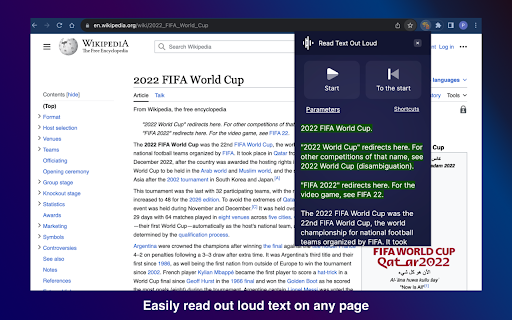
Read text out loud is a Chrome extension that converts written text into clear and natural-sounding speech. 🔍 Introducing Read Text Out Loud Chrome Extension! 📖 Are you looking for a convenient way to have text read out loud? Look no further! With the "Read Text Out Loud" Chrome extension, you can transform any written content into an immersive audio experience. Whether you're a student, professional, or simply someone who enjoys listening to articles, this extension is perfect for you. 🌟 Why Choose "Read text out loud" Extension? 🔹 Enhanced Accessibility: This extension is perfect for individuals with visual impairments, reading difficulties, or those who simply prefer to listen to content rather than read it. 🔹 Productivity Boost: Save time and multitask by having web content read aloud to you while you focus on other tasks. Whether you're researching, studying, or simply browsing the web, this extension can improve your productivity. 🔹 Language Learning Aid: Use the extension to listen to foreign language content and improve your pronunciation and comprehension skills. It's a great tool for language learners of all levels. 🔹 Multilingual Support: "Read text out loud" supports multiple languages, allowing you to enjoy text-to-speech functionality in various contexts and across different websites. 🔹 User-Friendly Interface: The extension's intuitive interface makes it easy to use, even for those who are not tech-savvy. Enjoy a seamless and hassle-free reading experience with this user-friendly tool. 🔊 Text to Speech Made Easy ✨ Say goodbye to straining your eyes and let our extension do the reading for you. "Read Text Out Loud" utilizes advanced text-to-speech technology to convert written content into natural-sounding speech. Simply select the lines you want to hear and let the extension take care of the rest. 🎙️ Experience the Joy of Reading Aloud 🌟 Reading aloud has never been easier! "Read Text Out Loud" allows you to listen to your favorite articles, blog posts, and documents while you multitask. Whether you're cooking, exercising, or simply relaxing, this extension provides a seamless and enjoyable reading experience. 🚀 Key Features The Read text out loud Chrome extension offers a range of features to enhance your reading experience: 📚 Read Aloud: Simply highlight any word on a webpage and let the extension read it out loud to you. 📝 Text Reader: Copy and paste text from other sources, such as documents or emails, and have the extension read it to you. 🗣️ Language Support: Enjoy text-to-speech functionality in multiple languages, including English, Spanish, French, and more. 🎧 Customizable Settings: Adjust the speech rate, volume, and voice to personalize the reading experience to your liking. 📌 Bookmarking: Bookmark specific sections of a webpage to easily return to them later and have them read aloud. 🌐 Webpage Compatibility: The extension works seamlessly with most websites, allowing you to listen to content across the web. 🎯 Text Reader for Enhanced Productivity 💡 Boost your productivity by turning text into speech! "Read Text Out Loud" assists you in absorbing information more effectively. Take advantage of the extension's features to: 💯 Listen to important articles while commuting or taking a walk. 💯 Review study materials by listening to them repeatedly. 💯 Proofread documents by hearing the content read aloud. 💯 Easily consume online content without the need for extensive screen time. 🌐 Seamless Integration and Accessibility 💫 "Read Text Out Loud" integrates seamlessly into your Chrome browser, ensuring a smooth and hassle-free user experience. Accessible with just a few clicks, this extension brings the power of text-to-speech technology to your fingertips. 📖 A Smart Text Reader Experience the convenience of a smart text reader right in your browser. "Read text out loud" intelligently detects and reads text from various sources, including websites, PDFs, and online documents. Whether you're researching, studying, or simply browsing the web, this extension ensures that you never miss out on important information. 🔊 A World of Possibilities Unlock a world of possibilities with "Read text out loud." Whether you're a student, professional, or simply an avid reader, this Chrome extension revolutionizes the way you consume written content. Dive into the immersive experience of having a document come to life through speech and make your browsing sessions more engaging and efficient. 🥷🏻 How "Read text out loud" Works: 1️⃣ Install the "Read text out loud" Chrome extension from the Chrome Web Store. 2️⃣ Once installed, an intuitive toolbar will appear in your browser. 3️⃣ Highlight any text on a webpage that you want to be read aloud. 4️⃣ Click on the "Read text out loud" icon in the toolbar. 5️⃣ Sit back, relax, and enjoy as the extension brings the text to life with its seamless text-to-speech capabilities! 🔝 How "Read text out loud" Extension Can Benefit You: - Enhanced Accessibility: "Read text out loud" ensures that everyone, regardless of visual impairments or reading difficulties, can access and understand online content effortlessly. 🌐👨🦯 - Improved Multitasking: Listen to articles, blog posts, and other textual content while engaging in other tasks. Stay productive and stay informed with the help of this extension! 📚💻 - Language Learning: Practice foreign language pronunciation and comprehension by listening to written content in different languages using "Read text out loud." 🇺🇸 🇪🇸 🇵🇹 🇦🇪 - Efficient Proofreading: Catch errors and improve the quality of your written work by having it read back to you. Easily identify typos, grammar issues, or inconsistencies with this handy extension! ✍️🔍 With "Read text out loud," the possibilities are endless! Experience a new way of consuming online content with its unparalleled text-to-speech capabilities. Install this extension today and let the words come alive! 🎉🔊 Remember, "Read text out loud" is your reliable companion for all your text-to-speech needs. Say goodbye to eye strain and hello to effortless reading! Get the extension now and embark on an immersive reading journey like never before! 🔊🚀

Read Frog - Translate & Learn
Read Frog is an open source browser extension designed to help you learn languages deeply from any website. 🐸 Read Frog - Open-Source AI Language Learning Extension Transform your everyday web reading into an immersive language learning journey! Read Frog is an open-source, AI-powered browser extension that makes language learning natural and personalized. 🔄 Bilingual / Translation Only Switch between bilingual mode (original + translation side-by-side) or translation-only mode for cleaner reading. 🧠 Context-Aware Translation AI understands the full article context for accurate, domain-appropriate translations. ✨ Selection Translation Select any text to translate, get detailed explanations tailored to your level, or listen with TTS. 📝 Custom Prompts Create your own translation prompts with dynamic tokens for domain-specific translations. 📦 Batch Requests Save up to 70% on API costs with intelligent request batching. 🤖 20+ AI Providers Support use API Key from 20+ providers to translate including OpenAI, DeepSeek, Gemini, Ollama, and more. Plus free options: Google Translate, Microsoft Translate. 🎬 Subtitle Translation (Beta) Translate YouTube subtitles directly in the video player. 🔊 Text-to-Speech (TTS) Listen to text with high-quality AI voices. Adjustable speed from 0.25x to 4x. 👤 Perfect for: Join our growing community and help shape the future of Read Frog!

Read Aloud
Use Read Aloud Chrome Extension for fast text to speech as your screen narrator and voice reader on any webpage 🗣️ Read Aloud Chrome Extension is a powerful text-to-speech tool designed to transform any webpage into clear, natural audio. With this chrome extension read aloud solution, users can enjoy articles, documents, or long pages while multitasking or resting their eyes. This read aloud extension chrome helps improve accessibility and reading comfort for millions of users worldwide. 💡 The read aloud extension for chrome is easy to use and turns any paragraph into spoken content instantly. Whether you need a chrome read aloud extension for studying, working, or entertainment, the tool adapts to your needs. Many people choose the free read aloud chrome extension because it works quickly, smoothly, and without limitations. 📍 chrome extensions read aloud tools are becoming essential for productivity. This google chrome read aloud extension stands out due to its clean interface, stable operation, and compatibility with many websites. It also supports naturalreader text to speech and voice reader modes for enhanced clarity. read aloud a text to speech voice reader chrome extension gives you the flexibility to listen to articles at your own pace. Use this read aloud text to speech chrome extension to turn blogs, research, PDFs, and even emails into audio you can follow effortlessly. 📲 Key benefits of using this chrome extension that will read aloud any webpage text: ➤ smooth text-to-speech generation ➤ clear voice aloud reader mode ➤ support for multiple speeds and voices ➤ ability to read my text from various content sources ➤ compatibility with pdf voice reader features 🌟 Why users choose this read aloud chrome extension Simple interface Natural and stable text-to-speech Support for long reading sessions Works with articles, blogs, PDFs Helps boost productivity 🎧 Extra features included in this read aloud extension for chrome • integration with natural reader text to speech engines • speech to text free tools for added flexibility • support for google speech to text and speech speech to text workflows • automatic detection of text reader content • useful for pdf document reader voice tasks 📘 Many users call it the best read aloud extension for chrome because it merges accessibility and convenience. Others appreciate that it’s also a best free read aloud chrome extension alternative, helping convert text into audio with minimal effort. With this chrome extension read aloud setup, your online reading becomes easier and more enjoyable. 📌 Use cases for the read aloud text to speech chrome extension 1️⃣ studying and note-taking 2️⃣ reading digital books 3️⃣ multitasking while listening 4️⃣ improving focus 5️⃣ learning languages with natural voices ▸ It works great as a voice reader for long documents ▸ Helps transform articles into free text to speech ai audio ▸ Acts as a speech to text app companion for people who switch between reading and dictation 📄 Many users also rely on the google chrome read aloud extension for accessibility needs, especially when dealing with long research documents. Combined with voice aloud reader features, this chrome extension that will read aloud any text becomes an essential tool. 🧩 The read aloud a text to speech voice reader chrome extension integrates seamlessly into your workflow. Whether you use naturalreader text to speech daily or just need a quick text reader for a PDF, this tool handles it with ease. enhances productivity for students and professionals 🧠 This chrome read aloud extension is built for anyone who wants to make digital reading more comfortable. By using chrome extensions read aloud features, your browser becomes a complete audio reading assistant. 📌 What can the read aloud chrome extension do? ➤ It converts any webpage into spoken audio using advanced text-to-speech technology. 📌 Can it read PDFs? ➤ Yes, it works as a pdf voice reader and pdf document reader voice tool. 📌 Does it support natural voices? ➤ Yes, it integrates with natural reader text to speech and naturalreader text to speech engines. 📌 Can it help with eye strain? ➤ Absolutely, the read aloud extension chrome lets you listen instead of reading. 📌 Is it free? ➤ Yes, it works as a free read aloud chrome extension with no hidden fees.

Page Plain Text
Chrome extension that shows page plain text and allows you to edit or download the text [Features] - Shows page plain text (keyboard shortcut: Ctrl + Shift + 1) - Extracts text from the selection on the page - Text editing - Download page plain text (keyboard shortcut: Ctrl + Shift + 2) - Removes all formatting from text - Removes all advertising to focus only on the content of the text - Copy text to use it in other documents (keyboard shortcut: Ctrl + Shift + 3) - Zoom In and Zoom Out text to improve legibility (keyboard shortcut: Ctrl + ➕ / Ctrl + ➖) - Contextual menu to quickly copy or download the plain text of the current page - Dark Mode color scheme [Keyboard Shortcuts] To change the keyboard shortcuts of the extensions you can go here: chrome://extensions/shortcuts [Links] - My Home page: https://www.vincenzodevivo.com/ - My GitHub: https://github.com/deltavi ... or you can buy my books on Amazon 📚 www.amazon.it/Vincenzo-De-Vivo/e/B09MPTBBFY

HoverSpeak – Free Text-to-Speech Chrome Extension
Reads aloud any text you hover or select in a natural voice. 100% free, built for dyslexic readers. HoverSpeak is a truly free text-to-speech (TTS) Chrome extension that instantly speaks the exact words under your mouse or in any selected text using natural-sounding voices. Completely free: no paywalls, no registration, no login. Built for people with dyslexia, with an emphasis on an easy point-and-read approach and support for dozens of languages. ⭐ Press Alt + Z to have the text under your mouse read aloud-including buttons, tooltips, chat snippets, and other accessibility items. ⭐ Prefer selecting text manually? Highlight a section you’d like read to you. Press Alt + Z to start reading. ⭐ HoverSpeak automatically detects the language of the page or your selection and reads it in the appropriate language. ⭐ Instantly see what’s being read with a clear red focus frame. ⭐ Adjust the reading speed to whatever is most comfortable for you. HoverSpeak will save your preference for that voice. ⭐ Follow‑Mouse: Keep a visible highlight that follows the cursor, pointing out text that can be read to you. Press the shortcut only when you want it spoken aloud. ⭐ No narration limitations, no registrations, no subscriptions, and no hidden costs. - Dyslexic readers – You don’t have to struggle with the constant effort of reading text. HoverSpeak reads each snippet aloud as you point, so you can focus on meaning instead of decoding. - Low-vision & aging eyes – No more constant figuring out where the start of the text selection is and its end. Hover over the text you want to read, and you'll see exactly what's about to be read to you. - ADHD / focus challenges – Forget getting lost in long passages or interrupting your flow to select text. Focus on one segment of text at a time, HoverSpeak delivers bite-size audio on demand, helping you stay engaged with exactly the text you choose. - Eye-strain relief – Give your eyes a break, you don't have to constantly be reading. Sometimes it's just easier to point and read while giving your eyes the relief they need. 1. Install HoverSpeak. 2. Hover over any on-screen text. 3. Press Alt + Z → listen while you keep browsing. 4. Press Alt + X to stop. Want to customize and choose another voice? Go to the extension icon where you can find additional voices, adjust your speed and the language you want to be spoken. tts: to speak text locally via Chrome’s Speech Synthesis API, Or your local voices. storage: to remember your settings. offscreen: to perform speedy language Identification locally on your machine. activeTab: so the extension knows from which tab you're trying to read from. scripting: for settings changes to take effect immediately. - Sites compatibility: If a site or a site technology does not expose its text to assistive technology (like the use of the canvas element), the extension might not be able to read text from that site or sections of that site. Give your eyes a break—Hover, press, hear. Enjoy effortless text-to-speech in Chrome today!
