
cledombdgacmpceceadogfpacbhfehlf

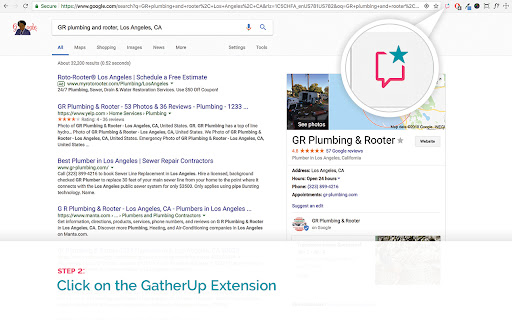

The GatherUp extension allows you to generate the Google Write a Review link for any business. The GatherUp Chrome extension (previously GetFiveStars) allows you to easily generate the Google Write a Review link for any business. It works for service area businesses where the address is hidden as well. It has the added benefit of surfacing the Maps URL, the Google Place ID and the location CID for any location. These are important values to archive for diagnostics if there is an issue with a local listing. 1. Install the Google Review Link generator as a Chrome Extension 2. Head to Google search 3. Search for your company + address and retrieve a single Knowledge Panel result for the business 4. Select the GatherUp Extension and you will be directed to a new page that includes the "Write a Review link"

XTranslate
Translate from 100+ foreign languages to your native directly on web-site you're reading or put text in the extension's drop-down window. Features: ----------- Many ways to get translation of text from the page: [-] full-page text translation (replacement + tooltips) for a whole document (Google, Bing) [-] double-click on the word Select text and get immediate translation after one of: [-] press hotkey defined in extension settings (Alt+Shift+X by default) [-] click on the translate icon appeared near selected text [-] click on selected text (turned off by default) [-] just release mouse button (turned off by default) [-] write text in input fields, mouse over it and press hotkey [-] press context menu on the page and select item to get translation in place or translate whole page in new tab with specific translation vendor. You can get even some information from images by putting mouse cursor over the image element and press hotkey (title or alt attributes will be used, if applicable). This trick actually works with any element under mouse cursor. Just put mouse over item and press hotkey! (1) Translate texts in PDF-files (2) Listen text-to-speech for all supported translation vendors (3) Adjust your unique design of the popup with translated text (4) Customize the ways of getting translations and other options in the settings (5) Insert any text in app's window (Alt+X hotkey by default) and get translation of sentences or words with dictionary support (6) Save your favourite translations as quick bookmarks in history (7) View and edit history of translations Supported advanced translation providers (requires your own API-key): ----------- [-] OpenAI - (pay-as-you-go: top-up balance and provide your API-key from https://platform.openai.com) [-] Grok - (pay-as-you-go: create account at https://console.x.ai, top-up balance and provide your own api-key) [-] Gemini - (pay-as-you-go: create account at https://aistudio.google.com/, top-up balance and provide your own api-key) [-] DeepSeek (pay-as-you-go: top-up at https://platform.deepseek.com/ and provide your own api-key) In order to work with local files (HTML or PDF) allow access for the extension: ----------- [-] open extensions page `chrome://extensions/`, find XTranslate™ and click "Details" button [-] enable checkbox "Allow access to file URLs" XTranslate may show occasional sponsored or affiliate recommendations in the free version. These recommendations are clearly labeled and only open when you click them. XTranslate does not automatically modify web pages, replace links, inject affiliate codes, or redirect your browsing.

Detailed SEO Extension
Get SEO insights at the click of a button to any website you're currently on. Built by full-time SEO's for daily analysis. Get SEO-related insights at the click of a button to any website you're currently on. Pull back their title tag, meta description, meta robots tag and much more. Save hours of time looking through the source code of this page with our SEO analysis extension.

PlePer Local SEO Tools
Useful shortcuts and quick analyzes for Local SEO`s The extension offers collection of tools and shortcuts for Local SEO's. With this extension you get detailed information for every google my business listing in Maps, Local Finder, Knowledge panel and making four different analysis based on maps search results. Listing details returned by the extension: Name / Address / Phone / All Categories / Verification status / Attributes / Coordinates / All important Google ID’s (CID, Place ID, Knowledge Graph ID) / Export function / Pin function / Links to popular business directories, search engines, different website analysis tools (Speed Test / Mobile Friendly Test / Whois information / Domain backlink analysis etc ). For US listing direct link to corespondig Secretary of state business lookup website. Four different analyzes when searching in Maps: - Categories - top categories used, average categories per listing, max categories per listing; - Reviews - average rating and reviews, maximum/minimum rating and reviews, listings without reviews; - Attributes - all the attributes used; - Business Hours - when business are open and the average business hours; Pin function - the listing information on any website with keyboard combination (CTRL + ALT + E). Easiest way to compare / enter data anywhere. The chrome extension is plug and play - no settings or configuration needed! Instructions: 1. Install the extension 2. Open in new tab google maps 3. Make a search and you will see the analyses. 4. Select any listing from the results and you will see the details.

Google Review Link Generator
This extension helps you easily find your Google place id and generate a Google review link for your business on Google Maps. Find the place id and generate the Google review link for any business on Google Maps. Follow the steps below in order to obtain your Google review link: 1. Find your business on Google 2. Click on the ReviewsOnMyWebsite extension 3. Copy your Google review link and share it with your customers
