
ckfdnhplhmbingcopckooenamecdckne


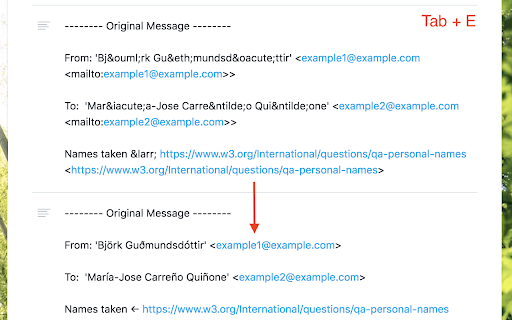
Enhance navigation for Asana -- less mouse moves and key presses. Update May 2022: - Migrated to manifest v3 - Convert task section feature is still not fully working - Asana tabs are no longer reloaded when the extension is updated to a newer version. Please manually reload Asana tabs when it doesn't work well This is an unofficial Google Chrome / Firefox extension to enhance navigation for Asana tasks. It has functionality to: - Search tasks in the currently open project or user (Advanced search - Tab+/ or Tab+;) - Go back to what you were doing before visiting Inbox (Tab+J) - Show arrows and jump to previous/next sibling subtasks (Shift+Tab+↑/↓) - Show drop-down list of all sibling subtasks to jump to them (Shift+Tab+→) - Add keyboard shortcuts to attach files (Tab+V and Tab+1/2/3/4/5) - Add keyboard shortcuts to open more actions (Tab+.) - Replace text in task description (Tab+E) - Convert to subtask (set new parent task) (Tab+G) - Convert task to section and vice versa (Tab+: or Shift+Tab+:) Not fully working - Show additional keyboard shortcuts in the list (only with Cmd/Ctrl+/) All done seamlessly in Asana UI, in your localized language, using the same CSS used by Asana (at least I try as much as possible). Each feature can be switched on/off in the extension options, which is accessible by going to chrome://extensions > Asana Navigator > Details > Extension options, or in Firefox, about:addons > Asana Navigator > Preferences. If this extension doesn't work well, please try reloading the Asana task page. This is an open source project and you can see the source code at: https://github.com/ShunSakurai/asana-navigator Firefox extension: https://addons.mozilla.org/en-US/firefox/addon/asana-navigator

Ticket Number Generator, by OneHat
Automatically add ticket numbers to your task items. Useful for project or task management web apps like Freedcamp or Asana. Easily add auto-generated sequential ticket numbers to any text box. Works great for project management software like Freedcamp and Asana. Works for teams or individuals. Now, use the context menu, or a keystroke to automatically add the ticket number!

TodoistChute: Finish Time for Todoist
TodoistChute calculates the estimated time required to every tasks on Todoist, and shows the finish time. TodoistChute calculates the estimated time required to every tasks on Todoist, and shows the finish time. Enter the time in minutes as "//60" in label or text of task.

Todoist Shortcuts (GMail / vim inspired)
This extension adds a bunch of keybindings for Todoist. In particular, it adds a cursor in the task view which can be moved via the arrow keys or j / k / h / l (vim style keys). Many of the keybindings are inspired by gmail's keyboard shortcuts, so those that are familiar with those will find it very easy to get used to it. Currently it provides keybindings for most non-premium features you might want to use, including: task completion, archival, deletion, setting priority, setting project, rescheduling, changing ordering, changing indent levels, and more. If this extension is useful to you, feel free to show your appreciation at https://www.buymeacoffee.com/mgsloan

TeamCal for Google Calendar™
The missing schedule view for Google Calendar TeamCal provides a timeline view layout for Google Calendar that displays many calendars at once TeamCal transforms your Google Calendar into the perfect tool to schedule your employees, contractors, rooms, machinery, and resources. Google Calendar can become very cluttered when displaying multiple calendars. TeamCal will display your calendar data as a nice Gantt like “Schedule View”. The TeamCal schedule view is a new horizontal timeline view for Google Calendar that displays many calendars at once. See employee availability easily by comparing events on a horizontal Gantt like timeline view. With a glance, you can identify scheduling gaps and prevent overbooking. Perfect for scheduling staff rotations, on-call duty times, and team vacations. Stop switching between Google Calendar and other tools for scheduling your team. Because TeamCal uses your Google Calendar data, all information required for scheduling is available in a single place. Create new events or change existing ones directly within TeamCal. Share your schedule with employees and clients to keep everyone updated. With TeamCal, you can embed your schedule on a website, TV screen, or show it as a dashboard. You can export a PDF of your schedule, too. Print or send your planning results by email. Features: - Integrated & synced with Google Calendar - Customizable Scheduling view - Share, Print, and Export your schedules - Support for mobile and tablets - Multi-user functionality - And much more! Chrome Extension: This Chrome extension shows you all TeamCal schedules in a convenient drop down. Access your schedules directly from the Chrome toolbar.
