
mkiflbeenlaomokhbibbgillnkppgane


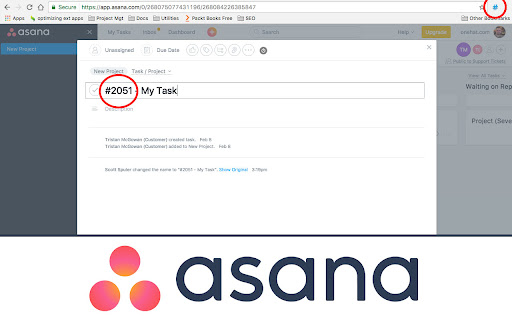
Automatically add ticket numbers to your task items. Useful for project or task management web apps like Freedcamp or Asana. Easily add auto-generated sequential ticket numbers to any text box. Works great for project management software like Freedcamp and Asana. Works for teams or individuals. Now, use the context menu, or a keystroke to automatically add the ticket number!

Tracking Time | Time Tracker Button
Enhance your preferred web project manager with the Time Tracker Button and get automatic timesheets. Enhance your favorite work apps with the TrackingTime extension and get automatic timesheets. The TrackingTime extension brings effortless time tracking to more than 60 popular project management and productivity apps like Asana, Trello, Notion, ClickUp, and many more. It integrates directly into the tools your team already uses—no setup required. Track time effortlessly Start tracking tasks right inside your workflow. The extension automatically detects the task and project you’re working on and syncs it to your TrackingTime account. No manual input, no configuration—just click and track. All your time data, all in one place With teams using different tools across departments, the TrackingTime extension makes it easy for everyone to track time in their own workflow. All data is stored centrally, making timesheets, billing, and team reporting a breeze.

Time Tracker by TimeCamp
Put your favorite free time tracker into any tool you use. Add a timer to any web tool you use, and enjoy tracking time straight from the browser! TimeCamp Plugin for Chrome works two-way as: - An extra button within the task/card view of your tool, - Separate timer within a plugin interface under the TimeCamp icon next to the address bar. Start a timer whether you need it and stop it when you finish the task. The plugin syncs with TimeCamp automatically, so the records will immediately appear in your timesheets. Get the plugin in seconds: 1. Hit the “Add to Chrome” button and install the plugin, 2. Once installed, log into your TimeCamp account (or create a new one at timecamp.com). Voila! Don’t forget to pin it to the extension bar to always keep it handy ;) 82% of our users chose TimeCamp over other time trackers. Join them and enjoy clear-cut, data-driven project profitability analysis with estimates-based budget tracking.

Asana Expander
This Chrome extension is no longer maintained. Another developer stepped up and forked the code. You can find their extension here: https://chromewebstore.google.com/detail/asana-expander-v2/kjhnkemellgoedcmmmkfdfemaaechepf?pli=1 --- Do you also hate to click on those "See more" links in Asana, just to see the last sentence of a longer comment? Or did you also miss an important comment in a longer comment thread in an Asana Task? This extension solves this problem my automatically clicking on those links whenever you open a task with many comments or when a comment is longer than 300 characters. Note: The extension currently doesn't work in Asana's Inbox view.

Zapier
Save time by automating your work. Save time by automating your work. Zapier is a workflow automation platform that supports thousands of the most popular apps. In just a few minutes, you can set up automated workflows (called Zaps) that connect the apps you use most. You can save webpages to a spreadsheet, add tasks to your to-do list, share articles with your team, automatically reply to new leads, and much more—with no manual work or coding required. Some things you can do with Zapier - Save websites to a table so you can keep track of leads, recruits, or real estate - Look up data from any app and display it in the Chrome extension without having to switch tabs or log into other apps - Share interesting articles on your social media accounts - Add items to your to-do list app - Send a webpage to your colleagues in your messaging app or by email - Report bugs to your team in your ticketing system - Discover new ways to automate your favorite tools and save time in the "Suggestions" tab How to get started 1. Install Zapier's Chrome extension 2. Sign up for Zapier (Zapier has a free forever plan. Paid plans scale with usage.) 3. Click on the Zapier Chrome extension, then click "Create Zap" to build a Zap that will automate the task you want 4. Then, whenever you want to run that workflow, click its button in the Zapier Chrome extension Pro tip: don't forget to "pin" the Chrome extension so it's easy to access. Learn more in our Zapier for Chrome tutorial: https://zapier.com/apps/zapier-chrome-extension/
